EasyManua.ls Logo

Panasonic NV-HD100EA - Page 29

Panasonic NV-HD100EA
35 pages
Print Icon
To Next Page IconTo Next Page
To Previous Page IconTo Previous Page
Loading...
Timer
Recording
Setting
Timer
Recordings
from
Bar
Codes
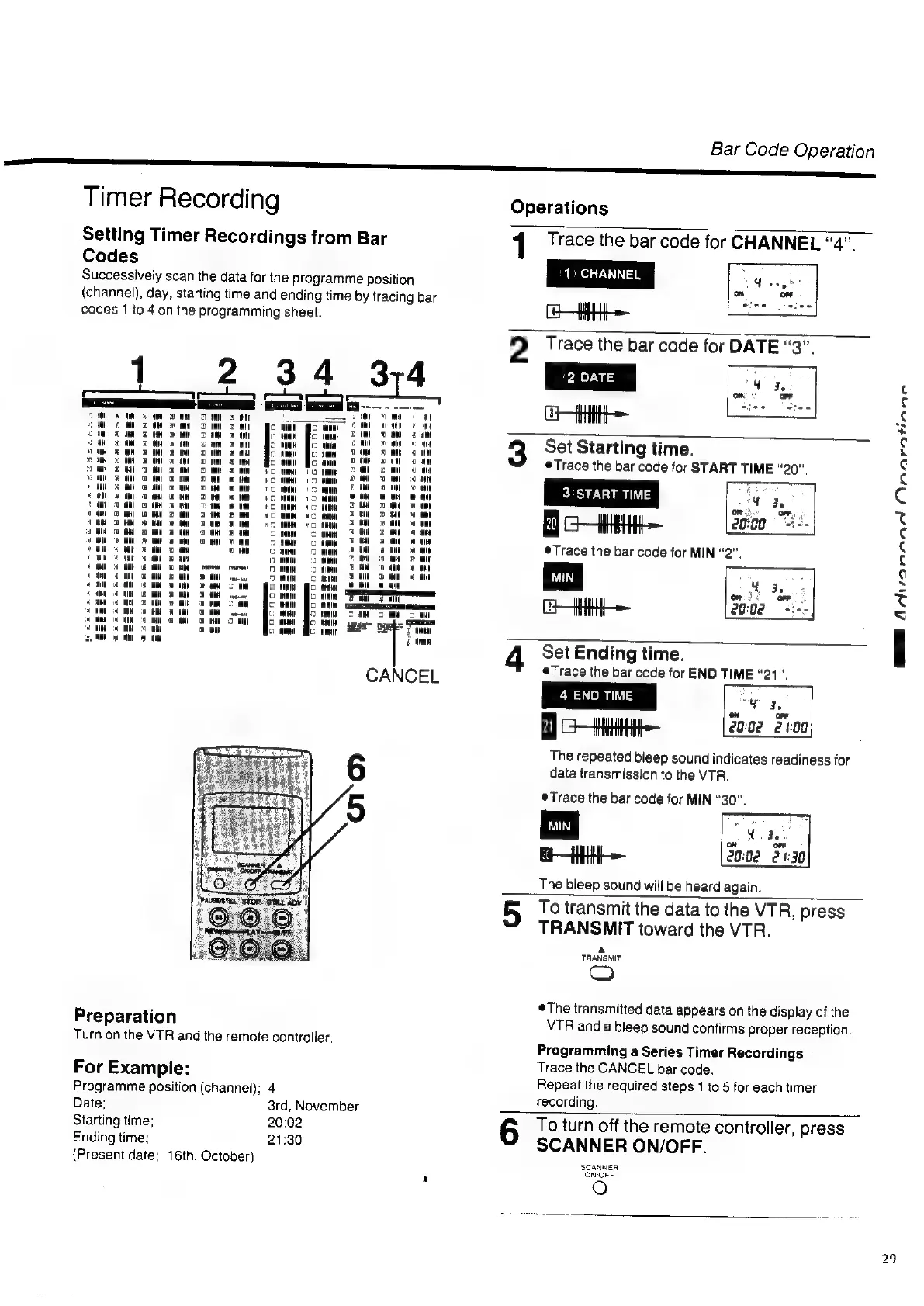
Successively
scan
the
data
for
the
programme
position
(channel),
day,
starting
time
and
ending
time
by
tracing
bar
codes
1
to
4on
the
programming
sheet.
1
234
374
|
|
sss
en
er,
acne
|
mea
ne
ee
aa
vom
aw 2K
2
Dam
8
On
mg
amt
ee
ee
or
ee
TT
wm
=
aH
oon
2
i
ea
On
oe
a
Ce
ee
ee
|
eat
oO
wl
om
oR
al
rio
oN
©
mM
x
oh
@
st
oom
OM
am
sa
0
tH
oan
aa
oom
oO
oo
ooo
mt
ea
a
HW
el
ec)
oan
a
nao
oo
a
aim
oN
am
oe
att
ea
ea
Ca
e
att
mM
i
2
im
_
Par
aw
7
oa
«tm
evanvoay
n
sen
a
atl
mem
oom
=
Leer
a
Oe
(CL:
(SR,
eo
TY
Ce
ee
we
mt
Bo
a)
ho
me
op
Po
“8
On
om
co
am
Ce
+
tan
ee
|
at
CANCEL
aM
go
mw
aul
vem
OH
fo
ie
Ce
ee
fo
re,
Preparation
Turn
on
the
VTR
and
the
remote
controller,
For
Example:
Programme
position
(channel);
4
Date;
3rd,
November
Starting
time;
20:02
Ending
time;
21:30
(Present
date;
16th,
October)
Bar
Code
Operation
Operations
1
Trace
the
bar
code
for
CHANNEL
“4”,
1:
CHANNEL
HHH}
2
Trace
the
bar
code
for
eH
3
4
Set
Starting
time.
Trace
the
bar
code
for
START
TIME
“20”,
Citi
Trace
the
bar
code
for
MIN
“2”,
Set
Ending
time.
Trace
the
bar
code
for
END
TIME
“21”.
4
END
TIME
“Yy
2.
on
ofr
8
HH
2002 2109
The
repeated
bleep
sound
indicates
readiness
for
data
transmission
to
the
VTR.
Trace
the
bar
code
for
MIN
“30”,
a
EHH
The
bleep
sound
will
be
heard
again.
MM
AdNiiannad
Onaratinne
doa
28:82 24:30
5
To
transmit
the
data
to
the
VTR,
press
TRANSMIT
toward
the
VTR.
a
TRANSMIT
=)
The
transmitted
data
appears
on
the
display
of
the
VTR
and
a
bleep
sound
confirms
proper
reception.
Programming
a
Series
Timer
Recordings
Trace
the
CANCEL
bar
code.
Repeat
the
required
steps
1
to
5
for
each
timer
recording.
6
To
turn
off
the
remote
controller,
press
SCANNER
ON/OFF.
SCANNER
ON-OFF
)
29

Related product manuals