PICTURE
TAPE
CARD
F 7
640
VOICE
3,4
1
2
5
PUSH
MENU
1
1
MPEG4
PHOTO
SHOT
W.B/SHUTTER/IRIS/
VOL/JOG
CARD MODE
PICTURE
STILL
1
2
AUTO MNL
PUSH
MENU
1
NOWWRITING
;
TAPE
CARD
%
W.B/SHUTTER/IRIS/
VOL/JOG
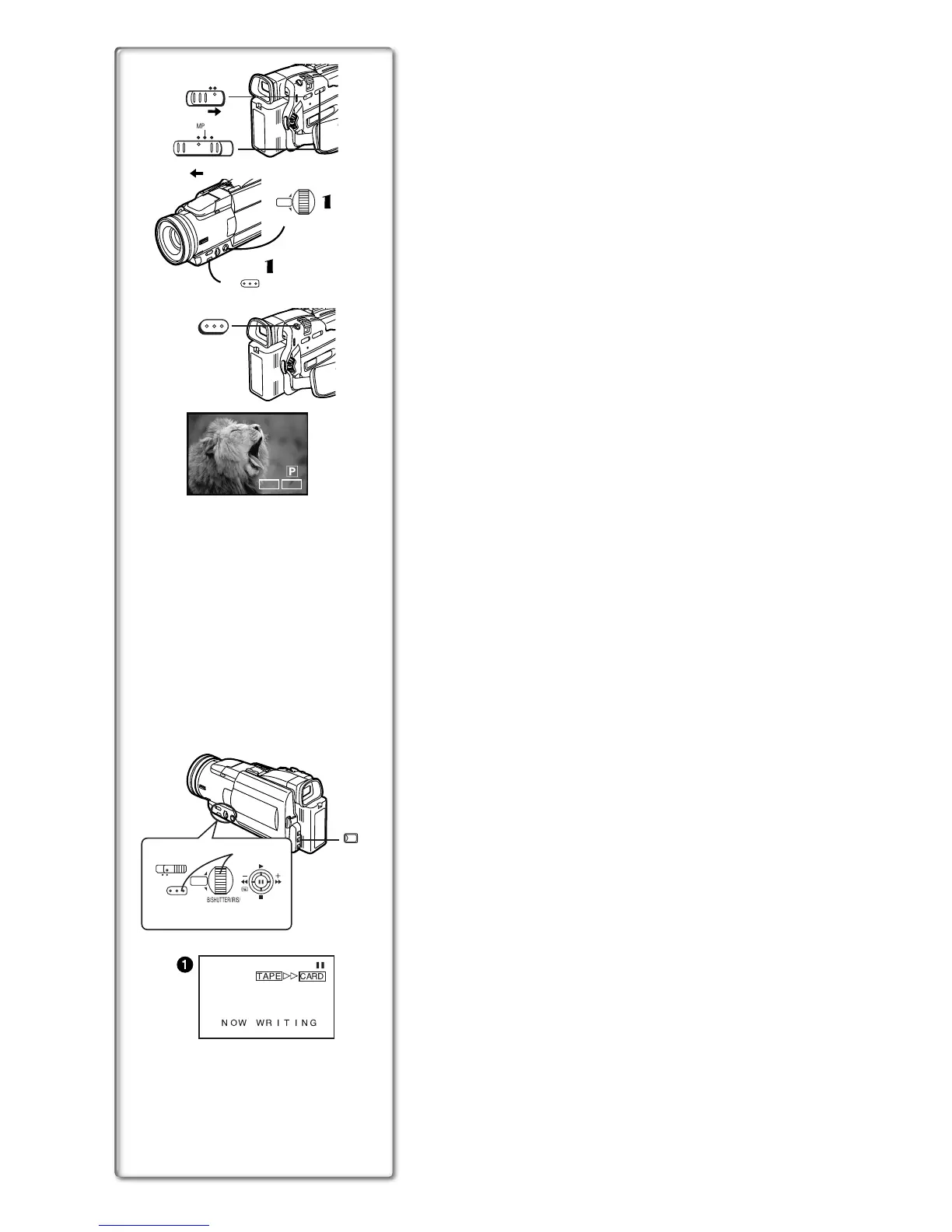
Recording on a Card
ªCard Photoshot(Camera Mode)
Recording from the Movie Camera Lens
1
Slide the [TAPE/CARD] Selector to [CARD].
2
Slide the [PICTURE/MPEG4/VOICE] Selector to [PICTURE].
3
Set [PICTURE SIZE] on the [CARD SETUP] Sub-Menu to
[1280k
kk
k960] or [640k
kk
k480].
4
Set the [PICTURE QUALITY] to desired picture quality.
5
Press the [PHOTO SHOT] Button.
≥The [ø] indication lights up in red.
≥Mega-pixel recording (when you select [1280k960] in step 3) is useful for
taking clear pictures, but the following functions are disabled during mega-
pixel recording.
≥Digital zooming (l 20)
≥Optimal Image Stabilizer (l 20)
≥Digital functions (l 25))
≥When the [TAPE/CARD] Selector is set to [CARD], you cannot record to the
Tape.
Recording from a Cassette (VCR Mode)
1
Set [PICTURE SIZE] on the [CARD SETUP] Sub-Menu to
[1280k
kk
k960] or [640k
kk
k480].
2
Slide the [TAPE/CARD] Selector to [CARD].
3
Slide the [PICTURE/MPEG4/VOICE] Selector to [PICTURE]
or [MPEG4].
4
Still Picture Mode:
Press the [PHOTOSHOT] Button at the desired scene.
MPEG4 (Moving Picture) Mode:
Press the Recording Start/Stop Button at the desired scene.
Selecting the quality of Card Photoshot images
1
11
1
Set [CAMERA FUNCTIONS] or [VCR FUNCTIONS] >>
[CARD SETUP] >> [PICTURE QUALITY] >> a desired image
quality.
Maximum number of images recordable on the supplied Card (16MB)
When the picture size is 1280k
kk
k960:
[FINE] (high image quality): approximately 25 pictures
[NORMAL] (Normal): approximately 45 pictures
[ECONOMY] (low image quality): approximately 65 pictures
When the picture size is 640k
kk
k480:
[FINE] (high image quality): approximately 100 pictures
[NORMAL] (Normal): approximately 200 pictures
[ECONOMY] (low image quality): approximately 400 pictures
ª Automatically Copying Still Pictures That Have Already
Been Recorded on a Tape
The images with the Photo Index signals are automatically recorded to the
Card.
1
Set the Movie Camera to Still Playback Mode at the scene
immediately before you want to start moving images.
2
Set [VCR FUNCTIONS] >> [PLAYBACK FUNCTIONS] >>
[RECORD TO CARD] >> [YES].
≥Search starts from the current Tape position, and images with Photo
Index signals are recorded onto the Card sequentially.
≥During copying, the Indication
1
appears.
To Stop Automatic Recording
Press the [∫] Button.
≥For other notes concerning this item, see page 49.






 To Next Page