12
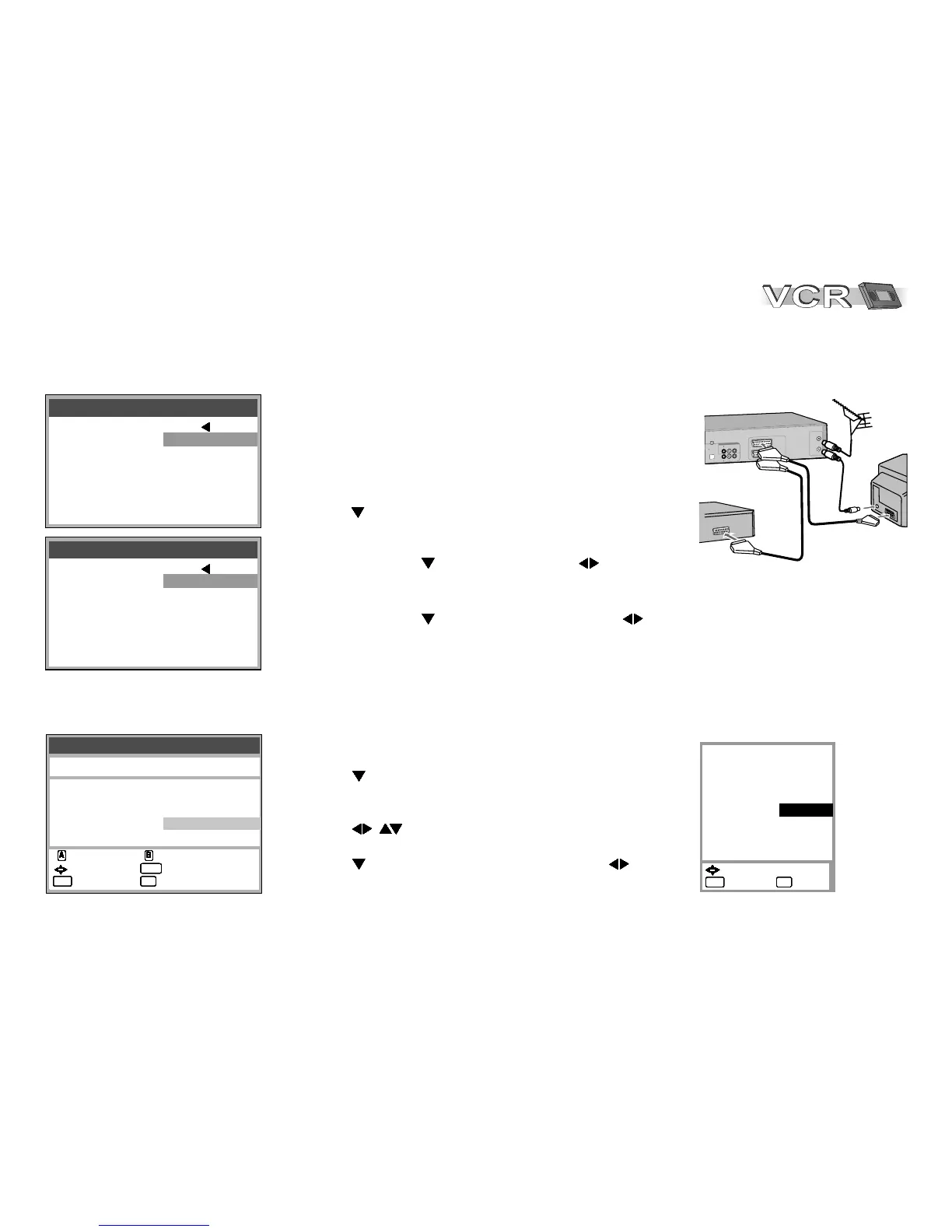
Connecting a Set Top Box, satellite receiver, decoder or a second recorder.
You can connect a Set Top Box to receive digital broadcast by antenna (DVB-T) signals,
a satellite receiver (digital/analogue) or a decoder to decrypt encrypted programmes.
V1
A
(
T
) V
V2
A
O/
CR
EE
(
DD
)
E
X
T
I
A
D
O
U
R
L
V
I
E
D
O
AD
O
U
I
R
L
DO
V
I
E
/
V
T
V
R
DD U
C O
D
D
O
U
V
T
D
GI
A DO
T
A
U
I
L
I
/
A
P
I
(
T
M
M
B
T E
C
R
S
)
T
I
A
C L
O
P
TV
VCR/DVD
External Devices
Tuning
Pos Name Ch Pos Name Ch
1 ARD 7
2 ZDF 4
3 N3 2
4 RTL 12
5 SAT1 13
: delete : move
AAAAAAAAAAAAAAAAAAAAAAAAAAAAAAAA BBBBBBBBBBBBBBBBBBBBBBBBBBBBBBBB
6 VOX 8
7 PRO7 95
8 RTL2 85
9 PREM 97
10 SRTL 98
: : access
select
: return : exit
ENTERENTERENTERENTERENTERENTERENTERENTER
MENUMENUMENUMENUMENUMENUMENUMENU
EXITEXITEXITEXITEXITEXITEXITEXIT
Disconnect power to all devices.
Connect the external device to the AV2 input of the VCR/DVD
by using a 21-pin Scart cable.
Connect VCR/DVD, television set and the external unit to the
AC mains supply and switch them on.
!
Press MENU.
!
With select the Others menu and confirm with ENTER.
Set Top Box, satellite receiver, second recorder:
!
Select AV2 with , and set to [EXT] with .
Decoder:
!
Select AV2 with , and set to [DECODER] with .
Press MENU to return to the Menu screen.
When using a decoder switch channel to decoder.
Setting the channel to decoder
!
Press MENU.
!
With select menu Tuning.
and confirm with ENTER.
!
With ENTER select Manual.
!
With , select the encrypted channel and
confirm with ENTER.
!
With select Decoder, then select [ON] with .
!
Press MENU to return to the Tuning menu.
External unit
21-pin Scart cable
Aerial
Pos
Name
Channel
Fine tuning
Decoder
Video system
Mono
Audio mode
:
: PREM
: 97
AUTO
:
:PAL
: OFF
:DK
- - -
ON
9
:
: select
: return : exit
MENUMENUMENUMENUMENUMENUMENUMENU
EXITEXITEXITEXITEXITEXITEXITEXIT
Tape length : AUTO ( E-240)
AV2 : EXT
TV system : AUTO
SQPB : AUTO
OSD : 4 : 3
VCR/DVD OUTPUT : AUTO
RFC system : DK
Others 1 / 2
Tape length : AUTO ( E-240)
AV2 : DECODER
TV system : AUTO
SQPB : AUTO
OSD : 4 : 3
VCR/DVD OUTPUT : AUTO
RFC system : DK
Others 1 / 2








 To Next Page