Recording with ShowView
(not for VP21)
ShowView
24
ShowView
is a trademark of Gemstar Development
Corporation. The ShowView system is
manufactured under licence from
Gemstar Development Corporation.
ShowView
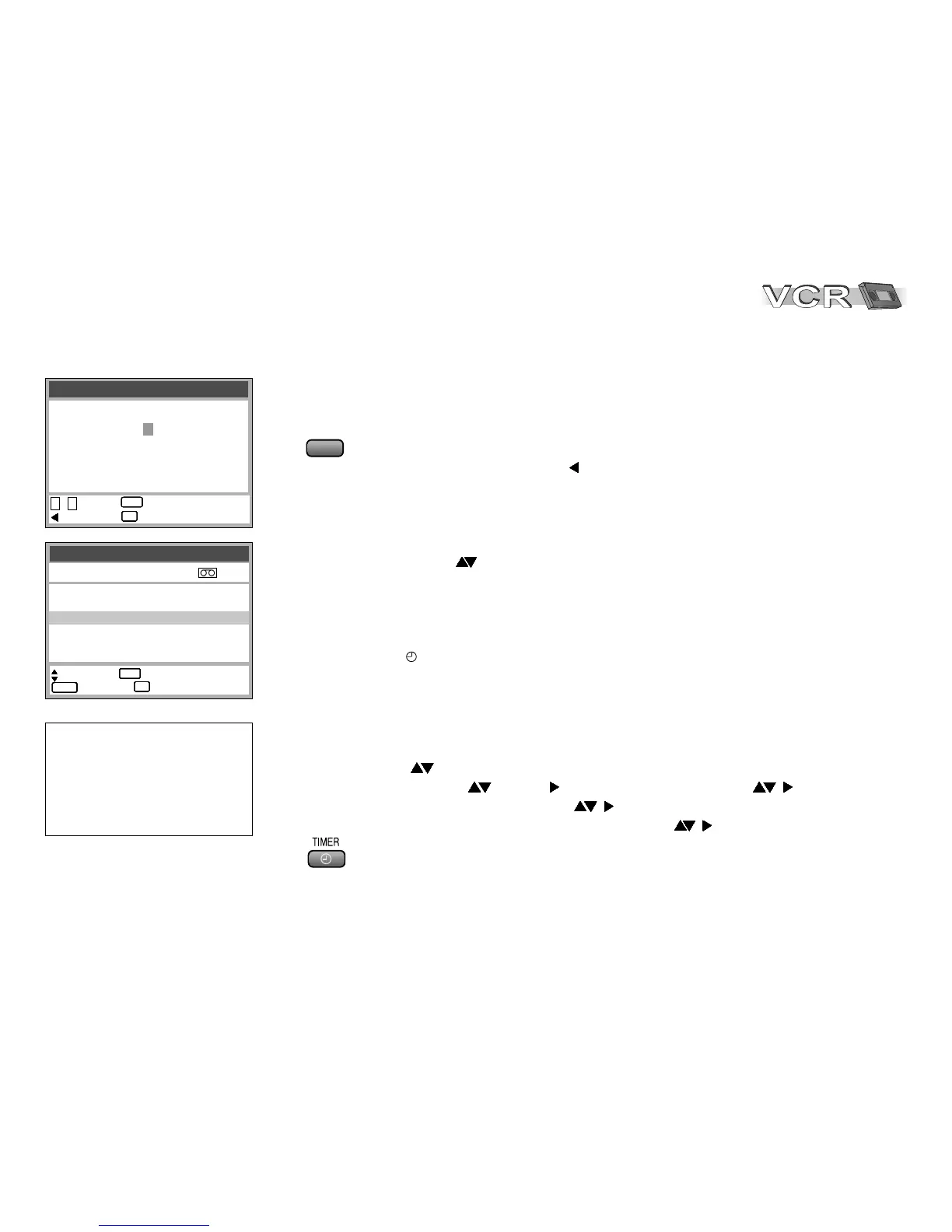
: enter : access
0 - 9
: correct : exit
ENTERENTERENTERENTERENTERENTERENTERENTER
EXITEXITEXITEXITEXITEXITEXITEXIT
8 3 5 4 2 - - - -
Timer recording 1/3
: select access
:
: delete : exit
ENTERENTERENTERENTERENTERENTERENTERENTER
CANCELCANCELCANCELCANCELCANCELCANCELCANCELCANCEL
EXITEXITEXITEXITEXITEXITEXITEXIT
Pos Date Start Stop
VPS
PDC
1 ARD 31/12 10:30 11:30 SP ON
1 ARD 31/12 11:30 12:30 SP ON
2 ZDF 31/12 12:30 13:30 SP OFF
- - - - - - - -/ - - - -:- - - -:- - - - - -
- - - - - - - -/ - - - -:- - - -:- - - - - -
- - - - - - - -/ - - - -:- - - -:- - - - - -
Activating timer mode
!
Press TIMER to activate the timer mode.
The symbol appears on the VCR display.
Programming recordings with the ShowView function
The ShowView code simplifies entering programme information to record
TV and SAT programmes.
!
Press ShowView.
!
Enter the ShowView number ( to correct entry).
!
Confirm entry with ENTER.
The Timer recording screen appears.
If the device fails to recognise the TV station automatically, it must be entered
manually with . The VCR will store this information so it will not have to be
entered again.
Modifying programmed data
!
Press PROG/CHECK,
the Timer recording menu appears.
!
With select the entry to be modified, confirm with ENTER.
!
Select station and use to set date, week or weekday , .
!
Then enter start and stop time , .
!
Select tape speed: A (Automatic), SP, LP, EP , and
confirm with ENTER.
!
Press TIMER to activate the VCR’s timer mode.








 To Next Page