EasyManua.ls Logo

Panasonic NV-VX55A - Using the Main Menu; Using the Title Menu

Panasonic NV-VX55A
96 pages
Print Icon
To Next Page IconTo Next Page
To Previous Page IconTo Previous Page
Loading...
MENU
»
2
nes
PAUSE
STOP
a0
TITLESET
=
OFF
Ah
(lek
4
6 8
APS
POFF
Si)
3,5,7
Areal
a
D.Z00M
pb
42x
ean
v7)
MSENSOR
OFF
SHUTTER
REC
®
OFF
SELF
SHOOT
»NOR.
.
PRESS
MENU
TO
&xIT
fe
TITLE
MENU
DATE/TITLE
DATE
TIME
TITLE
HOLIDAY
LANGUAGE
FOR
TITLE
ENGLISH
SIZE
NORMAL
LARGE
COLOUR
WHITE
PRESS
MENU
TO
RETURN
NX
4
Using
the
Main
Menu
1
turn
out
the
[POWER]
Switch
to
turn
the
Movie
Camera
on.
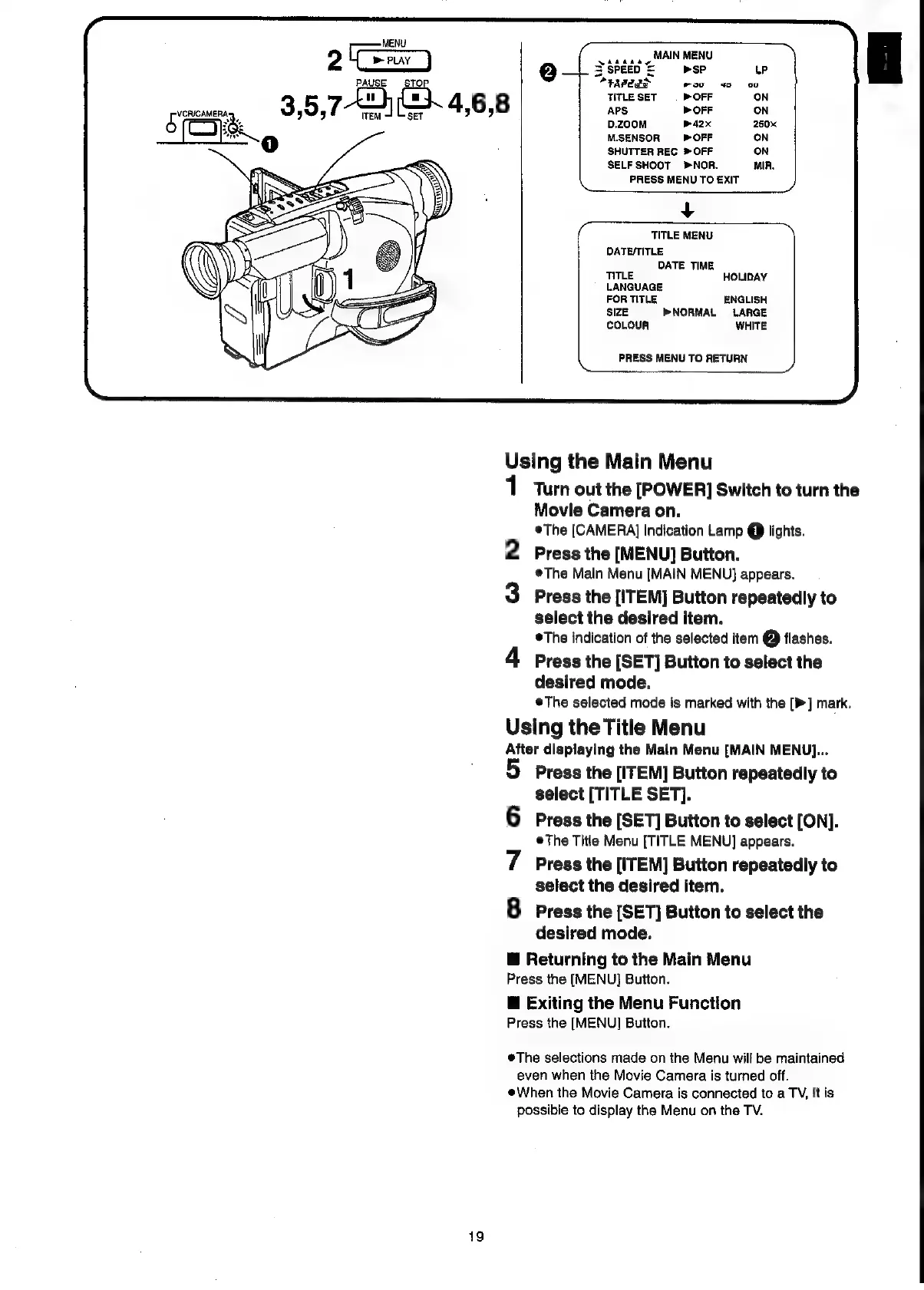
©The
[CAMERA]
Indication
Lamp
@
lights.
2
Press
the
[MENU]
Button.
®The
Main
Menu
[MAIN
MENU}
appears.
3
Press
the
[ITEM]
Button
repeatedly
to
select
the
desired
item.
©The
indication
of
the
selected
item
@
flashes.
4
Press
the
[SET]
Button
to
select
the
desired
mode.
eThe
selected
mode
is
marked
with
the
[>]
mark,
Using
the
Title
Menu
After
displaying
the
Main
Menu
[MAIN
MENU]...
Press
the
[ITEM]
Button
repeatedly
to
select
[TITLE
SET].
6
Press
the
[SET]
Button
to
select
[ON].
©The
Title
Menu
[TITLE
MENU]
appears.
7
Press
the
[ITEM]
Button
repeatedly
to
select
the
desired
item.
8
Press
the
[SET]
Button
to
select
the
desired
mode.
@
Returning
to
the
Main
Menu
Press
the
[MENU]
Button.
@
Exiting
the
Menu
Function
Press
the
[MENU]
Button.
The
selections
made
on
the
Menu
will
be
maintained
even
when
the
Movie
Camera
is
turned
off.
@When
the
Movie
Camera
is
connected
to
a
TV,
it
is
possible
to
display
the
Menu
on
the
TV.
19

Related product manuals