EasyManua.ls Logo

Panasonic NV-VX55A - Recording and Playback Indications

Panasonic NV-VX55A
96 pages
Print Icon
To Next Page IconTo Next Page
To Previous Page IconTo Previous Page
Loading...
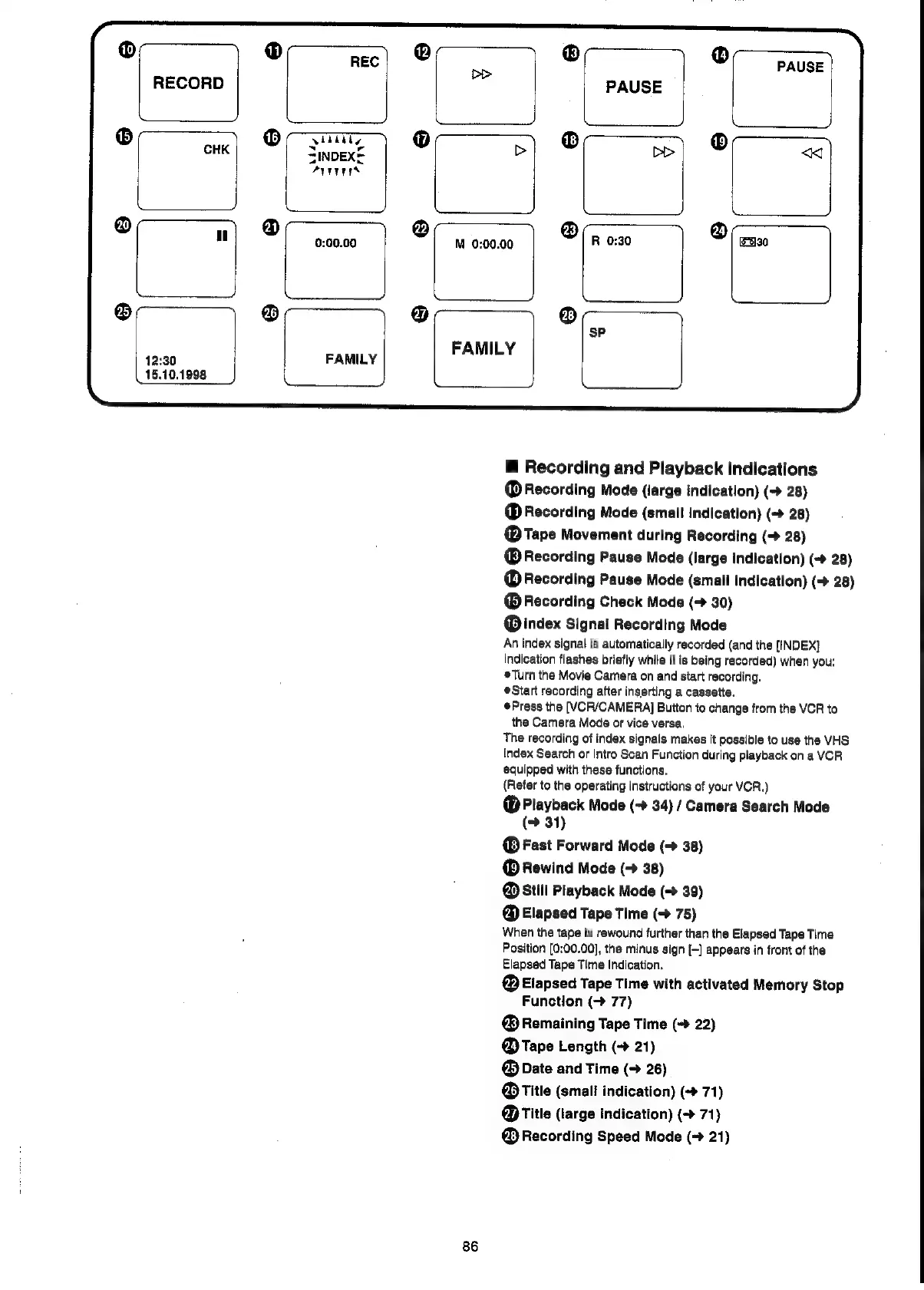
RECORD
—_______/
M
0:00.00
12:30
15.10.1998
FAMILY
FAMILY
86
@
Recording
and
Playback
Indications
@
Recording
Mode
(large
indication)
(-»
28)
@
Recording
Mode
(small
indication)
(->
28)
@
Tape
Movement
during
Recording
(>
28)
Recording
Pause
Mode
(large
indication)
(-»
28)
@
Recording
Pause
Mode
(small
indication)
(+
28)
Recording
Check
Mode
(+
30)
@index
Signal
Recording
Mode
An
index
signal
is
automatically
recorded
(and
the
[INDEX]
Indication
flashes
briefly
while
it
is
being
recorded)
when
you:
Turn
the
Movie
Camera
on
and
start
recording.
eStart
recording
after
inserting
a
cassette.
Press
the
[VCR/CAMERA]
Button
to
change
from
the
VCR
to
the
Camera
Mode
or
vice
versa.
The
recording
of
index
signals
makes
it
possible
to
use
the
VHS
Index
Search
or
Intro
Scan
Function
during
playback
on
a
VCR
equipped
with
these
functions.
(Refer
to
the
operating
instructions
of
your
VCR.)
®@
Playback
Mode
(-
34)
/
Camera
Search
Mode
31)
Fast
Forward
Mode
(->
38)
Rewind
Mode
(-
38)
@
Still
Playback
Mode
(->
39)
@
Elapsed
Tape
Time
(->
75)
When
the
tape
is
rewound
further
than
the
Elapsed
Tape
Time
Position
[0:00.00],
the
minus
sign
(-]
appears
in
front
of
the
Elapsed
Tape
Time
Indication.
@
Elapsed
Tape
Time
with
activated
Memory
Stop
Function
(>
77)
@
Remaining
Tape
Time
(->
22)
@
Tape
Length
(->
21)
@
Date
and
Time
(+
26)
@
Title
(small
indication)
(-»
71)
@
Title
(large
indication)
(->
71)
@
Recording
Speed
Mode
(->
21)

Related product manuals