Connections
ENGLISH -
35
Getting Started
Connections
Before connection to the projector
Read carefully the instruction manual for the device to be connected.
z
Turning off the power switch of the devices before connecting cables.
z
If any connection cable is not supplied with the device, or if no optional cable is available for connection of the
z
device, prepare a necessary system connection cable to suit the device.
Video signals containing too much jitter may cause the images on the screen to randomly wobble or wafture.
z
In this case, a time base corrector (TBC) must be connected.
The projector accepts the following signals: VIDEO, S-VIDEO, analogue-RGB (with TTL sync. Level) and
z
digital signal.
Some computer models are not compatible with the projector.
z
When using long cables to connect with each of equipment to the projector, there is a possibility that the image
z
will not be output correctly unless a compensator is used.
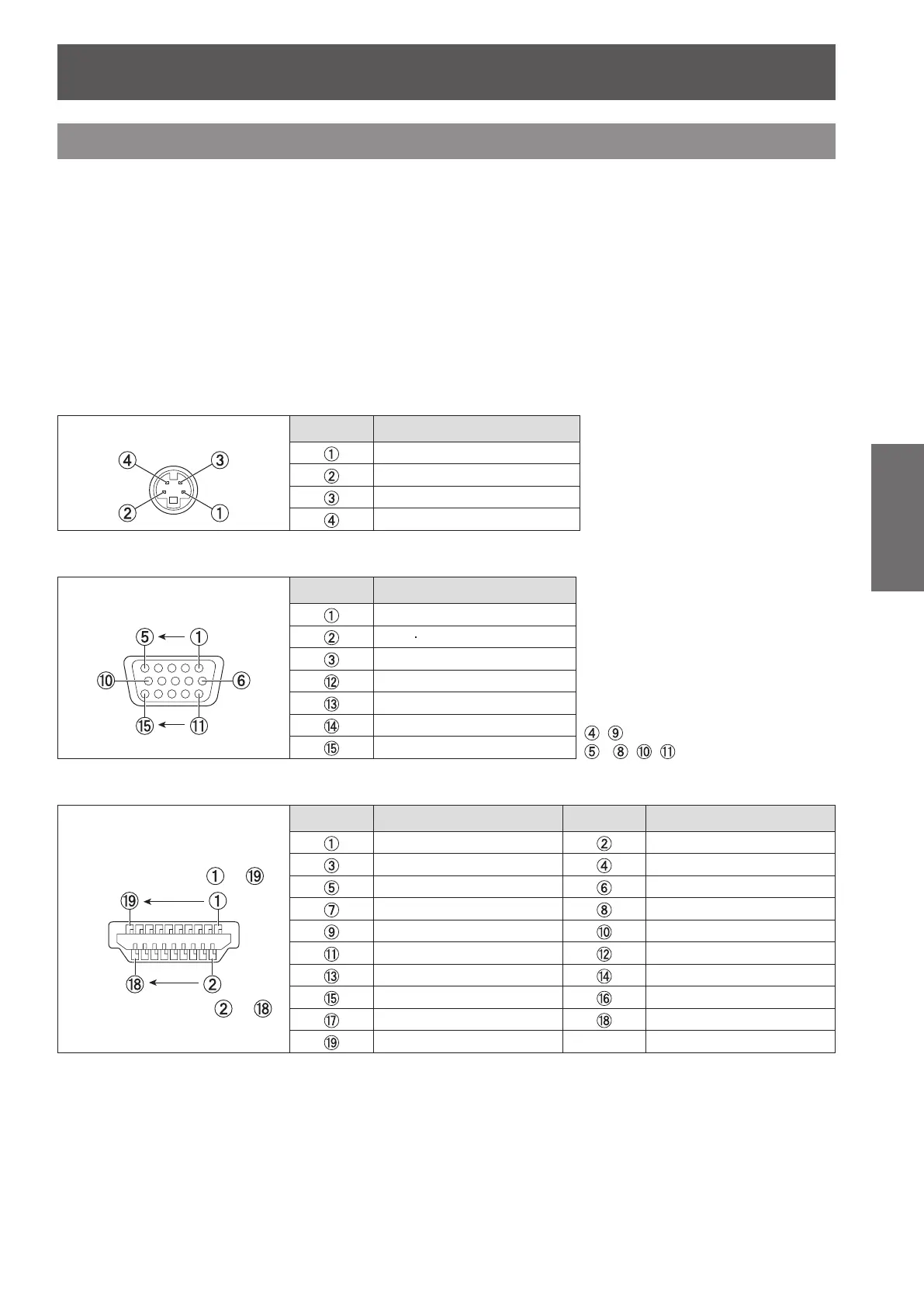
Pin assignments and signal names of <S-VIDEO IN> terminal
J
Outside view
Pin No. Signal names
GND (luminance signal)
GND (color signal)
Luminance signal
Color signal
Pin assignments and signal names of <RGB2 IN> terminal
J
Outside view
Pin No. Signal names
, : Not assigned
- , , : GND terminals
R/P
R
G/G SYNC/Y
B/P
B
DDC data
HD/SYNC
VD
DDC clock
Pin assignments and signal names of <HDMI IN> terminal
J
Outside view
Pin No. Signal names Pin No. Signal names
T.M.D.S data 2+ T.M.D.S data 2 shield
T.M.D.S data 2
-
T.M.D.S data 1+
T.M.D.S data 1 shield T.M.D.S data 1
-
T.M.D.S data 0+ T.M.D.S data 0 shield
T.M.D.S data 0
-
T.M.D.S clock +
T.M.D.S clock shield T.M.D.S clock
-
CEC —
SCL SDA
DDC/CEC GND +5V
Hot plug detection
Even-numbered
pins to
Odd-numbered
pins to



 To Next Page