Chapter 5 Operations — Using the web control function
ENGLISH - 249
[Authentication set up] page
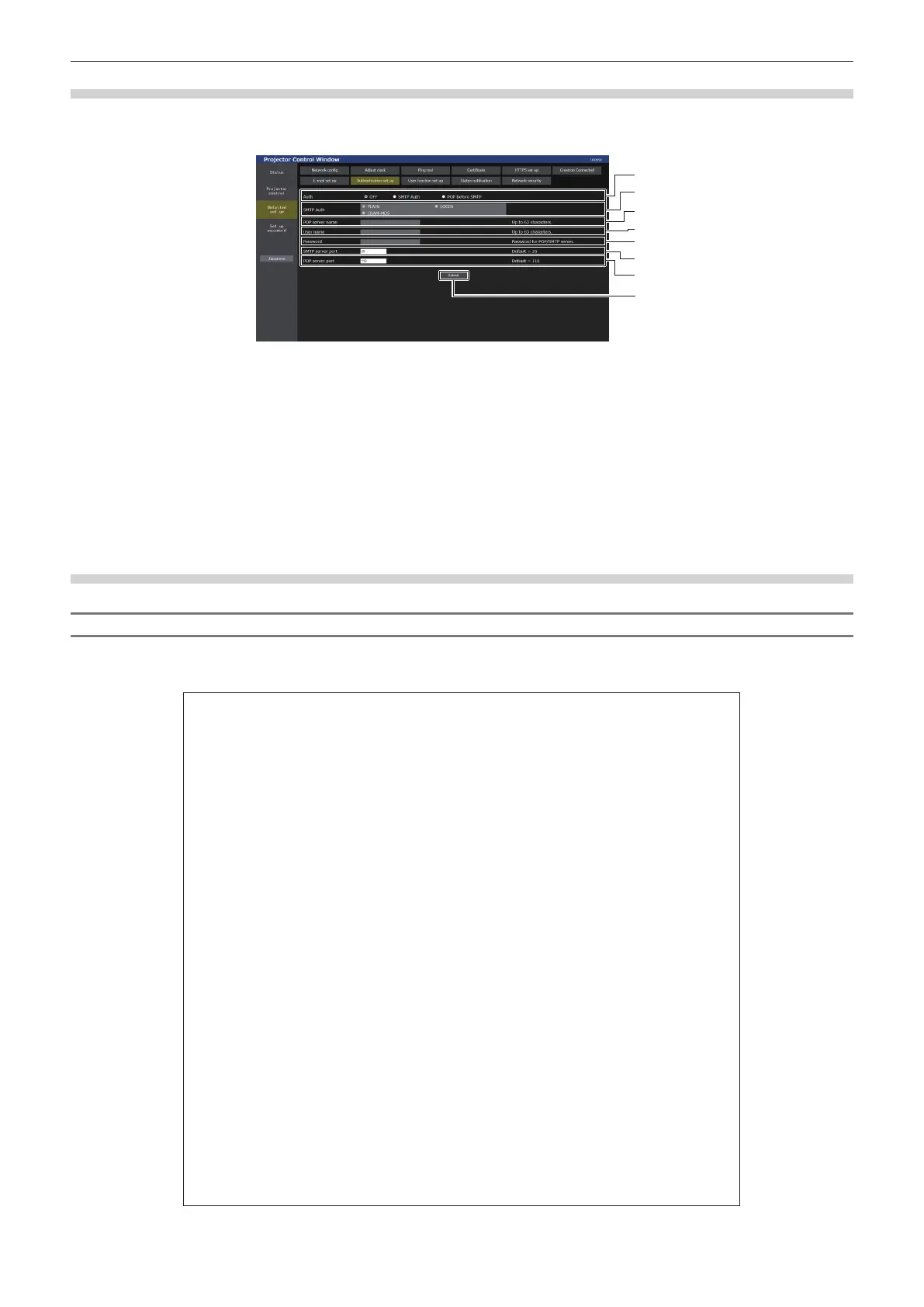
Set the authentication items when POP authentication or SMTP authentication is necessary to send an E-mail.
Click [Detailed set up] → [Authentication set up].
1
2
3
4
5
6
7
8
1 [Auth]
Select the authentication method specied by your Internet
service provider.
2 [SMTP Auth]
Set when the SMTP authentication is selected.
3 [POP server name]
Enter the POP server name.
Allowed characters:
Alphanumerics (A - Z, a - z, 0 - 9)
Minus sign (-) period (.) colon (:)
4 [User name]
Enter the user name for the POP server or the SMTP server.
5 [Password]
Enter the password for the POP server or the SMTP server.
6 [SMTP server port]
Enter the port number of the SMTP server.
(Normally 25)
7 [POP server port]
Enter the port number of the POP server.
(Normally 110)
8 [Submit]
Update the settings.
Contents of E-mail sent
Example of the E-mail sent when E-mail is set
The following E-mail is sent when the E-mail settings have been established.
f Example: When [MAIL CONTENTS] is set to [SIMPLE] in the [E-mail set up] page
=== Panasonic projector report(CO NF I G URE) ===
Projector T ype : PT-REQ12
Serial No : 123456789012
----- E-mail setup data -----
TEMPERATURE WARNING SETUP
MINIMUM TIME at [ 60] minut es interval
INTAKE AIR T EMPERAT URE O ver [ 46 degC / 114 degF ]
ERROR [ OFF ]
INTAKE AIR TEMPERATURE [ OFF ]
PERIODIC REPO RT
Sunday [ OFF ] Monday [ OFF ] T uesday [ OFF ] Wednesday [ OFF ]
Thursday [ O F F ] Friday [ O FF ] Saturday [ OFF ]
00:00 [ O F F ] 01:00 [ O F F ] 02:00 [ O FF ] 03: 00 [ OFF ]
04:00 [ O F F ] 05:00 [ O F F ] 06:00 [ O FF ] 07: 00 [ OFF ]
08:00 [ O F F ] 09:00 [ O F F ] 10:00 [ O FF ] 11: 00 [ OFF ]
12:00 [ O F F ] 13:00 [ O F F ] 14:00 [ O FF ] 15: 00 [ OFF ]
16:00 [ O F F ] 17:00 [ O F F ] 18:00 [ O FF ] 19: 00 [ OFF ]
20:00 [ O F F ] 21:00 [ O F F ] 22:00 [ O FF ] 23: 00 [ OFF ]
----- Wired network configuration (IPv4) -----
DHCP Client OFF
IP address 192.168.0. 8
MAC address 00:0B: 97: 41:E7: E5
----- Wired network configuration (IPv6) -----
Auto Configuration
ON
Link Local Address
fe80:: 20b:97ff: fe41:e7e5
MAC address 00:0B: 97: 41:E7: E5
----- Wireless network conf iguration -----
IP address 192.168.13. 45
MAC address 12:34:56: 78:90:12
----- Error information -----
SELF TEST : NO ERRO RS
Wed Apr 20 04: 05:18 20XX
----- Memo -----














 To Next Page