Chapter 5 Operations — Using the web control function
250 - ENGLISH
Example of the E-mail sent for an error
The following E-mail is sent when an error has occurred.
f Example: When [MAIL CONTENTS] is set to [SIMPLE] in the [E-mail set up] page
=== Panasonic projector report(ERRO R) ===
Projector T ype : PT-REQ12
Serial No : 123456789012
----- Wired network configuration (IPv4) -----
DHCP Client OFF
IP address 192.168.0. 8
MAC address 00:0B: 97: 41:E7: E5
----- Wired network configuration (IPv6) -----
Auto Configuration
ON
Link Local Address
fe80:: 20b:97ff: fe41:e7e5
MAC address 00:0B: 97: 41:E7: E5
----- Wireless network conf iguration -----
IP address 192.168.13. 45
MAC address 12:34:56: 78:90:12
----- Error information -----
SELF TEST : WARNING
U081 Low AC volt age warning (below 90V)
Mon Jan 01 12: 34:56 20XX
----- Memo -----
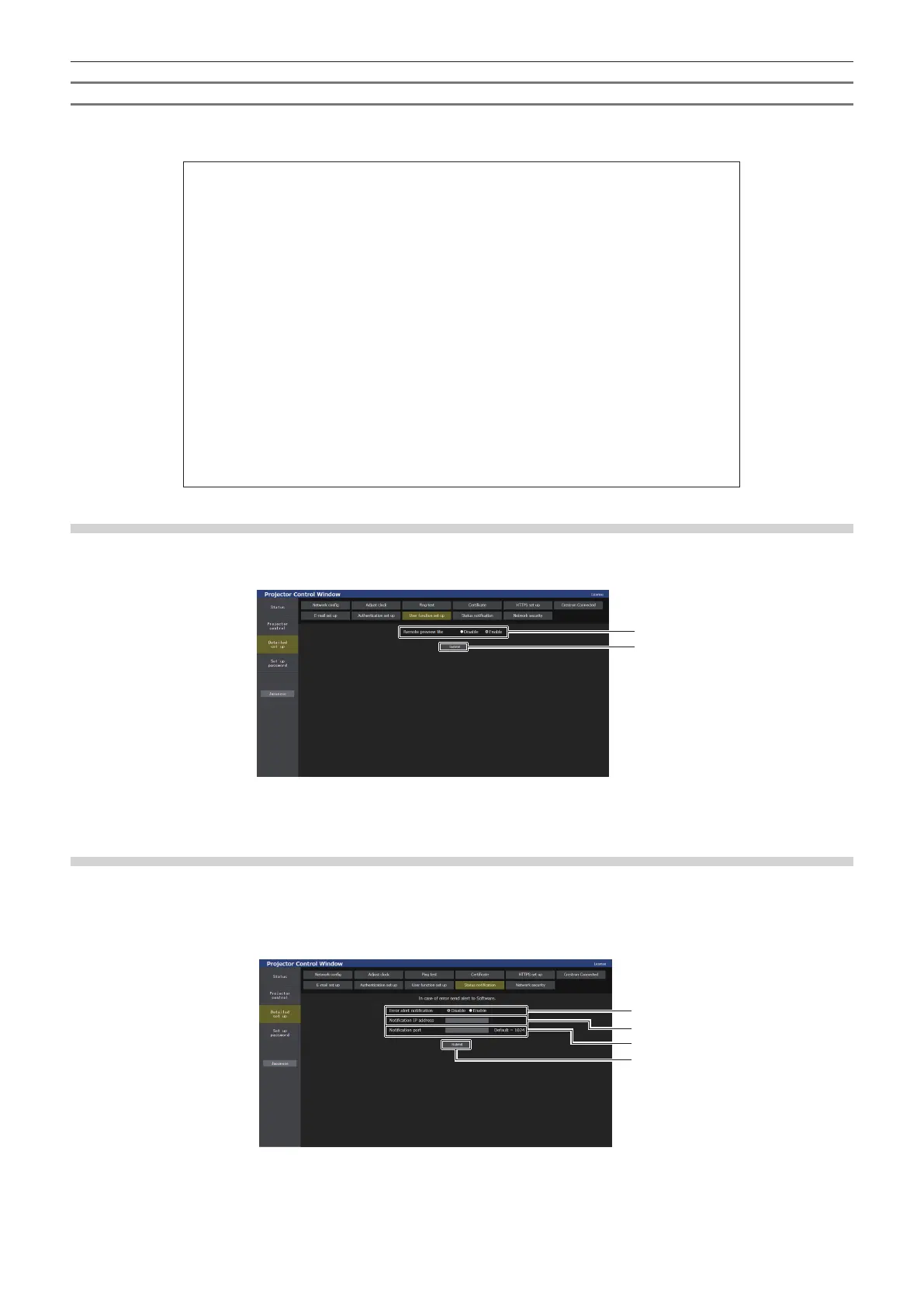
[User function set up] page
Set the function limitation for the user rights.
Click [Detailed set up] → [User function set up].
1
2
1 [Remote preview lite]
To disable the remote preview lite function with the user rights,
set [Disable].
2 [Submit]
Updates the setting.
[Status notication] page
Set the push notication function. A push notication of updated information is sent to the application software
linked to the projector, such as the “Multi Monitoring & Control Software”, when there is a change in status, such
as occurrence of an error in the projector.
Click [Detailed set up] → [Status notication].
1
2
3
4
1 [Error alert notication]
Set to [Enable] to use the push notication function.
2 [Notication IP address]
Enter the IP address of the notication destination.
3 [Notication port]
Enter the port number of the notication destination.
4 [Submit]
Updates the setting.














 To Next Page