To Record A TV Program
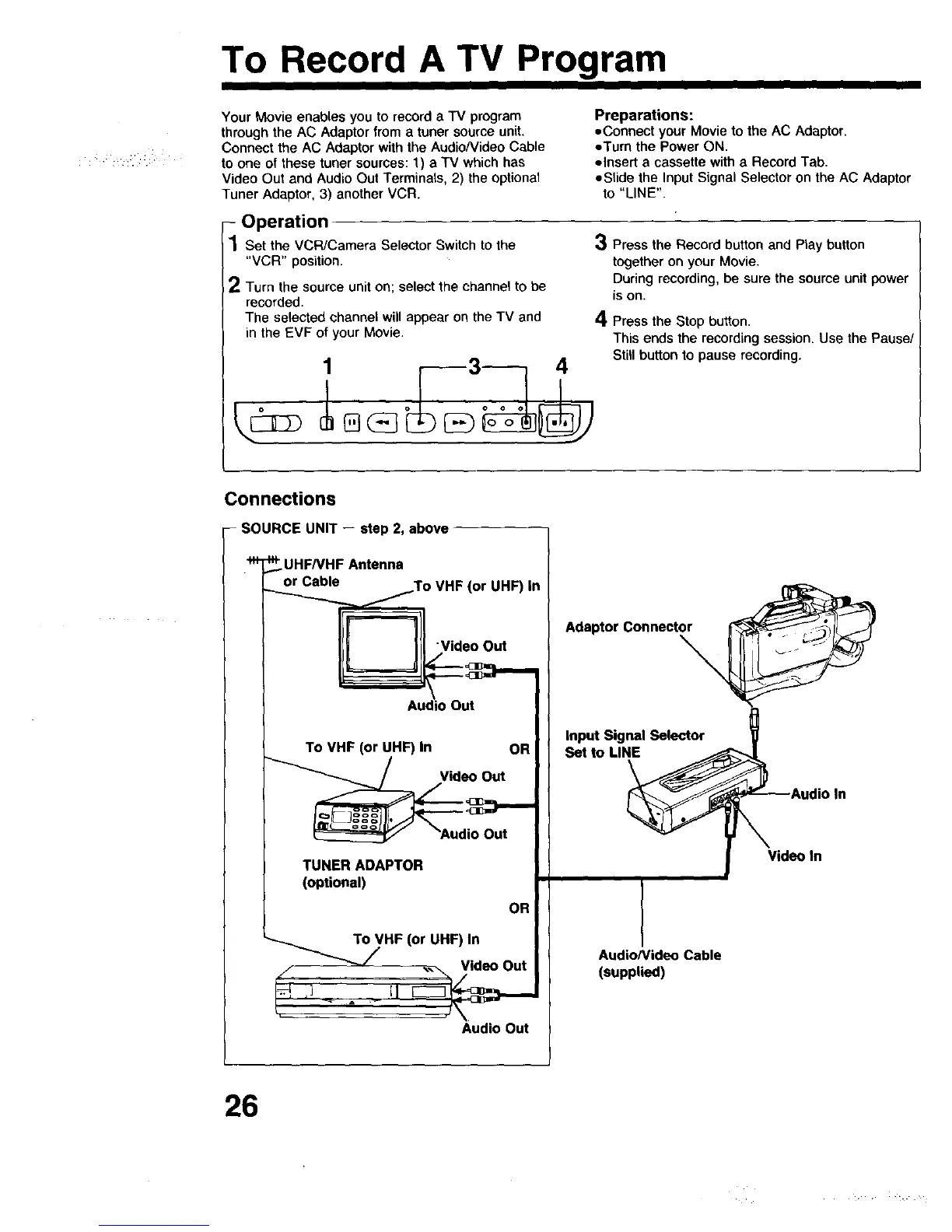
Your Movie enables you to record a TV program
through the AC Adaptor from a tuner source unit.
Connect the AC Adaptor with the AudioWideo Cable
to one of these tuner sources: 1) a TV which has
Video Out and Audio Out Terminals, 2) the optional
Tuner Adaptor, 3) another VCR.
Preparations:
=Connect your Movie to the AC Adaptor.
=Turn the Power ON.
elnsert a cassette with a Record Tab.
=Slide the Input Signal Selector on the AC Adaptor
to "LINE".
- Operation
I Set the VCR/Camera Selector Switch to the
"VCR" position.
). Turn the source unit on; select the channel to be
recorded.
The selected channel will appear on the TV and
in the EVF of your Movie.
3 Press the Record button and Play button
together on your Movie.
During recording, be sure the source unit power
is on.
4 Press the Stop button.
This ends the recording session. Use the Pause/
Still button to pause recording.
Connections
-- SOURCE UNIT -- step 2, above
UHFNHF Antenna
or Cable
UHF) in
"Video Out
To VHF (or UHF) In OR
Video Out
TUNER ADAPTOR
(optional)
OR
To VHF (or UHF) In
Video Out
Audio Out
Adaptor Connector
\
input Signal Seieotor
Set to LINE
AudioNideo Cable
(supplied)
Video ln
26



 To Next Page