Basic Steps
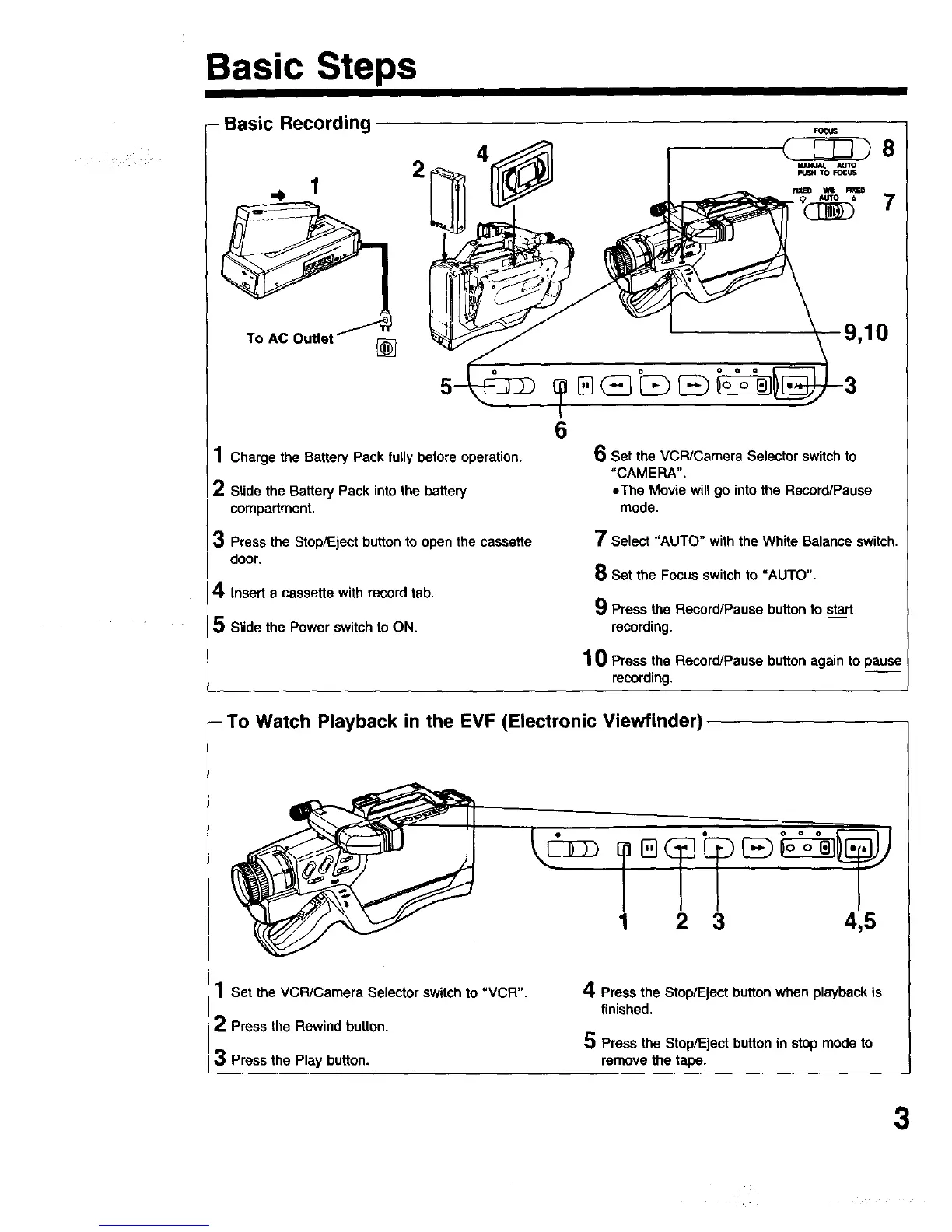
- Basic Recording ,o_
1 Charge the Battery Pack fully before operation.
2 Slide the Battery Pack into the battery
compartment.
3 Press the Stop/Eject button to open the cassette
door,
4 Insert a cassette with record tab.
5 Slide the Power switch to ON.
6
6 Set the VCR/Camera Selector switch to
"CAMERA",
eThe Movie will go into the Record/Pause
mode.
7 Select "AUTO" with the White Balance switch.
8 Set the Focus switch to "AUTO".
9 Press the Record/Pause button to start
recording.
1 0 Press the Record/Pause button again to pause
recording,
- To Watch Playback in the EVF (Electronic Viewfinder)
1 2 3 4,5
1 Set the VCPJCamera Selector switch to "VCR".
2 Press the Rewind button.
3 Press the Play button.
4 Press the Stop/Eject button when playback is
finished.
5 Press the Stop/Eject button in stop mode to
remove the tape.
3





 To Next Page