Video Dubbing (continued)
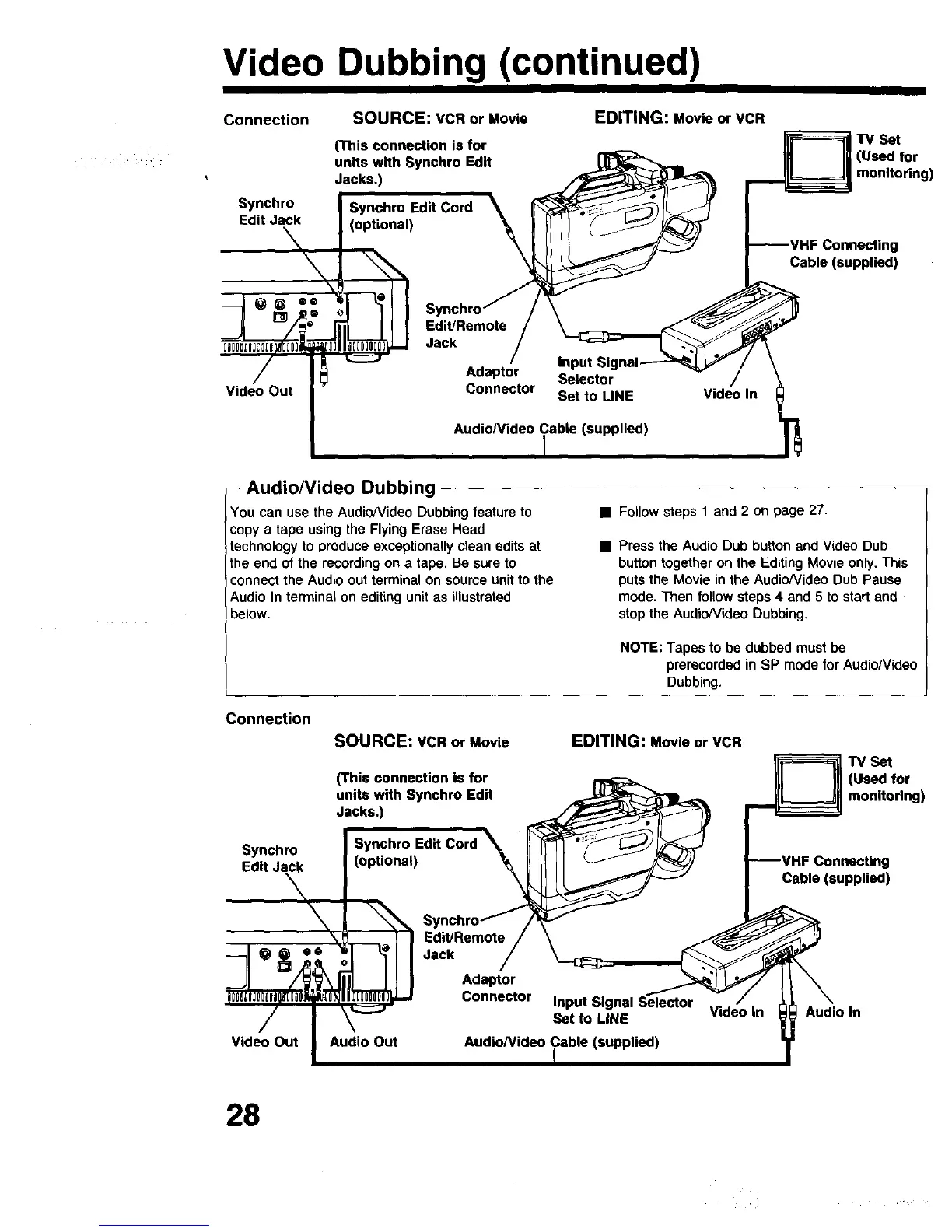
Connection
Synchro
Edit Jack
SOURCE: VCR or Movie
(This connection is for
units with Synchro Edit
Jacks,)
EDITING: Movie or VCR
TV Set
for
g
Cable (supplied)
Video Out
-- Audio/Video Dubbing
You can use the Audio/Video Dubbing feature to
copy a tape using the Flying Erase Head
technology to produce exceptionally clean edits at
the end of the recording on a tape. Be sure to
connect the Audio out terminal on source unit to the
Audio In terminal on editing unit as illustrated
below.
• Follow steps 1 and 2 on page 27.
• Press the Audio Dub button and Video Dub
button together on the Editing Movie only, This
puts the Movie in the Audio/Video Dub Pause
mode. Then follow steps 4 and 5 to start and
stop the Audio/Video Dubbing.
NOTE: Tapes to be dubbed must be
prereoorded in SP modefor AudioNideo
Dubbing.
Connection
SOURCE: VCR or Movie
(This connection is for
units with Synchro Edit
Jacks.)
EDITING: Movie or VCR
TV Set
i (Used for
monitoring)
Synchro
Connecting
Cable(supplied)
Video Out
Audio In
28





 To Next Page