VQT3T18
16
16
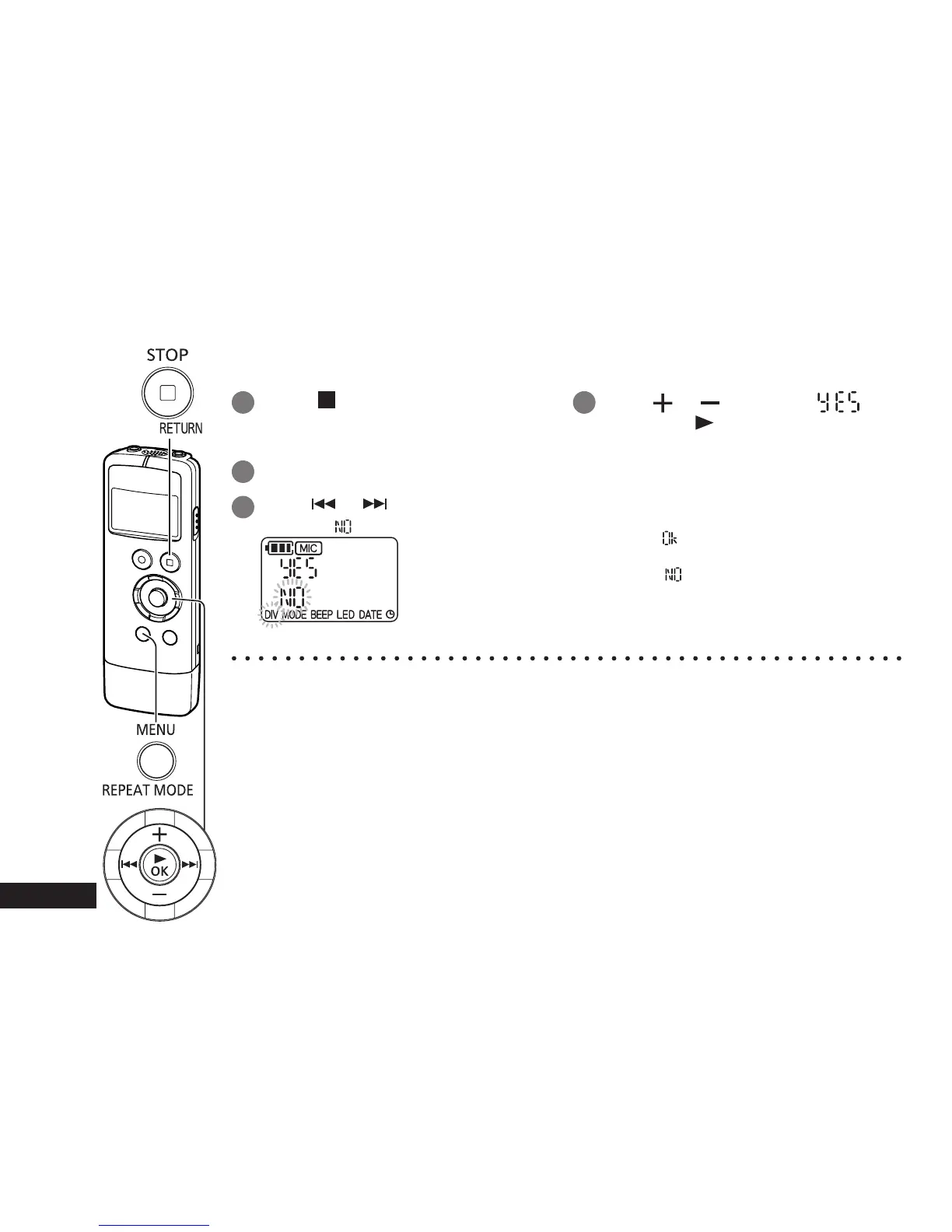
You can divide 1 file into 2 files at a specified position. A necessary part can be extracted or an
unnecessary part can be cut.
1
Press [
STOP/RETURN] at the
position you want to divide the file
during playback.
2 Press [MENU/REPEAT MODE].
3
Press
or to select “DIV”.
“DIV” and “ ” blink.
4
Press
or to select “ ”
and press [ OK].
The operation indicator blinks during
dividing.
Then, the file is divided into 2 files and
the playback stops at the beginning of the
second file.
• When “
” appears, file dividing is
complete.
• Select “
” to stop dividing.
● A file length of approx. 2 seconds or more is required to divide a file.
● A file cannot be divided at the beginning.
● Divided files cannot be restored.
● After a file is divided, one file is added.
● If there is no empty space in internal memory or if 199 files have already been recorded, a file
cannot be divided.
● For the file names displayed on a computer after the file is divided, see page 26.
Dividing files


 To Next Page