9
ENGLISH
VQT3T18
9
• Turn the power on beforehand. (
➜
page 7)
• When the unit is not in the stop state,
press [
STOP/RETURN].
1
Press [
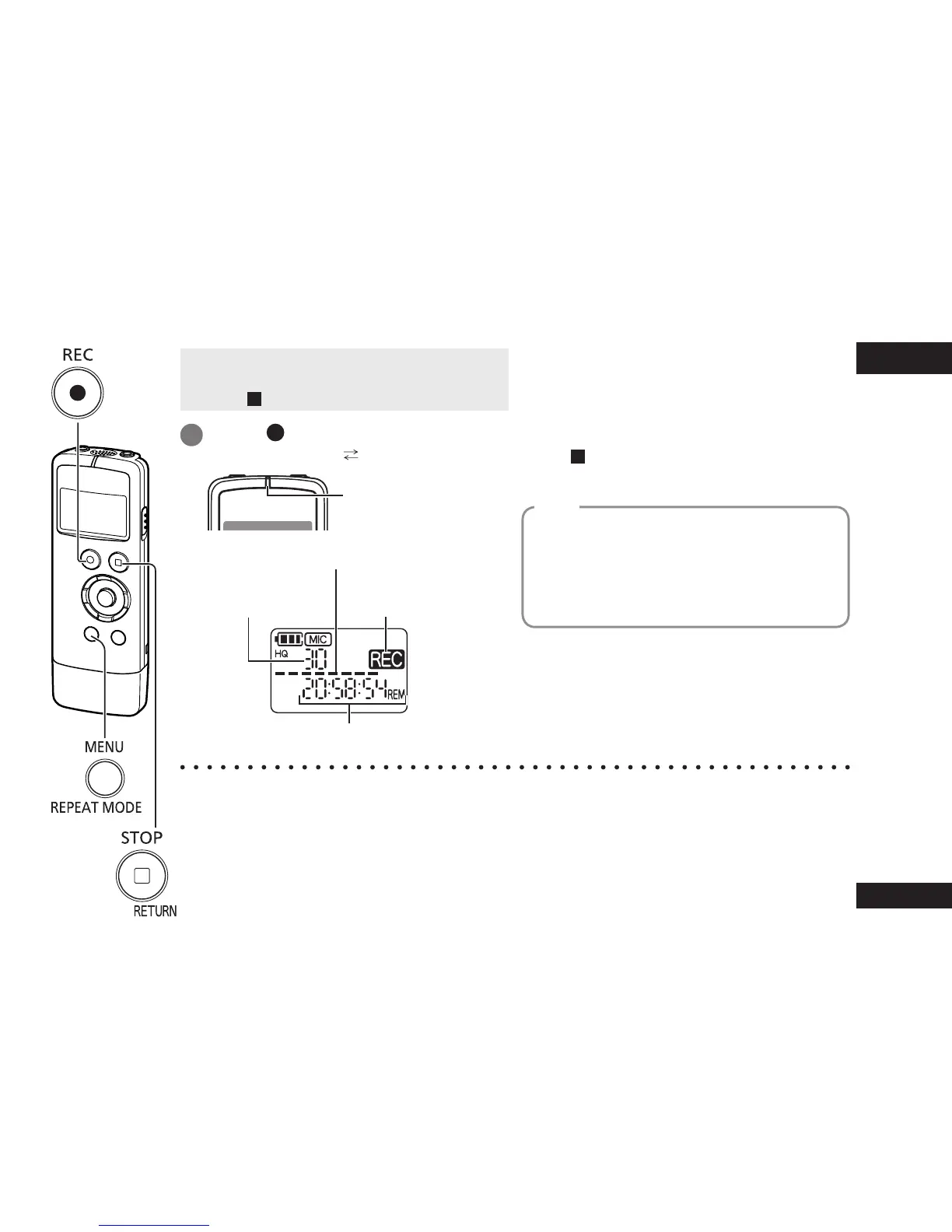
REC]. (Recording starts.)
Each press: Pause Resume recording
The recording indicator
lights.
(Blinks while paused.)
Number of file
being recorded
Level meter
(Blinks while paused.)
Remaining recording time
• If you press [MENU/REPEAT MODE] during
recording, the indication switches between
the remaining recording time and elapsed
recording time.
Stopping recording:
Press [
STOP/RETURN].
Recorded audio data from the starting point
to the ending point is saved as a file.
The saved data is called a file.
• The maximum number of files that can be
recorded is 199.
File
● Before recording, check that there is sufficient battery power remaining.
● If no operation is performed for approx. 30 minutes while recording is paused, the unit turns
of
f.
● Change the microphone sensitivity or sound quality as necessary. (
➜
page 12)
● Note that if you rub the unit with a hand or an object touches the unit during recording,
a rustling sound will be recorded through the microphone.
Recording















 To Next Page