VQT3T18
6
6
● Use an alkaline battery.
● Remove the battery from the unit when you will not
use the unit for a long period of time.
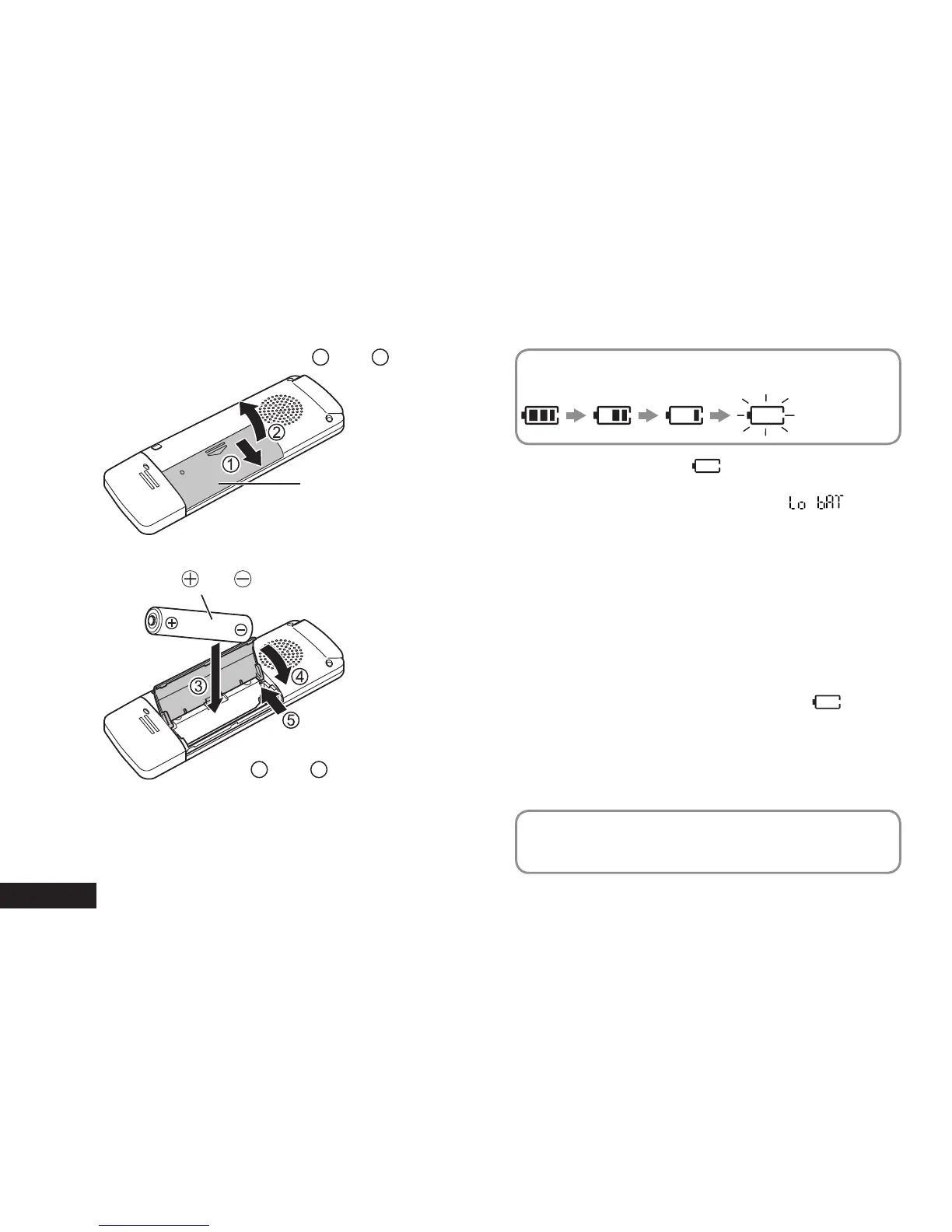
1
AAA LR03 battery (not supplied)
Make sure
and are correctly oriented.
The remaining battery level is indicated as shown
below while the unit is operating.
Blinking
● If the battery runs out, “ ” blinks. Replace the
battery as soon as possible.
● When the battery runs out of power, “
” is
indicated and then the power turns off automatically.
● Depending on the battery state and the operation to
be performed, even if the power turned of
f because
the battery ran out of power, the unit may be able to
be used for a while if it is turned on again. However,
the unit may suddenly turns off during operation due
to insufficient battery power.
● A certain level of battery power is required to
delete files, format the unit (
➜
page 1
1) and divide
files (
➜
page 16). If any of these operations are
performed when the battery indicator is “
”, the
power will be turned off because the battery will run
out of power.
● Turn the power off before removing the battery.
•
If the battery is removed while the power is on,
data may be lost or the unit may be damaged.
Set the clock after inserting a battery for the first time
or replacing the battery. (
➜
page 8)
Inserting a battery
Battery
cover
Open the battery cover (
1
and
2
)
Close the battery cover
(
4
and
5
)















 To Next Page