VQT3T18
8
8
The clock is used for file names (
➜
page 26) and recording date and time information so set
the correct date and time. The date and time need to be set after the battery is replaced.
• Turn the power on beforehand. (
➜
page 7)
• After turning the power on for the first time
after purchase or replacing the battery,
proceed to step
3
.
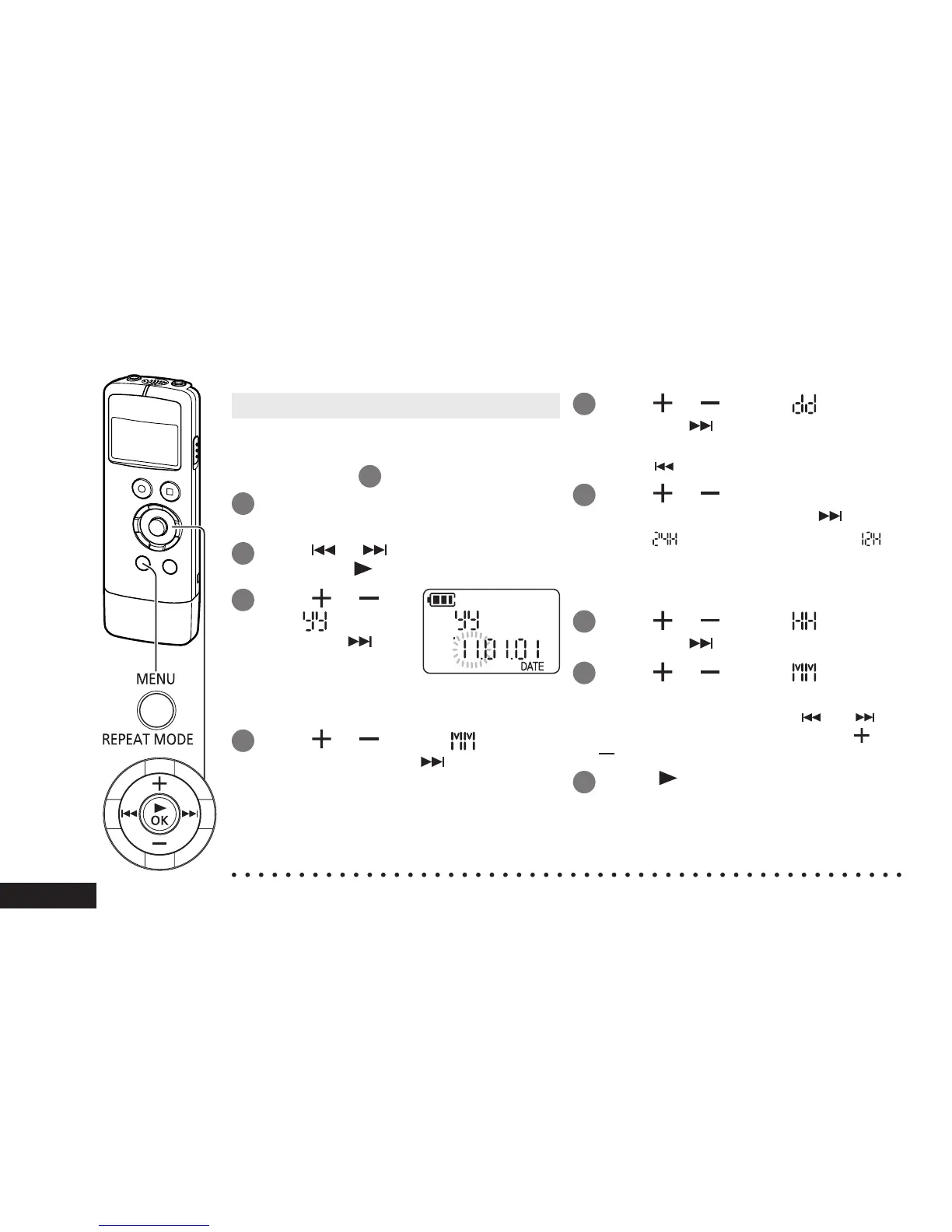
1
Press [MENU/REPEAT MODE].
2
Press or to select “DATE”
and press [ OK].
3
Press
or to
set “ ” (year)
and press .
• Set the last two digits of the year.
(“11” in the case of 2011)
4
Press
or to set “ ”
(month) and press .
5
Press
or to set “ ” (day)
and press .
• To return to the previous setting item,
press
.
6
Press
or to select the time
display format and press .
Select “ ” for 24-hour display, and “ ”
for 12-hour display.
• The display format that is blinking is
currently selected.
7
Press
or to set “ ” (hour)
and press .
8
Press
or to set “ ”
(minute).
To change the setting, press and to
move between the items, and press
and
again to make the setting.
9
Press [
OK] to confirm the
setting.
• The date and time are set and the clock
starts to operate.
● The clock operates with a monthly loss/gain of approx. ±60 seconds at normal temperature.
● The clock setting will be cleared if the battery completely runs out of power.
Setting the time















 To Next Page