EasyManua.ls Logo

Panasonic RX-C52 - Page 4

Panasonic RX-C52
20 pages
Print Icon
To Next Page IconTo Next Page
To Previous Page IconTo Previous Page
Loading...
|
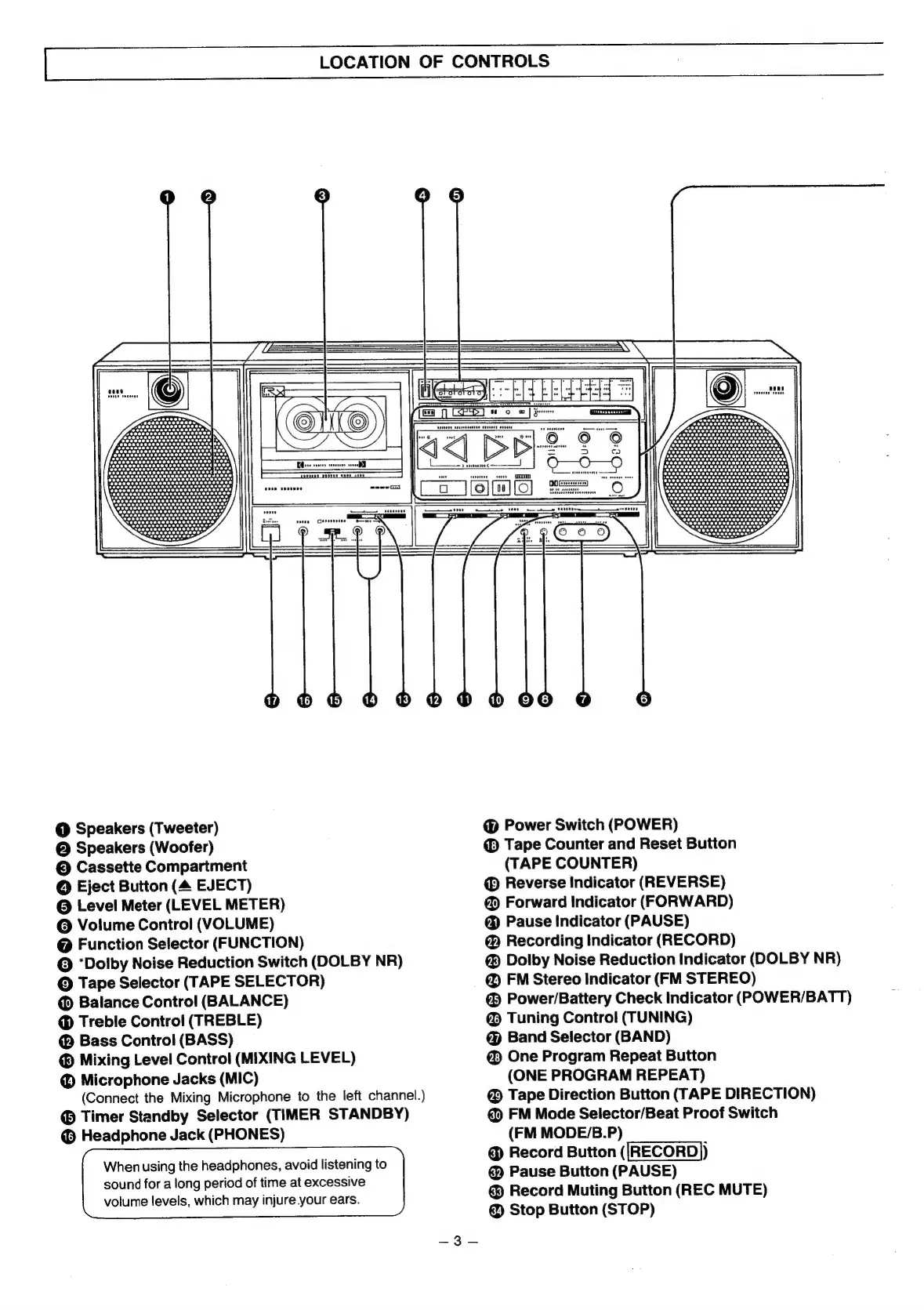
LOCATION
OF
CONTROLS
@
Speakers
(Tweeter)
@
Speakers
(Woofer)
©
Cassette
Compartment
@
Eject
Button
(4
EJECT)
@
Level
Meter
(LEVEL
METER)
©
Volume
Control
(VOLUME)
@
Function
Selector
(FUNCTION)
©
‘Dolby
Noise
Reduction
Switch
(DOLBY
NR)
©
Tape
Selector
(TAPE
SELECTOR)
Balance
Control
(BALANCE)
Treble
Control
(TREBLE)
@
Bass
Control
(BASS)
®
Mixing
Level
Control
(MIXING
LEVEL)
Microphone
Jacks
(MIC)
(Connect
the
Mixing
Microphone
to
the
left
channel.)
®
Timer
Standby
Selector
(TIMER
STANDBY)
©
Headphone
Jack
(PHONES)
When
using
the
headphones,
avoid
listening
to
sound
for
a
long
period
of
time
at
excessive
volume
levels,
which
may
injure
your
ears.
@
Power
Switch
(POWER)
®
Tape
Counter
and
Reset
Button
(TAPE
COUNTER)
®
Reverse
Indicator
(REVERSE)
@
Forward
Indicator
(FORWARD)
@
Pause
Indicator
(PAUSE)
Recording
Indicator
(RECORD)
@
Dolby
Noise
Reduction
Indicator
(DOLBY
NR)
@
FM
Stereo
Indicator
(FM
STEREO)
@
Power/Battery
Check
Indicator
(POWER/BATT)
@
Tuning
Control
(TUNING)
@
Band
Selector
(BAND)
@
One
Program
Repeat
Button
(ONE
PROGRAM
REPEAT)
@
Tape
Direction
Button
(TAPE
DIRECTION)
FM
Mode
Selector/Beat
Proof
Switch
(FM
MODE/B.P)
@
Record
Button
([RECORD))
Pause
Button
(PAUSE)
@
Record
Muting
Button
(REC
MUTE)
@
Stop
Button
(STOP)

Related product manuals