[^]
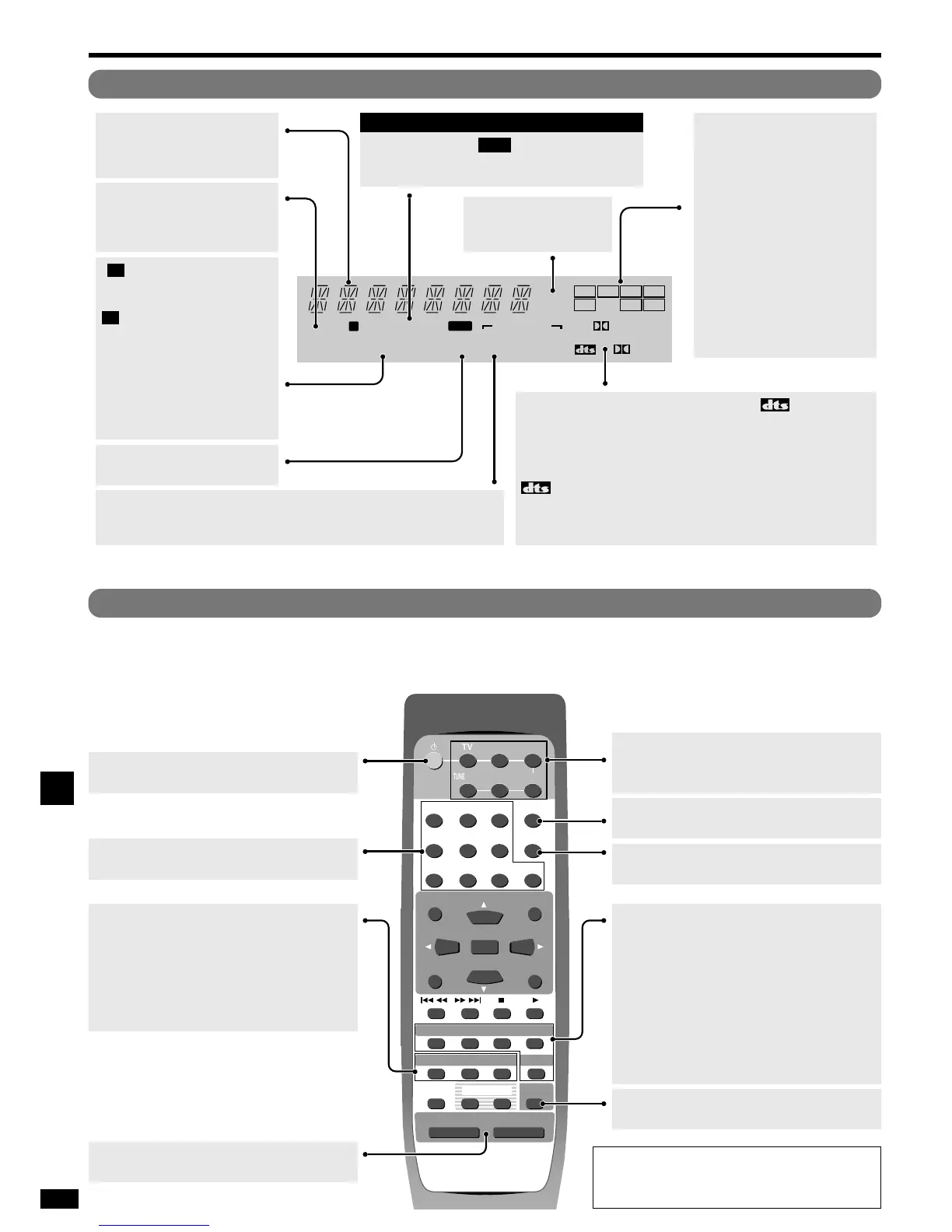
Standby/on button.
[MUTING]
To mute the volume.
[VOLUME, –, +]
To adjust the volume.
[1, 2, 3, 4, 5, 6, 7, 8, 9, 0]
To enter radio frequencies and channels.
[SOUND MODE]
For selecting “STEREO”, “SURROUND” or
“SFC”.
[SFC]
For selecting SFC modes.
[TEST]
To start the speaker test signal.
[DIRECT TUNING/DISC]
To enable selection of radio stations by frequency.
[
>
=
10/-/--]
To enter two digit channels.
[TV, VCR, DVD, TUNER/BAND,
TAPE, CD]
Input mode and remote control mode buttons.
Buttons not explained on this page are used only to operate other equipment.
Refer to the separate Remote Control Operation Guide for details.
Display
[SOUND MODE, STEREO, SURROUND, SFC]
DSP sound mode indicators.
Show the current DSP sound mode.
[kHz, MHz]
Frequency unit indicators.
kHz: AM, MHz: FM
[L, C, R, S, SL, SR,
LFE]
Program format indicators.
Show the channels contained in
the digital input signal. They do
not light when input is analogue.
L: Front channel (left)
C: Center channel
R: Front channel (right)
S: If the surround channel is
monaural.
SL: Surround channel (left)
SR: Surround channel (right)
LFE (Low Frequency Effects):
Deep-bass effects.
[SPEAKERS]
Speaker indicator.
Lights when the speakers are
on.
General display
Shows the input mode, radio
frequency, and other general
information.
[FIX, %PRO LOGIC
22
, PCM, ,
%DIGITAL]
Signal format indicators.
Light depending on the source you are playing.
%
DIGITAL: Dolby Digital sources
: DTS sources
%
PRO LOGIC
22
: The Dolby Pro Logic 2 circuit is being used
FIX: PCM FIX or DTS FIX mode
PCM: PCM FIX mode
[ , TUNED, MONO,
STEREO]
Radio indicators.
: Flashes or lights during
presetting.
TUNED: A station is tuned.
MONO: You have switched to
monaural mode with
[-BAND, –FM MODE] to
improve reception.
STEREO: A stereo FM
broadcast is tuned.
M
M
Remote control
[SLEEP]
Sleep indicator.
[PS, PTY, RT, ]
RDS indicators.
Show the current RDS signal type.
RDS
For
continental Europe and the United Kingdom
[EFFECT]
Use when adjusting Dolby Pro Logic 2, or SFC
effects.
[LEVEL]
Use when adjusting speaker level.
[SLEEP]
For setting the sleep timer.
[–, +]
First select EFFECT, LEVEL, or SLEEP then
press [–] or [+] to adjust.
Operations
For your reference
When muting is on
Muting is also canceled when the unit is turned off.






 To Next Page