EasyManua.ls Logo

Panasonic SC-AK340 - User Manual

Panasonic SC-AK340
20 pages
Print Icon
To Next Page IconTo Next Page
Loading...
Operating Instructions
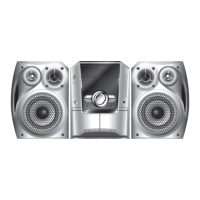
CD Stereo System
Model No. SC-AK340
SC-AK240
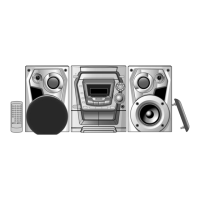
The illustrations show SC-AK340.
RQTV0070-1M
L1105KE1115
GCP
En Sp
Table of contents
IMPORTANT SAFETY INSTRUCTIONS ..3
Placement of speakers ............................3
Getting started .........................................4
Overview of controls ...............................6
Discs .........................................................7
Cassette tape – Play and record ..........11
Radio .......................................................13
Microphone mixing ................................14
Timer .......................................................15
Sound adjustment .................................16
External unit ...........................................17
Maintenance ...........................................17
When moving the unit ...........................17
Troubleshooting guide ..........................18
Specifi cations ........................................19
SUPPLIED ACCESSORIES
Please check and identify the supplied accessories.
1 x AC power supply cord
2 x Remote control batteries
1 x Power plug adaptor
1 x FM indoor antenna
1 x AM loop antenna
1 x Remote Control
(N2QAHB000065)
Before connecting, operating or adjusting this product,
please read the instructions completely.
Please keep this manual for future reference.
Operations in these instructions are described mainly
using remote control, but you can do the operations on
the main unit if the controls are the same.
Unless otherwise indicated, illustrations in these
operating instructions are of SC-AK340.
Your unit may not look exactly the same as illustrated.
RQTV0070-M_1EN.indd 1RQTV0070-M_1EN.indd 1 11/25/05 1:35:48 PM11/25/05 1:35:48 PM

Questions and Answers

  • S
    Stephanie SmithJul 31, 2025
    What to do if my Panasonic SC-AK340 Stereo System remote control doesn't work?
    • A
      Aaron LoweJul 31, 2025
      If the Panasonic Stereo System remote control isn't working, first ensure the batteries are correctly inserted. If the problem persists, replace the batteries, as they may be worn out.
  • M
    Monica ChanAug 4, 2025
    How to fix noise and sound distortion on Panasonic Stereo System?
    • J
      Joshua ClarkeAug 4, 2025
      If you're experiencing noise, distorted sound, a flickering stereo indicator, a beat sound, or a low hum during AM broadcast with your Panasonic Stereo System, try these solutions: Use an outdoor antenna. Turn off the TV or separate it from the unit. Separate the antenna from other cables and cords.
  • B
    Brandy HamiltonAug 9, 2025
    How to improve poor sound quality and fix recording issues on a Panasonic SC-AK340?
    • J
      Jason JonesAug 9, 2025
      If you're experiencing poor sound quality or are unable to record with your Panasonic Stereo System, try cleaning the heads. Also, if the erasure prevention tabs have been removed, cover the holes with adhesive tape.
  • F
    Francisco ToddAug 15, 2025
    What to do if the picture on my TV disappears or stripes appear on the screen with my Panasonic Stereo System?
    • H
      Henry TaylorAug 15, 2025
      If the picture disappears or stripes appear on the screen when using your Panasonic Stereo System, the antenna's location and orientation may be incorrect. If you're using an indoor antenna, switch to an outdoor antenna. Also, separate the antenna wire of the TV set from the unit.
  • S
    Stacy LucasAug 19, 2025
    What to do if my Panasonic SC-AK340 display is wrong or play won’t start?
    • R
      Ryan ReyesAug 19, 2025
      If your Panasonic Stereo System displays incorrect information, won't start playing, shows a different number of tracks each time, produces unusual sounds, can't read CD-RWs, or displays “VBR–” instead of play time, try these solutions: * Ensure the disc is not upside down. * Wipe the disc clean. * Replace the disc if it's scratched, warped, or non-standard. * Wait about an hour and try again. * Use recording equipment to fully format the disc before recording.
  • K
    Kevin YoungAug 25, 2025
    What to do if Panasonic Stereo System disc tray won't open and shows “CHGR ERR”?
    • T
      terri49Aug 25, 2025
      If the disc tray(s) on your Panasonic Stereo System won't open and “CHGR ERR” is displayed, press [y/I, POWER] to switch off the unit and release the jammed tray(s). Then, switch it on again to initialize the tray(s) to their previous condition. If the problem persists, consult a dealer.

Summary

Important Safety Instructions

Speaker Placement

How to position the speakers for optimal sound and safety.

Getting Started

Making Connections

Guide to connecting power, antennas, and speakers for system setup.

Optional Antenna Connections

How to connect external FM/AM antennas for improved radio reception.

Remote Control Setup

Instructions for correctly inserting batteries into the remote control and using the demo function.

Overview of Controls

Main Unit Controls

Details of buttons, indicators, and ports on the main stereo system unit.

Remote Control Functions

Explains buttons and functions available on the remote control unit.

Disc Playback

Basic Disc Playback

How to load, play, pause, and stop audio CDs and MP3/WMA discs.

Disc Play Modes

Options to play discs in specific modes like random, album, or single track.

Disc Management

How to change discs and view track information on the player.

Advanced Disc Functions

Program play, title search, repeat play, and track marking for discs.

Cassette Tape Operation

Basic Cassette Playback

How to play audio cassettes using the main unit's decks.

Recording Cassettes

Instructions for recording from discs, tape-to-tape, and voice.

Radio Tuning and Presets

Manual and Automatic Tuning

Methods for finding radio stations, including manual adjustment and auto-scan.

Preset Station Management

Saving, selecting, and managing preset radio stations.

Microphone Mixing

Recording Microphone Mixing

How to record voice mixed with music sources onto cassette tape.

Enjoying Microphone Mixing

How to sing along with music sources and adjust microphone volume.

Timer Functions

Setting the Clock

How to set the 24-hour clock on the unit.

Play and Record Timers

Instructions for setting timers to play or record sources automatically.

Sleep Timer

How to automatically turn off the unit after a set period.

Sound Adjustment

How to use preset EQs and enhance bass for desired audio output.

External Unit and Maintenance

Connecting Portable Audio

How to connect and play music from, or record to, a portable audio device.

Unit Maintenance

Instructions for cleaning the unit surfaces and preparing it for moving.

Troubleshooting Guide

Common Problems and Solutions

Troubleshooting common issues like display lights, no sound, or error messages.

Radio and Disc Issues

Resolving problems related to radio reception and disc playback errors.

Cassette Deck and Remote Control

Troubleshooting cassette quality, recording, and remote control malfunctions.

Memory Reset

Instructions to reset the unit's memory to factory presets.

Specifications

Panasonic SC-AK340 Specifications

General IconGeneral
BrandPanasonic
ModelSC-AK340
CategoryStereo System
LanguageEnglish

Related product manuals