RQT7418
12
ENGLISH
CD display for MP3
During play or pause
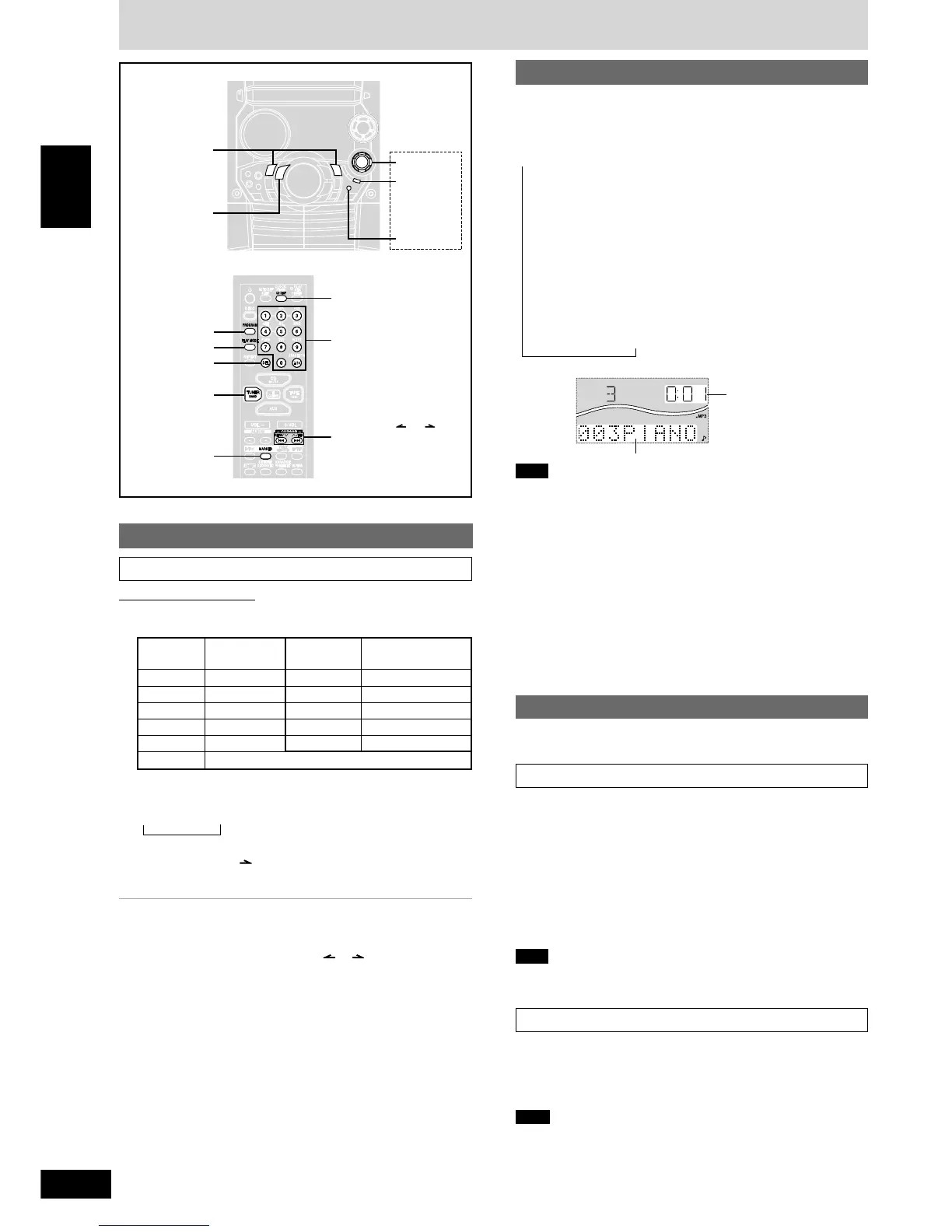
Press [CD DISP] on the remote control to select a desired
CD display mode.
Every time you press the button:
a Remaining play time, Original display
b Elapsed play time, Album title
c Elapsed play time, Track title
d Elapsed play time, ID3 album name
e Elapsed play time, ID3 title name
f Elapsed play time, ID3 artist name
g Elapsed play time, Original display
Example:
c
Note
•
When a title is longer than 8 characters, it will scroll across the
display. If you selected a mode from b - f (see above), the
scrolling will start again after every 3 seconds.
•
“NO ID3” is displayed if titles with ID3 tags haven’t been entered.
•
Maximum number of displayable characters:
Album/track title: 31
ID3 album/title/artist name: 30
(ID3 is a tag embedded in MP3 track to provide information about
the track.)
•
This unit can display album and track titles with ID3 tags (version
1.0 and 1.1). Titles containing text data that the unit doesn’t support
cannot be displayed.
•
Titles entered with 2-byte code cannot be displayed correctly on this
unit.
To recall a marked track number in the current disc
During play or stop
Press [MARKER, -RECALL] to recall a marker.
Remote control: Press [MARKER].
Play starts from the track recalled.
Note
•
“NO MARKER” indicates that the marker in the current disc is empty.
•
The marker memory is cleared when you open the CD tray.
•
For CD-DA, you cannot use this function during 1-RANDOM play
and A-RANDOM play.
•
You cannot use this function during program mode.
Marking a track
You can mark one track each on the discs loaded so that you can
start play from them later.
To mark a track number
1 During play or stop
Select your desired track.
(For MP3, refer to “Track skip play” on page 10.
For CD-DA, press the numbered buttons on the remote control.
To select track 10 or over, press [
X
10] then the two digits.)
2 Hold down [MARKER, –MEMORY] until “STORING”
blinks on the display.
Remote control: Hold down [MARKER].
The selected track is stored in the marker of the current disc.
Note
If a track is already stored in the marker, it will be replaced next time
you store a new track in the same marker.
How discs with MP3 differ from CDs
22
22
2 Press [CURSOR ] to enter the character.
Repeat steps 1~2 to complete the keyword.
L Editing keywords
To move the cursor
Push the joystick left/right ([g, CURSOR] or [f, CURSOR]).
Remote control: Press [CURSOR ( or )].
Deleting a character
1. Move the cursor over the character to be deleted.
2. Press [DELETE] (remote control: Press [DEL].)
Editing a character
1. Move the cursor over the character to be edited.
2. Enter the correct character.
The characters change each time a numbered button is pressed.
For example, every time you press [2]:
A → B → C → 2
∧
Numbered Characters Numbered Characters
buttons buttons
1 1 6 M N O 6
2 A B C 2 7 P Q R S 7
3 D E F 3 8 T U V 8
4 G H I 4 9 W X Y Z 9
5 J K L 5 0 0
>10
space
!”#$ %&’()∗+,– ./:;<= > ?_ `
Title search function
TUNER, BAND
PROGRAM
PLAY MODE
DEL
TUNER, BAND
MARKER
Elapsed play time
Track title
→
→→→→→
→
Entering characters
On the remote control
11
11
1 Press the numbered button to select the required character.
Characters allocated to the numbered buttons:
g
/REW/3,
f
/FF/4
CD DISP
Numbered
buttons
CURSOR ( or )
g
, REW/3,
f
, 4/FF
Joystick
MARKER
–MEMORY
-RECALL
DELETE








 To Next Page