4
RQT0A83
Control reference guide
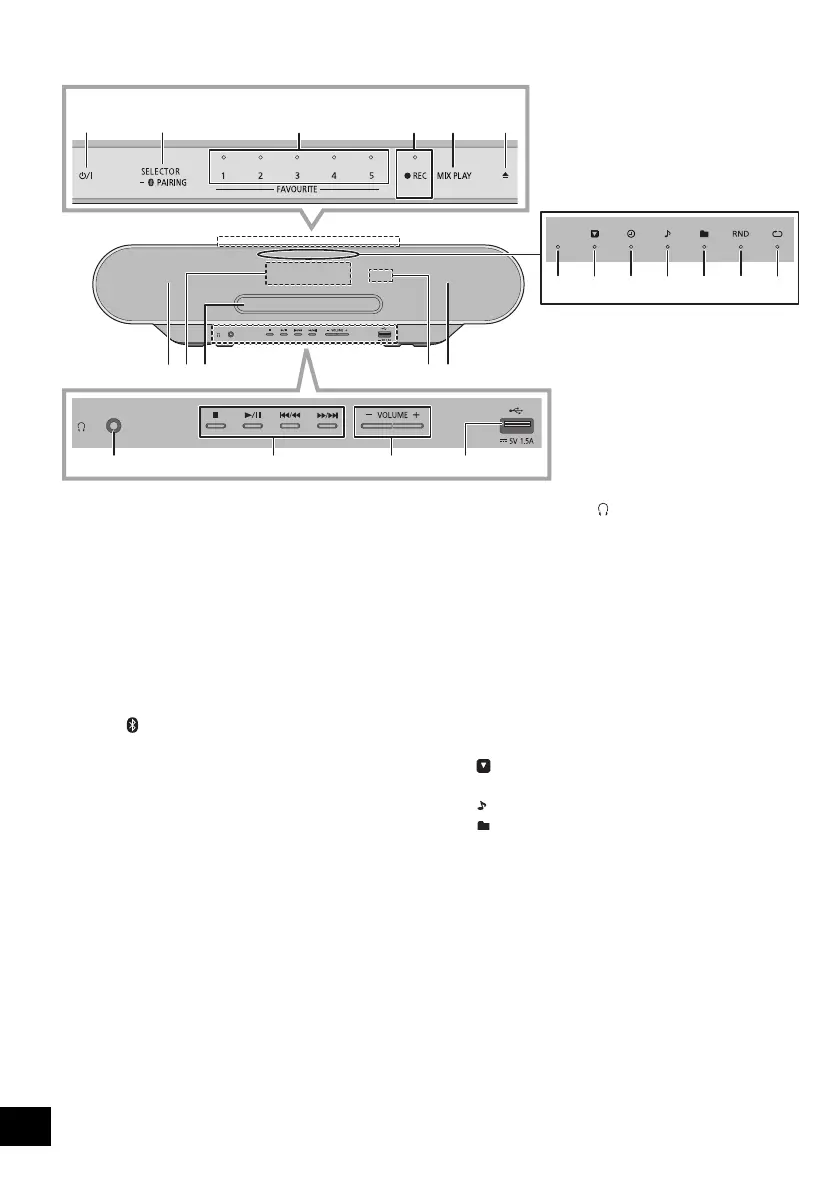
1 Standby/on switch (Í/I)
Touch to switch the unit from on to standby mode or vice
versa. In standby mode, the unit is still consuming a small
amount of power.
2 Select the audio source
On this unit:
≥ Touch and hold to enter pairing mode (l 13) or
disconnect a Bluetooth
®
device (l 13).
On the remote control:
[MEMORY]: “MEMORY”
[CD/ ]: “CD” ,. “BLUETOOTH”
3 FAVOURITE buttons and indicators for favourite
play / storing or selecting radio station ([1] to [5])
(l 12, 15, 17, 18)
4 This unit: Record button and indicator (l 20)
Remote control: Record button (l 20)
5 Start one-touch mix play (l 15)
6 Open or close the disc tray
7 Speakers
≥ These speakers do not have magnetic shielding. Do not
place them near a TV, personal computer or other
magnetic devices.
8 Display
9 Disc tray
≥ Do not put any object in front of the disc tray.
10 Headphones jack ( )
≥ Plug type: 3.5 mm stereo (not supplied)
≥ Avoid listening for prolonged periods of time to prevent
hearing damage.
≥ Excessive sound pressure from earphones and
headphones can cause hearing loss.
≥ Listening at full volume for long periods may damage
the user's ears.
11 Basic playback control
12 Adjust the volume (0 (min) to 50 (max))
13 USB port (l 6)
14 Remote control signal sensor
Distance: Within approx. 7 m directly in front
Angle: Approx. 30o left and right
15 Network indicator
16 “ ”: Secondary service indicator
17 “F”: Play timer indicator
18 “ ”: Track indicator
19 “ ”: Album indicator
20 “RND”: Random indicator
21 “`”: Repeat indicator
22 Turn the unit on or off
23 Select number
≥ To select a 2-digit number
Example: 16: [S10]
> [1] > [6]
≥ To select a 3-digit number
Example: 124: [S10]
> [S10] >[1] > [2]> [4]
1
※
7
7
9
2
※
3
※
8
14
4
※
5
※
6
※
15 16 17 18 19 20 21
10 11 12 13
“CD” -------. “MEMORY” -------. “DAB+” -------. “FM”
:;
“NETWORK” (------ “BLUETOOTH” (------ “USB”
[RADIO, EXT-IN]: “DAB+” -"-. “FM” -"-. “USB”
^"" “NETWORK”("}
SC-ALL7CD_EGEBGN_RQT0A83-B.book 4 ページ 2016年3月1日 火曜日 午後4時19分









 To Next Page