Getting started
17
VQT3M06
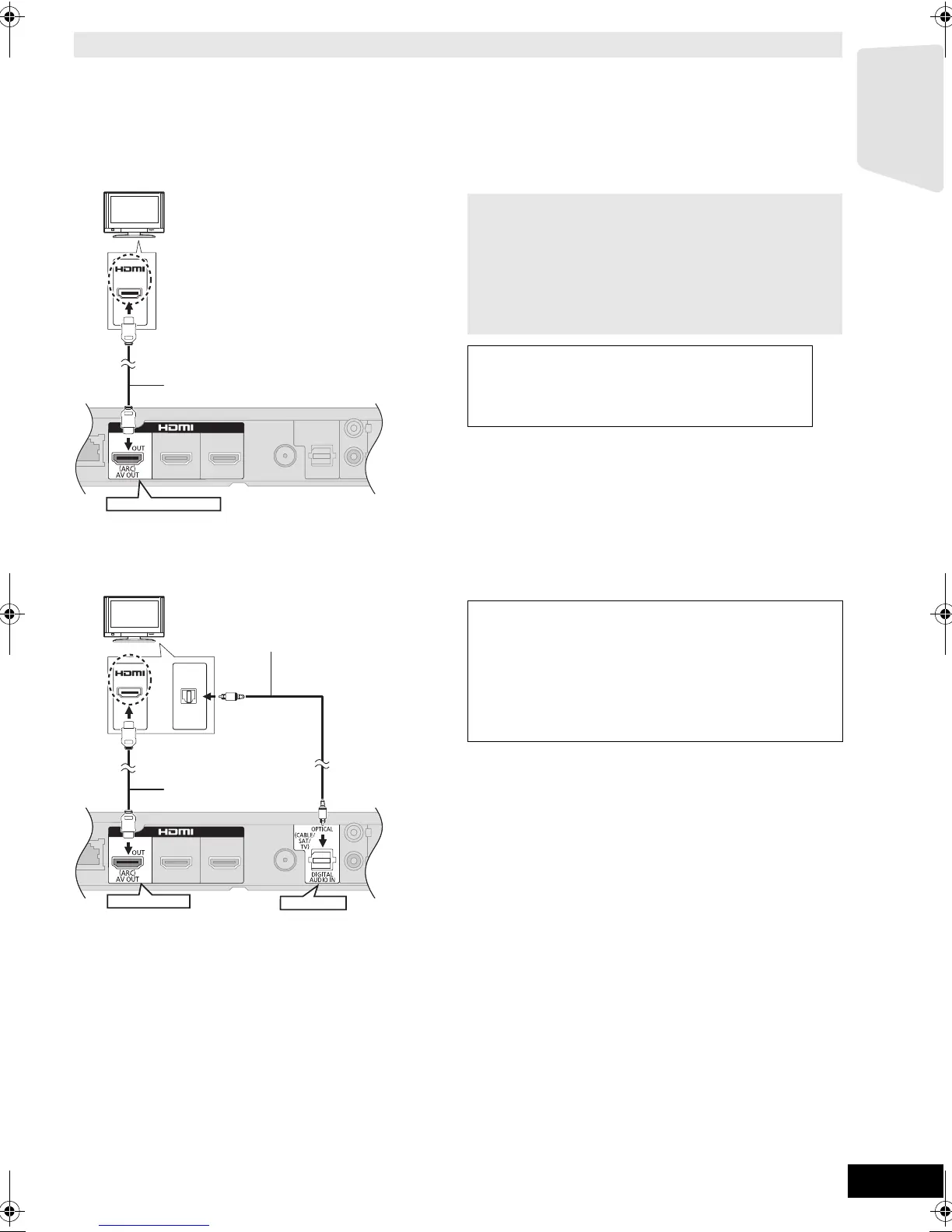
≥When connecting to a TV using an HDMI cable, check the HDMI terminal on the TV. If the HDMI terminal is labeled
“HDMI (ARC)”, you can connect the unit simply with a single HDMI cable.
≥It is possible to play back 3D videos and 3D still pictures by connecting this unit with a 3D compatible TV.
≥For details, refer to the operating instructions of your TV.
∫ When the HDMI terminal on the TV is labeled “HDMI (ARC)”
A HDMI cable (not supplied)
∫ When the HDMI terminal on the TV is not labeled “HDMI (ARC)”
A HDMI cable (not supplied)
B Optical digital audio cable (not supplied)
Connection for the best picture and audio
HDMI
(ARC)
HDMI AV OUT (ARC)
What is ARC?
ARC is an abbreviation of Audio Return Channel, also
known as HDMI ARC. It refers to one of the HDMI functions.
When you connect the unit to the terminal labeled
“HDMI (ARC)”, the optical digital audio cable that is usually
required in order to listen to sound from TV is no longer
required, and TV pictures and sound can be enjoyed with a
single HDMI cable.
To enjoy TV audio from this home theatre
system’s speakers:
Select “ARC” as a source (> 25).
OPTICAL
OUT
HDMI
HDMI AV OUT
OPTICAL
To enjoy TV audio from this home theatre
system’s speakers:
1 Connect the TV and the main unit with the
Optical digital audio cable (not supplied).
2 Select “DIGITAL IN” or “D-IN” as a source
(> 25).
SCBTT775_770_370_270EBEPGN_VQT3M06.book 17 ページ 2011年1月18日 火曜日 午後6時14分




 To Next Page