Getting started
19
VQT3M06
The following services can be used when this unit is connected
to broadband.
jFirmware can be updated (> 24)
– You can enjoy BD-Live (> 29)
– You can enjoy VIERA CAST (> 38)
– You can access other devices (Home Network) (> 39)
For details about connection method, refer to the instructions
supplied with the connected equipment.
Precautions of Wireless LAN connection
The following limits are in place regarding the usage of this unit or Wireless LAN adaptor. You must be aware of these limits before using these devices.
Panasonic will in no way be responsible for any incidental damage which may arise due to a failure to obey these limits, or to any condition of use or disuse of these devices.
≥ Data transmitted and received over radio waves may be intercepted and monitored.
≥ This unit or Wireless LAN adaptor contain delicate electronic components.
Please use these devices in the manner in which it was intended and follow the following points:
–Do not expose these devices to high temperatures or direct sunlight.
–Do not bend, or subject these devices to strong impacts.
–Keep these devices away from moisture.
–Do not disassemble or alter the device in any way.
Connection to a broadband network
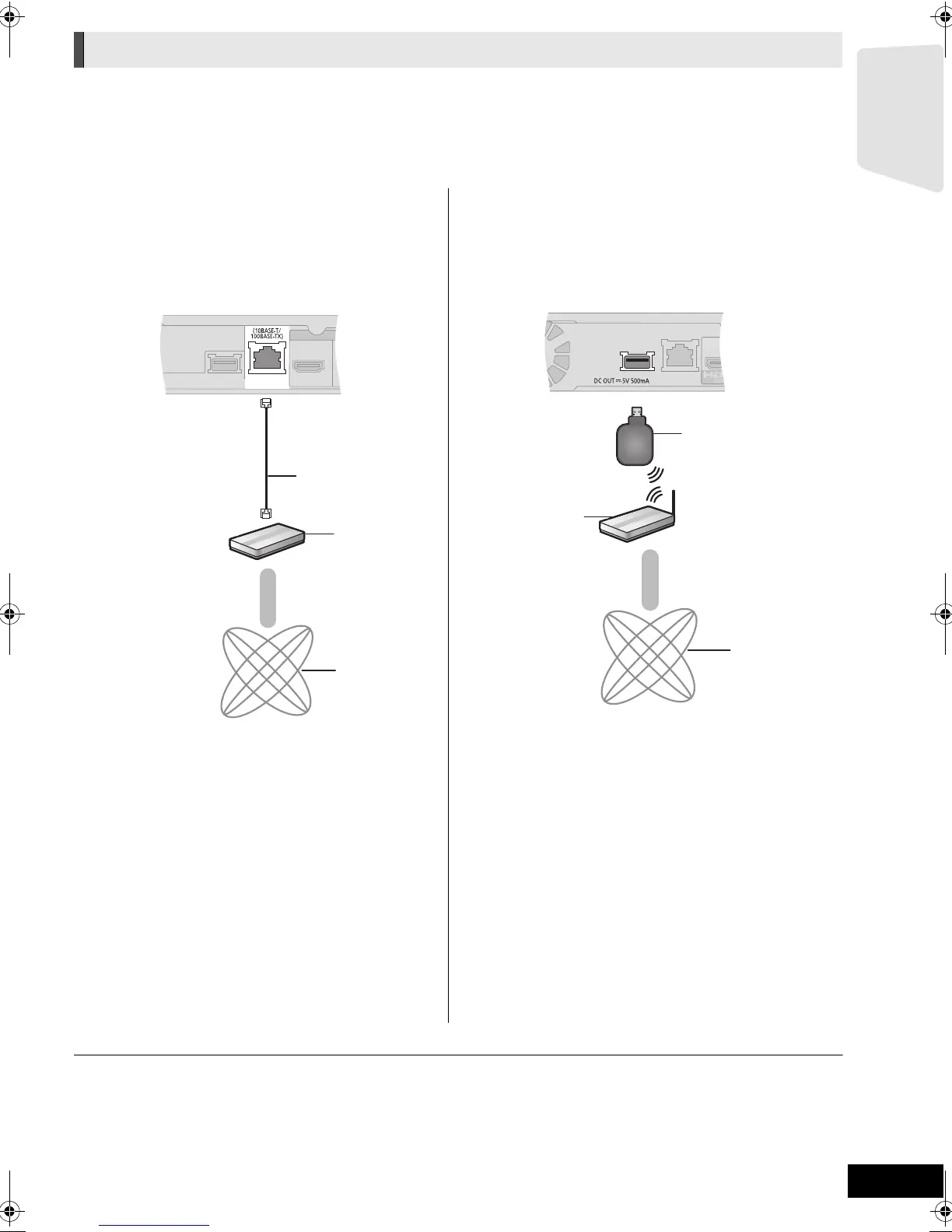
∫ LAN cable connection ∫ Wireless LAN connection
j[BTT775] [BTT770] [BTT370]
Wireless LAN is built in. (There is no need to connect a
Wireless LAN Adaptor.)
– [BTT270]
Connect the Wireless LAN Adaptor DY-WL10 (optional).
A LAN Cable (not supplied)
B Broadband router, etc.
C Internet
A Wireless LAN Adaptor
B Wireless router, etc.
C Internet
≥ Use category 5 or above straight LAN cables (STP) when
connecting to peripheral devices.
≥ Inserting any cable other than a LAN cable in the LAN
terminal can damage the unit.
≥ [BTT270]
Only the Wireless LAN Adaptor DY-WL10 (optional) can be used.
≥ [BTT270]
Read the operating instructions for the Wireless LAN
Adaptor DY-WL10 (optional) thoroughly when using it.
≥
For up to date compatibility information on your Wireless router refer to
http://panasonic.jp/support/global/cs/
(This site is in English only.)
≥ The unit is not compatible with public wireless LAN services
(Hotspot etc.) provided in airports, stations, cafes etc.
≥ [BTT270]
To simultaneously connect the Wireless LAN Adaptor
DY-WL10 (optional) and a LAN cable, use the extension
cable supplied with the DY-WL10.
SCBTT775_770_370_270EBEPGN_VQT3M06.book 19 ページ 2011年1月18日 火曜日 午後6時14分




 To Next Page