EasyManua.ls Logo

Panasonic SC-CH11 - Page 19

Panasonic SC-CH11
51 pages
Print Icon
To Next Page IconTo Next Page
To Previous Page IconTo Previous Page
Loading...
Listening to
Radio
Broadcasts
(continued)
Memory
tuner
Operation
(to
listen to
broadcast stations preset into
memory)
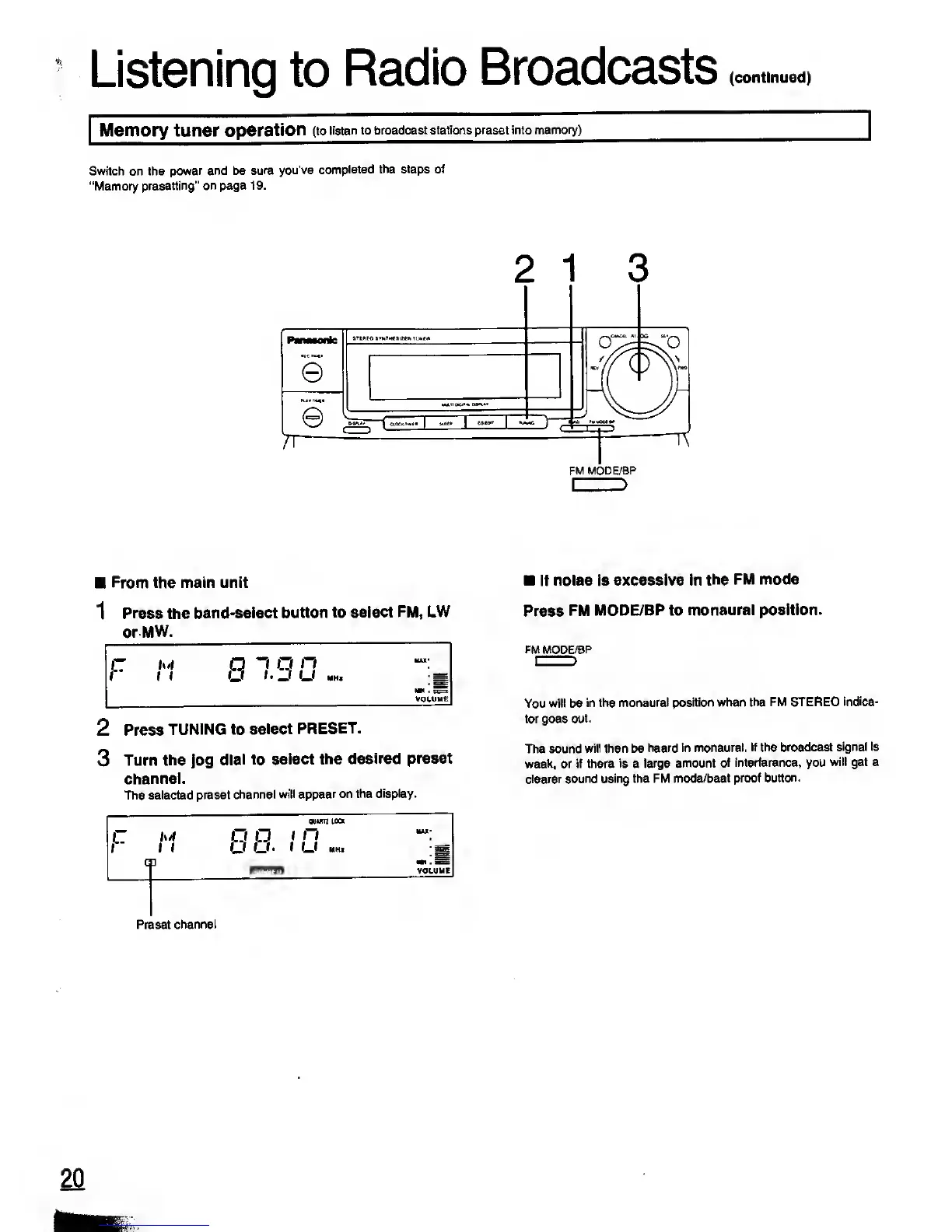
Switch on the
power and be
sure you've
completed
the steps of
"Memory
presetting"
on page 19.
e
rr
FM MODE/BP
I
>
From the main unit
1
Press the
band-select
button to select
FM, LW
orMW.
2 Press
TUNING to
select
PRESET.
3
Turn
the
jog
dial
to
select
the desired
preset
channel.
The selected
preset
channel will
appear on the
display.
F
c
M
1
1
p
cm
OUMU LOCK
r i
n
. t
U HHl
333
MAI*
VOLUME
Preset
channel
if noise is
excessive in
the FM mode
Press
FM
MODE/BP to
monaural position.
FM MODE/BP
You will be
in the monaural
position when the
FM STEREO
indica-
tor goes out.
The sound
will then be heard
in monaural.
If the broadcast
signal is
weak, or if there is a
large amount
of interference, you
will get a
clearer sound
using the FM
mode/beat proof
button.
20
IttK

Related product manuals