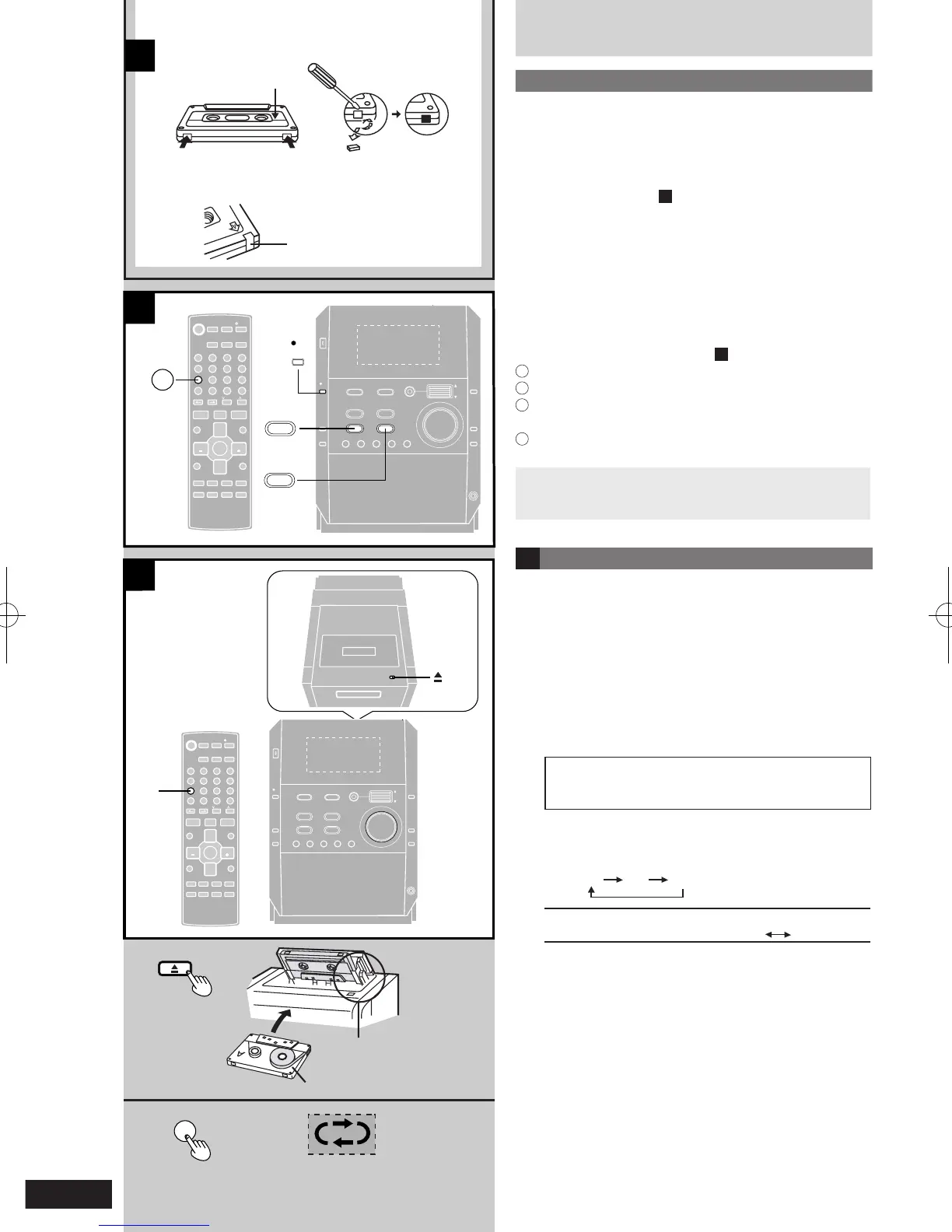
Making a recording
Before recording
Types of tapes which can be recorded correctly
Use normal position tapes.
High position and metal position tapes can be used, but
the unit will not be able to record or erase them correctly.
Erasure prevention
A
The illustration shows how to remove the tabs to prevent
recording. To record on the tape again, cover as shown.
The effect of volume and sound quality on
recording
These have no effect on recording.
They can be changed for playback.
To erase a recorded sound
B
1
Press [TAPE 7] and then [STOP g, -DEMO].
2
Insert the recorded cassette with the tape facing in.
3
Press [PLAY MODE] on the remote control to select
reverse mode.
4
Press [*/ h REC].
Your attention is drawn to the fact that recording
prerecorded tapes or discs or other published or
broadcast material may infringe copyright laws.
C Preparatory steps
Do these steps before each recording.
Wi n d u p t he lea der ta pe so rec ord ing ca n b e gi n
immediately.
Preparation: Press [TAPE 7] then [STOP g, -DEMO]
to select tape as the source.
1 Press [; OPEN], insert a cassette with the
tape facing in.
Make sure the cassette is fully inserted and close the
lid by hand.
The tape direction is automatically set to “F o”.
To record on the reverse side
Press [TAPE 7] twice, then press [STOP g,
-DEMO].
2 Press [PLAY MODE] on the remote control to
select the reverse mode.
Every time you press the button:
v / $
v
One side only records.
/ $
Both sides are record. (forward reverse).
“$ ” automatically changes to “/ ” when [*/ h
REC] is pressed.











 To Next Page