CDs
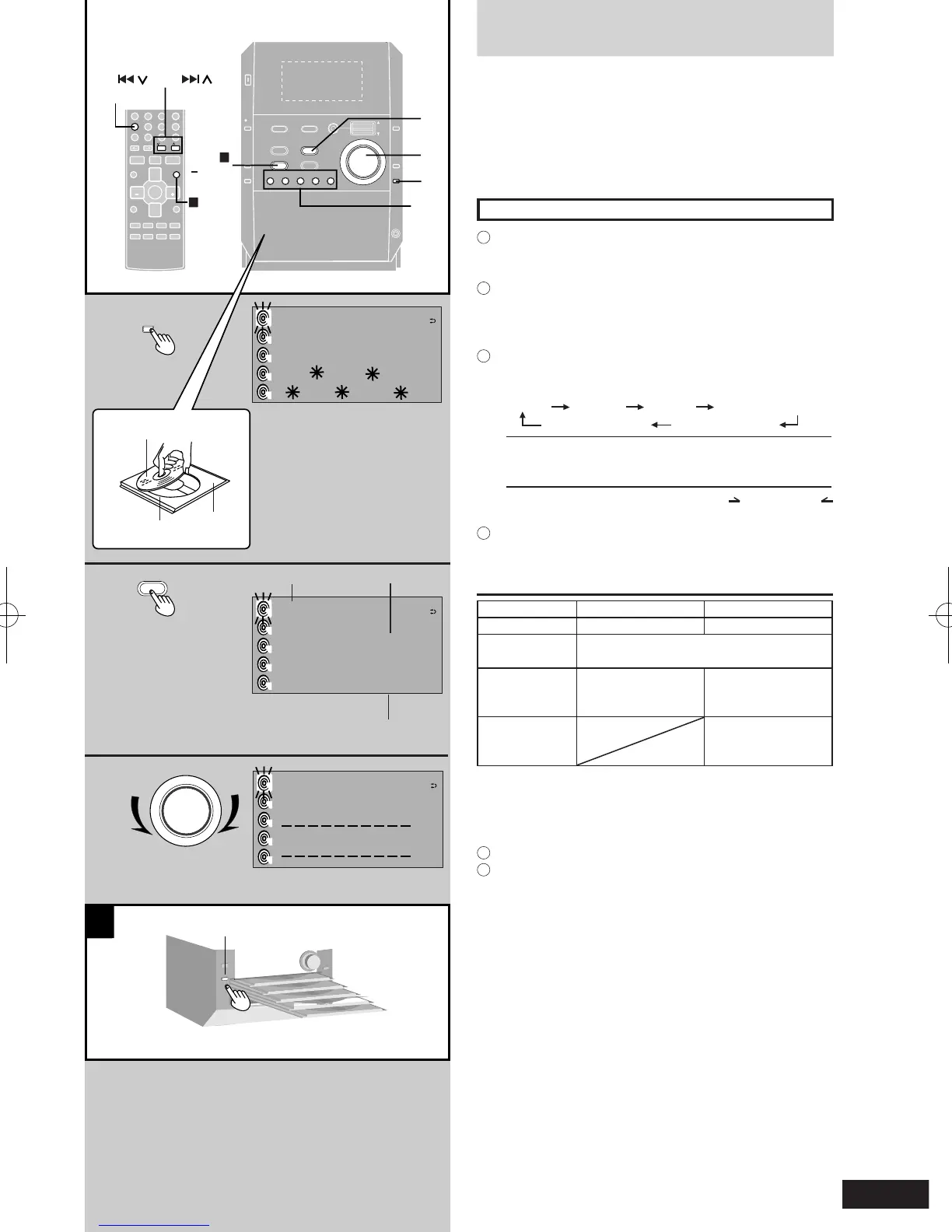
1 Press [; OPEN/CLOSE] to open the disc
tray, and insert the CD.
The unit comes on automatically.
Press again to close the tray.
2 Press [CD q/ h] to start play.
3 Adjust the volume.
Listening to the desired CDs or album
1
Press [CD 1] - [CD 5] to select the desired disc tray.
The unit comes on automatically.
Play starts if there is already a CD in the tray.
2
Press [; OPEN/CLOSE] to open the disc tray, and
insert the CD.
Press again to close the tray.
Repeat steps 1 and 2 to put CDs in the other trays.
3
Press [PLAY MODE] to select "1 DISC", "ALL DISC"
or "1 ALBUM (MP3/WMA only)".
Every time you press the button:
1 DISC ALL DISC 1 TRACK 1 ALBUM (MP3/WMA)
A RANDOM (CD-DA) 1 RANDOM (CD-DA)
1 DISC 1-Disc mode
ALL DISC All-Disc mode
1 ALBUM 1-Album mode (MP3/WMA only)
l
If you selected 1 ALBUM, press [ ALBUM] or [
ALBUM] to select the album.
4
Press [CD q/ h] to start play.
If you selected ALL DISC, the CDs play in order from
the disc you selected.
Operations Main unit Remote control
To stop the disc [STOP g, -DEMO] [CLEAR g]
To pause play [CD q/ h]
Press [CD q/ h] again to resume play.
Skipping tracks Jog control
Turn up (backward) or
down (forward).
[u 2/REW]
(backward)
[i 1/FF] (forward)
Searching
through tracks
[u 2/REW]
(backward)
[i 1/FF] (forward)
To remove the disc
While one CD is playing (except in All-Disc Random play
or program play), you can change the CDs in the other
trays.
1
Press [; CD CHANGE].
2
Press [1] - [5] to select the disc you want.
Press [; CD CHANGE] again to close the tray.
To check which tray the CD (12 cm) is in (CD CHECK)
Press [CD CHECK].
Press [CD CHECK] again to close the trays.
If a CD is being played, the corresponding tray will not
open.
l
Do not remove or insert CDs during a CD check.
l
Do not pull out the trays during a CD check.











 To Next Page