B
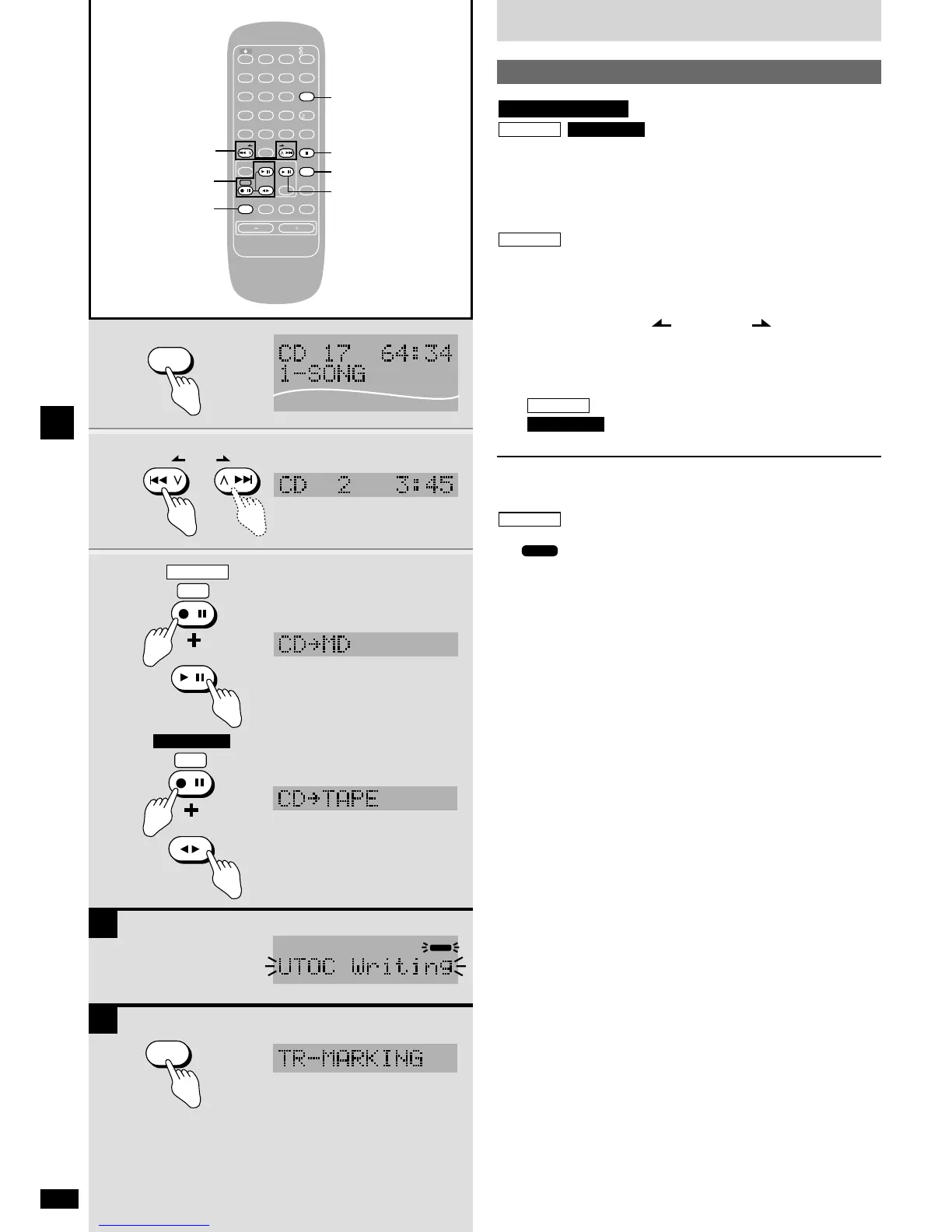
Records one track from a CD.
Preparation:
Insert the MD (
a
page 12) or the cassette tape (
a
page 16).
Insert the CD (
a
page 13) and press [q/h CD] to select CD as the
source then press [g
STOP/CANCEL].
Press [MD REC MODE] to select the SP/LP2/LP4 recording mode.
1 Press [PLAY MODE] to select “1-SONG”.
2 Press [u/2 REW/ ] or [1/i /FF] to select
the track to be recorded.
Unnecessary when recording the first track.
3 While pressing [*/h REC]
: Press [q/h MD].
: Press [7 TAPE].
Recording starts.
To stop recording
Press [g STOP/CANCEL].
Both CD and MD (or tape) stop.
Å Recording is complete after the message “UTOC Writing” and
“”stops flashing on the display.
Do not disconnect the unit from its power source while this message
is flashing. This can cause the recording to be erased and damage
the disc.
To cancel the one track edit recording
While stopped, press [PLAY MODE] to clear “1-SONG” from the display.
ı To add track marks while recording on MDs
Press [EDIT MODE] on the remote control where the track mark is
required.
These marks can be removed after recording with the editing function
(
a
“COMBINE”, page 33).















 To Next Page