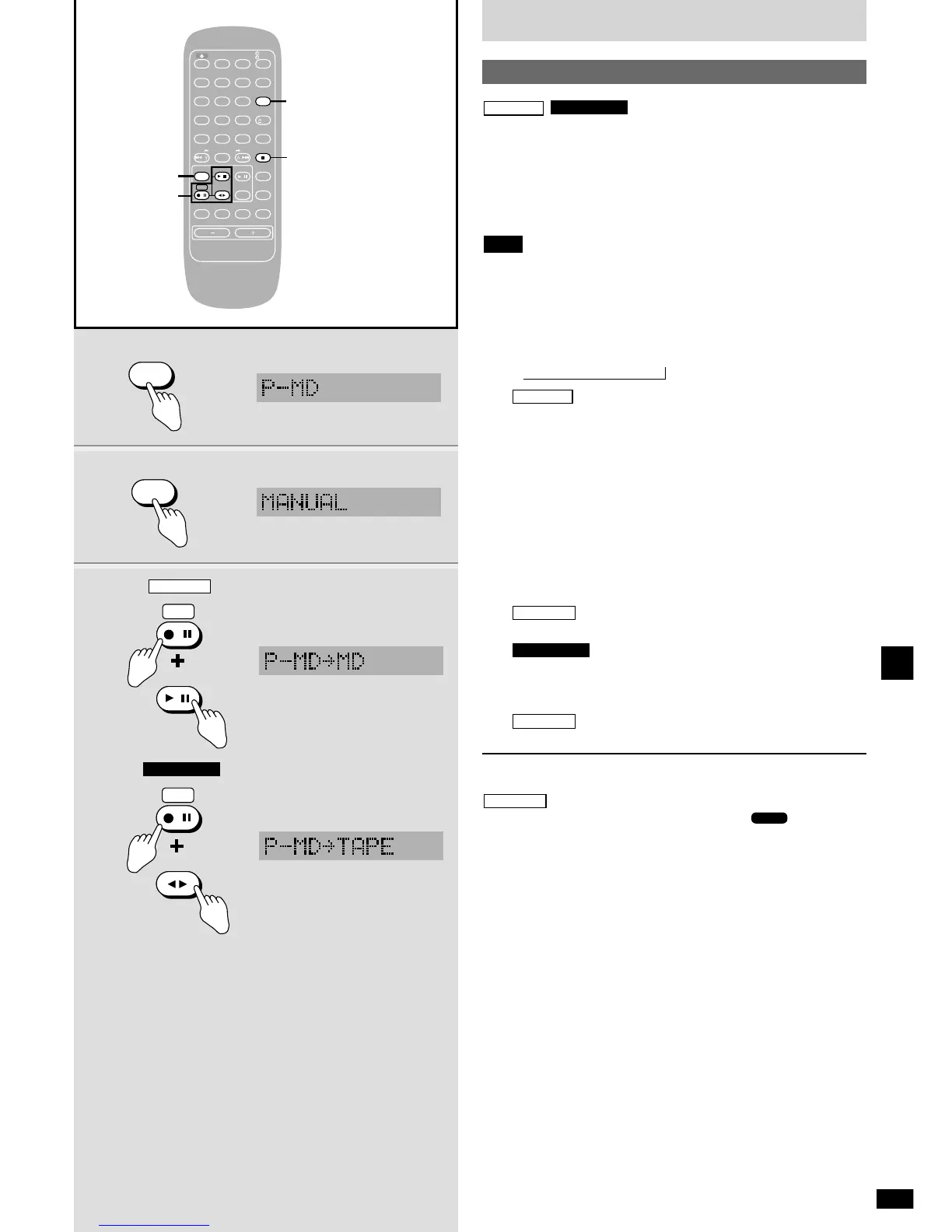
Make an analog recording from a portable MD player connected to the
P-MD terminal.
Preparation:
¡ Insert the MD (\ page 12) or the cassette tape (\ page 16).
¡ Set the volume on the portable MD player to an appropriate level and
turn all sound quality modes off.
¡ Do not place the portable MD player on top of this unit during
recording. This can cause noise.
¡ Adjust the volume on the portable MD player if there is distortion.
1 Press [EXT-IN] to select “P-MD”.
Each time you press the button:
USB
/ OPT IN / AUX / P-MD
2 Press [EDIT MODE] to select the desired mode.
Each time you press the button:
MANUAL !
SYNCHRO
MANUAL: Normal recording mode
SYNCHRO: Recording starts automatically when the signal
from the source reaches a certain level, pauses if
a 3-second silence is detected, then starts again
when play starts. A track mark is added at the
point recording starts.
3 While pressing [*/h REC]
: Press [q/h MD].
Recording starts when you have selected MANUAL.
: Press [7 TAPE].
Recording starts.
4 Start the portable MD player.
Recording starts when you have selected SYNCHRO.
To stop recording
Press [g STOP/CANCEL].
Recording is complete after “UTOC Writing” and “” stop flashing
on the display.















 To Next Page