A
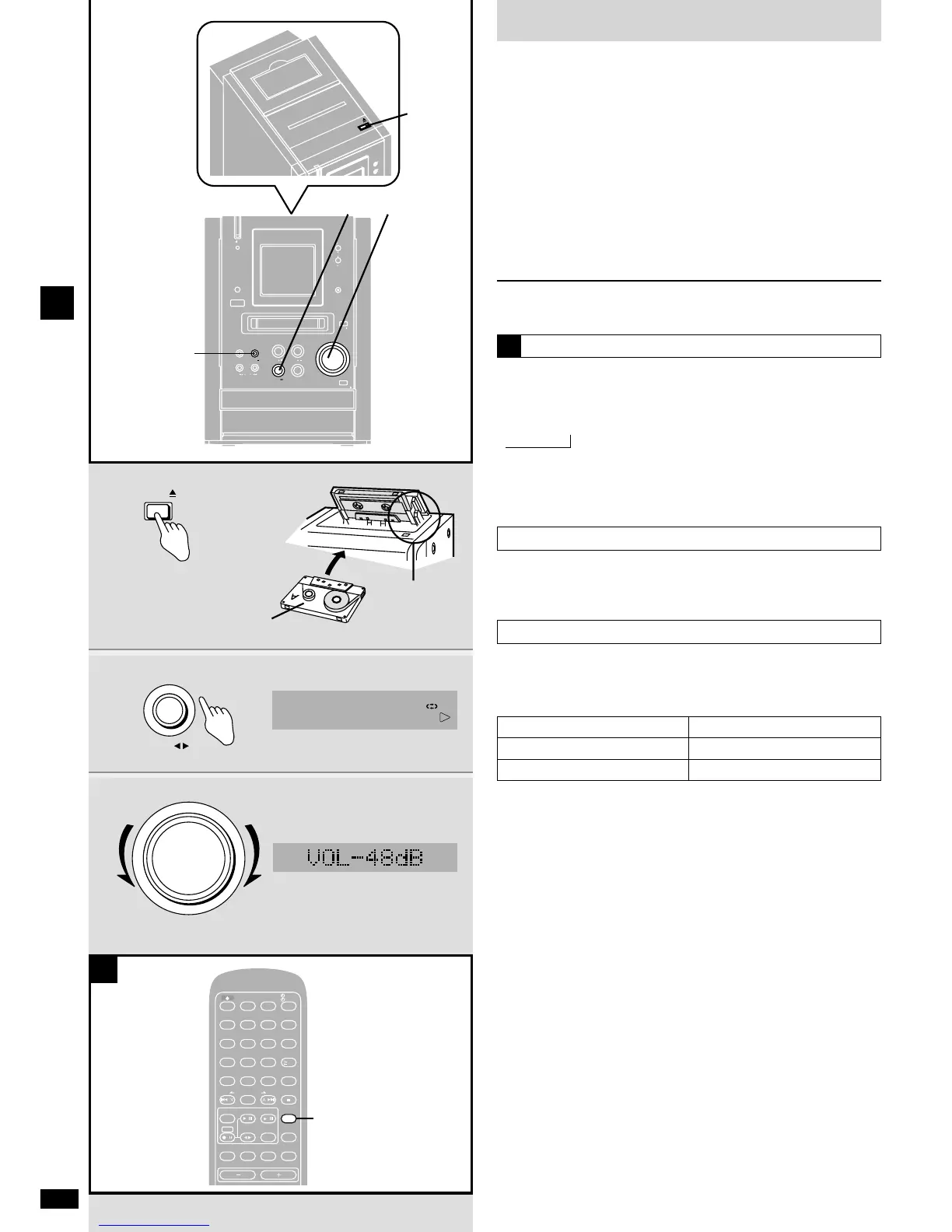
1 Press [OPEN ;], insert a cassette with the tape facing
in.
When the button is pressed, the unit comes on automatically.
Make sure the cassette is fully inserted and close the lid by hand.
Play is ready to start from the forward side (“FWD o
”).
2 Press [TAPE 7] to start play.
Each time you press the button:
FWD o!p
REV
“FWD o
”: to play the forward side
“p
REV”: to play the reverse side
3 Adjust the volume.
To stop the tape
Press [STOP g].
Selecting reverse mode
Press [PLAY MODE] on the remote control to select the
reverse mode.
Each time you press the button:
!
/ / / $
!
: One side is played.
/
: Both sides are played.
$
: Both sides are played continuously.
,
A
One touch play
When a cassette is inserted and the unit is off, press [TAPE 7].
The unit comes on and starts play in the direction last selected.
Cassette tape selection and care
The unit can correctly play the following tapes. It identifies the type
automatically.
Normal position/TYPE
1
High position/TYPE 2
Metal position/TYPE 4
✓
✓
✓
¡ Tapes exceeding 100 minutes are thin and can break or get caught in
the mechanism.
¡ Tape slack can get caught up in the mechanism and should be taken
up before the tape is played.
¡ Endless tapes can get caught up in the deck’s moving parts if used
incorrectly. Use tapes appropriate to this unit’s auto-reverse
mechanism.















 To Next Page