12
RQTV0265
LANG - 5 LANG - 4 FRANÇAIS DANSK ENGLISH
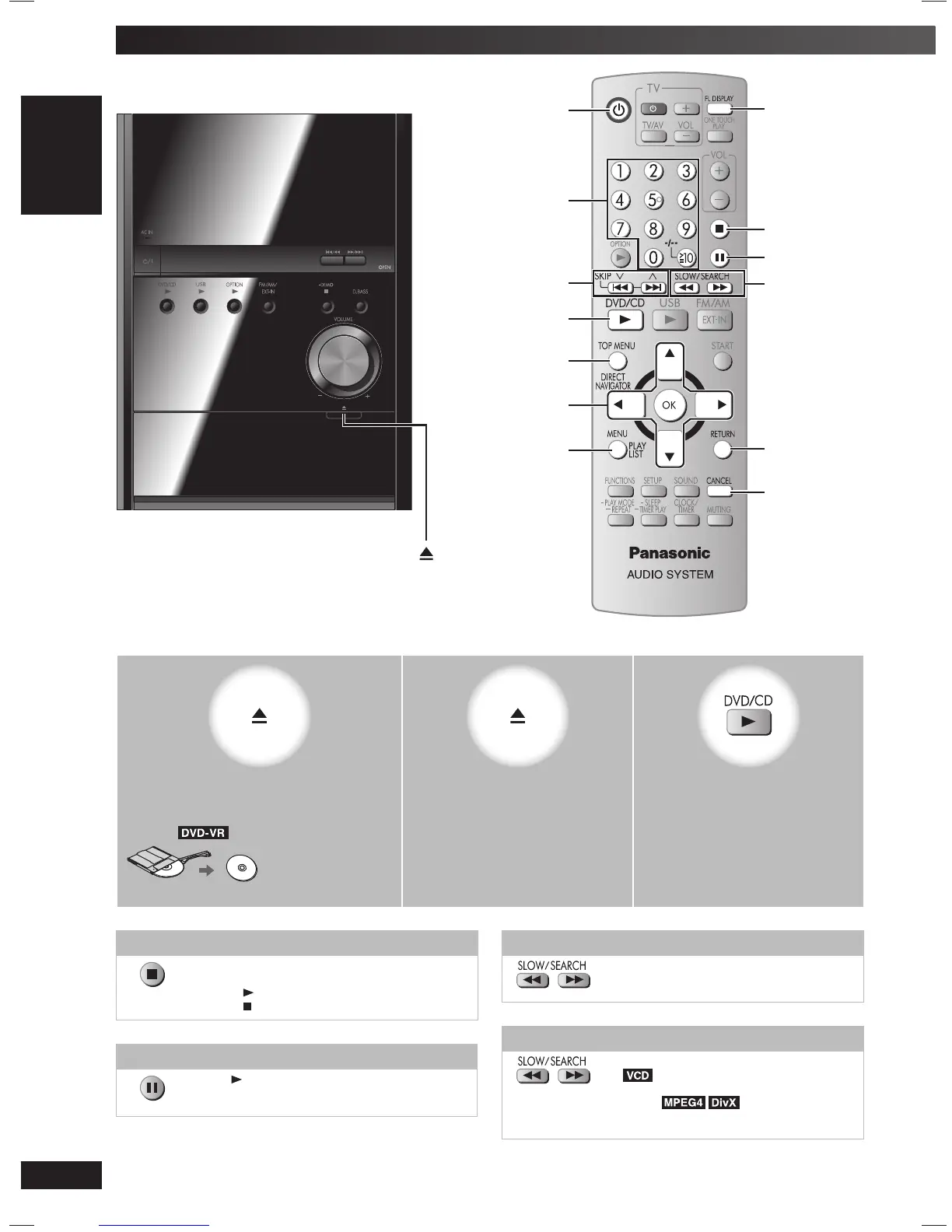
Discs — Basic play
1
2 3
Open the tray.
The unit turns on.
Load a disc in the tray.
Example:
Remove the disc from its cartridge before use.
Close the tray. Start play.
Stop
The position is memorised while “RESUME” is on
the display.
• Press [ , DVD/CD] to resume.
• Press [ ] again to clear the position.
Pause
Press [ , DVD/CD] to resume playback.
Search (during play)
• Play speed increases up to 5 steps.
• Press [3, DVD/CD] to resume normal
playback.
Slow-motion play (during pause)
• Play speed increases up to 5 steps.
•
Slow motion play is for forward
direction only.
• Except .
• Press [3, DVD/CD] to resume normal
playback.
3, DVD/CD
5, ∞, 2, 3, OK
1, ¡,
SLOW/SEARCH
FL DISPLAY
4, ¢,
4, 3, SKIP
Numeric buttons
y
RETURN
TOP MENU,
DIRECT NAVIGATOR
7
8
MENU,
PLAY LIST
CANCEL
RQTV0265_4B.indd 12RQTV0265_4B.indd 12 4/23/08 4:58:06 PM4/23/08 4:58:06 PM


 To Next Page