RQTX0208
8
8
ENGLISH
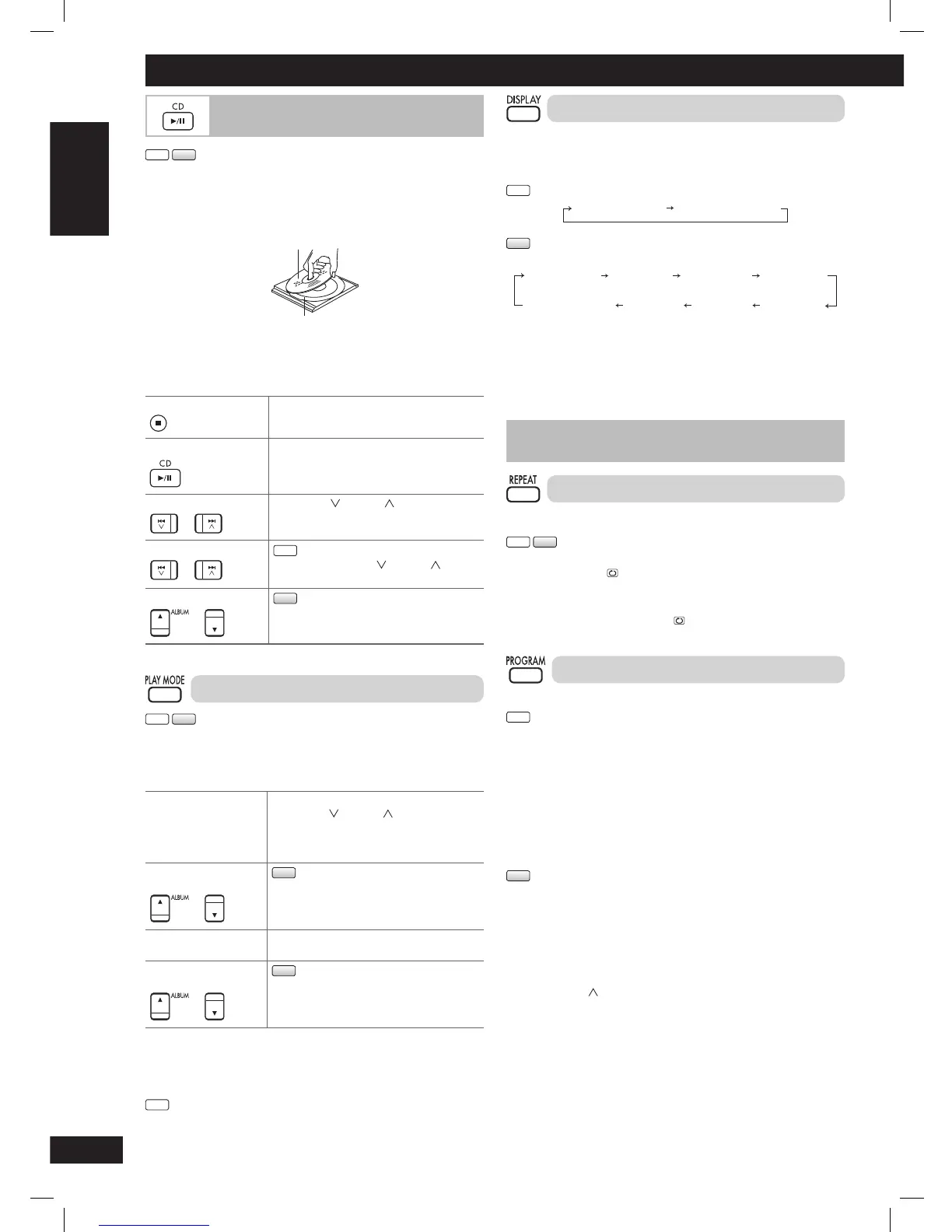
Display function
This function allows you to display the information of the current
track.
Press [DISPLAY] repeatedly during play or pause.
CD
Elapsed play time Remaining play time
MP3
Elapsed play
time
Remaining
play time
ID3 (Artist) ID3 (Track) ID3 (Album)
Playing bit rate
(during play only)
Album name Track name
Note:
• This unit supports ver. 1.0 & 1.1 ID3 tags. Text data that is not
supported will not be displayed.
• ID3 is a tag embedded in MP3 tracks to provide information about
the track.
Advanced play
Repeat play
You can repeat program play or other selected play mode.
CD
MP3
Press [REPEAT] before or during play.
“REPEAT ON” and “
” are displayed.
To cancel
Press [REPEAT] again.
“REPEAT OFF” is displayed and “
” is cleared.
Program play
This function allows you to program up to 24 tracks.
CD
1 Press [6, CD] and then [7] (stop).
2 Press [PROGRAM].
3 Press the numeric buttons to select your desired track.
Repeat this step to program other tracks.
4 Press [6, CD] to start play.
MP3
1 Press [6, CD] and then [7] (stop).
2 Press [PROGRAM].
3 Press [5/∞, ALBUM] to select your desired album.
4 Press [¢/ ] once and then the numeric buttons to select
your desired track.
5 Press [OK].
Repeat steps 3 to 5 to program other tracks.
6 Press [6, CD] to start play.
For two-digit track, press [h10] once, and then the two digits.
For three-digit track, press [h10] twice, and then the three digits.
Discs
Basic play
CD
MP3
1 Press [y/l] to turn the unit on.
2 Press [0] to open the disc tray and then load the disc.
Press [0] again to close the tray.
Label must face upward
Disc tray
3 Press [6, CD] to start play.
4 Adjust the volume.
Stop playback Press [7] (stop).
Pause play
Press [6, CD]. Press again to resume
play.
Skip tracks
Press [4/ ] or [¢/ ].
OR
Press the numeric buttons.
Search through tracks
CD
Press and hold [4/ ] or [¢/ ] during
play or pause.
Skip album
MP3
Press [5/∞, ALBUM].
Play Mode function
CD
MP3
1 Press [6, CD].
2 Press [PLAY MODE] to select the desired mode.
1-TRACK
1TR
Play one selected track on the disc.
Press
[4/ ] or [¢/ ].
OR
Press the numeric buttons to select the
track.
1-ALBUM
1ALBUM
MP3
Play one selected album on the disc.
Press [5/∞, ALBUM] to select the album.
RANDOM
RND
Play a disc randomly.
1-ALBUM RANDOM
1ALBUM RND
MP3
Play all tracks in one selected album
randomly.
Press [5/∞, ALBUM] to select the album.
Note:
• During RANDOM or 1-ALBUM RANDOM play, you cannot skip to
tracks that have been played.
• The current play mode is cleared when you open the disc tray.
CD
• During RANDOM play, you can search backward or forward only
within the current track.
PMX4_EP_EN.indd 8PMX4_EP_EN.indd 8 12/23/08 2:37:42 PM12/23/08 2:37:42 PM






 To Next Page