59
LSQT1346
Function Operating method
Dividing a scene to delete
(Continued)
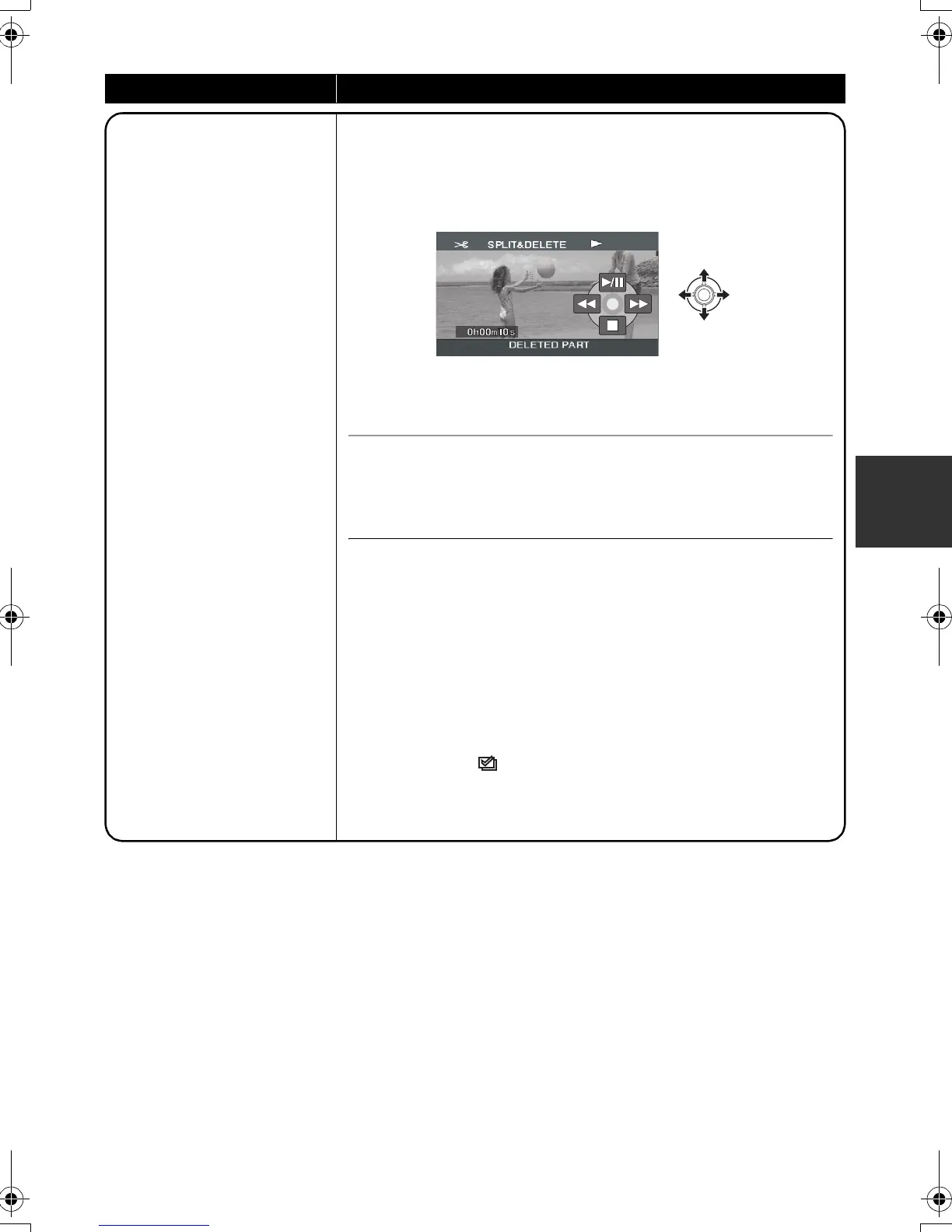
5 Select [YES], then press the joystick to play
back the part to be deleted.
≥ When [NO] is selected, the confirmation message appears.
Proceed to step 6.
When you stop the playback, the confirmation message appears.
6 Select [YES], then press the joystick.
To continue dividing and deleting other scenes
Repeat steps 2 to 6.
To complete editing
Press the MENU button.
≥ It is impossible to divide and delete scenes with a short recording
time. The length of the remaining scenes must be 3 seconds or
longer.
≥ It is impossible to set the dividing point at the beginning or the
end of the scene.
≥ When a scene that was divided and deleted using the
SPLIT&DELETE function is copied to a disc using the DVD
burner or the supplied software and played back on another
device, a maximum of about 1 second of the deleted part may be
played back.
≥ If a scene with [ ] (copied icon) is divided and deleted, the
copied information is erased. (l 71)
≥ The actual division may slightly slip off the previously designated
dividing point.
SDR-H60&40EP-LSQT1346_eng.book 59 ページ 2008年2月25日 月曜日 午後3時33分


 To Next Page