11
Connections
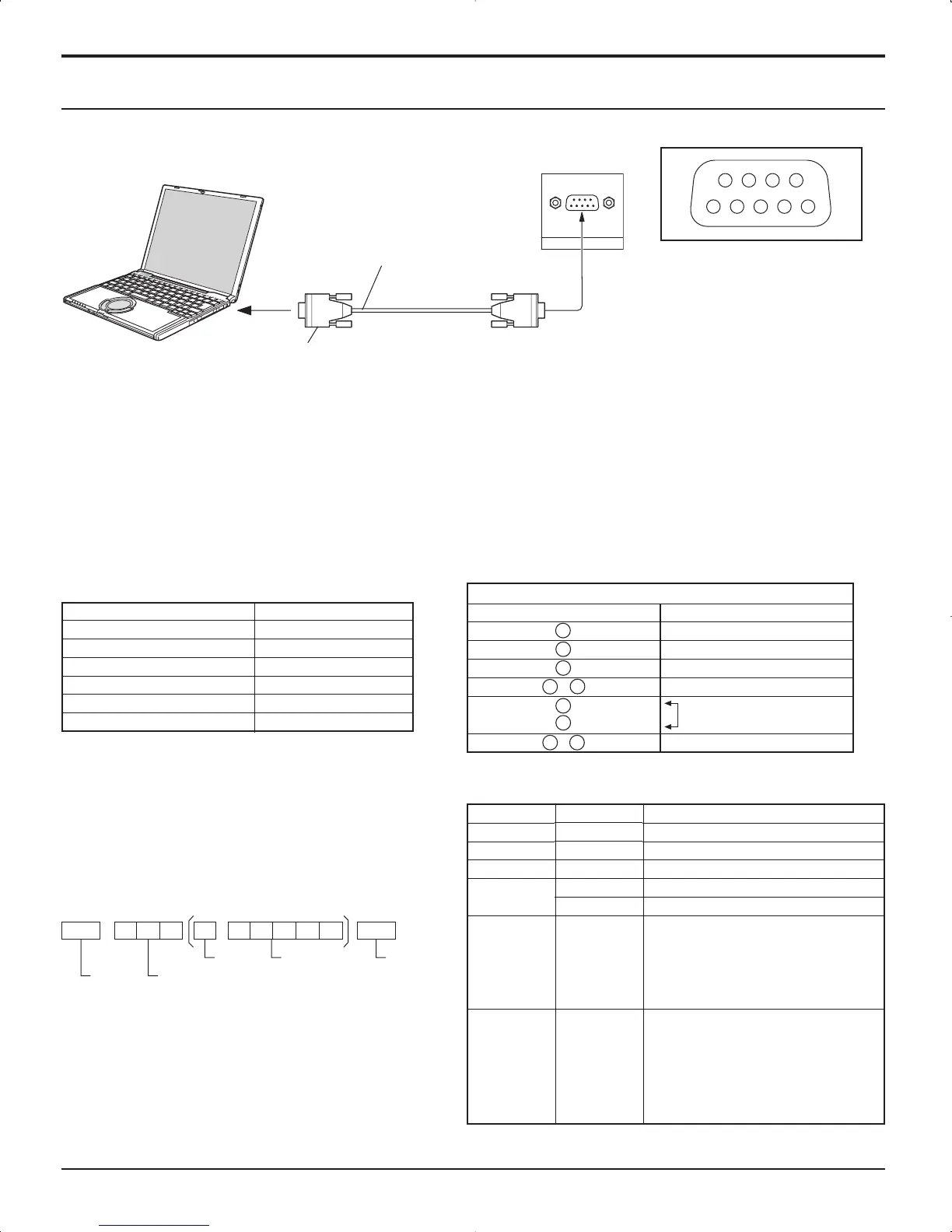
SERIAL Terminals connection
Notes:
• Use the RS-232C cable to connect the computer to the Plasma Display.
• The computer shown is for example purposes only.
• Additional equipment and cables shown are not supplied with this set.
The SERIAL terminal conforms to the RS-232C interface specification, so that the Plasma Display can be controlled by a
computer which is connected to this terminal.
The computer will require software which allows the sending and receiving of control data which satisfies the conditions
given below. Use a computer application such as programming language software. Refer to the documentation for the
computer application for details.
The SERIAL terminal is used when the Plasma Display is controlled by a computer.
Communication parameters
Basic format for control data
The transmission of control data from the computer
starts with a STX signal, followed by the command,
the parameters, and lastly an ETX signal in that order.
If there are no parameters, then the parameter signal
does not need to be sent.
Notes:
• If multiple commands are transmitted, be sure to wait
for the response for the first command to come from
this unit before sending the next command.
• If an incorrect command is sent by mistake, this unit will
send an “ER401” command back to the computer.
With the power off, this display responds to PON command only.













 To Next Page