(For TH-37PH9UK, TH-42PH9UK, TH-50PH9UK)
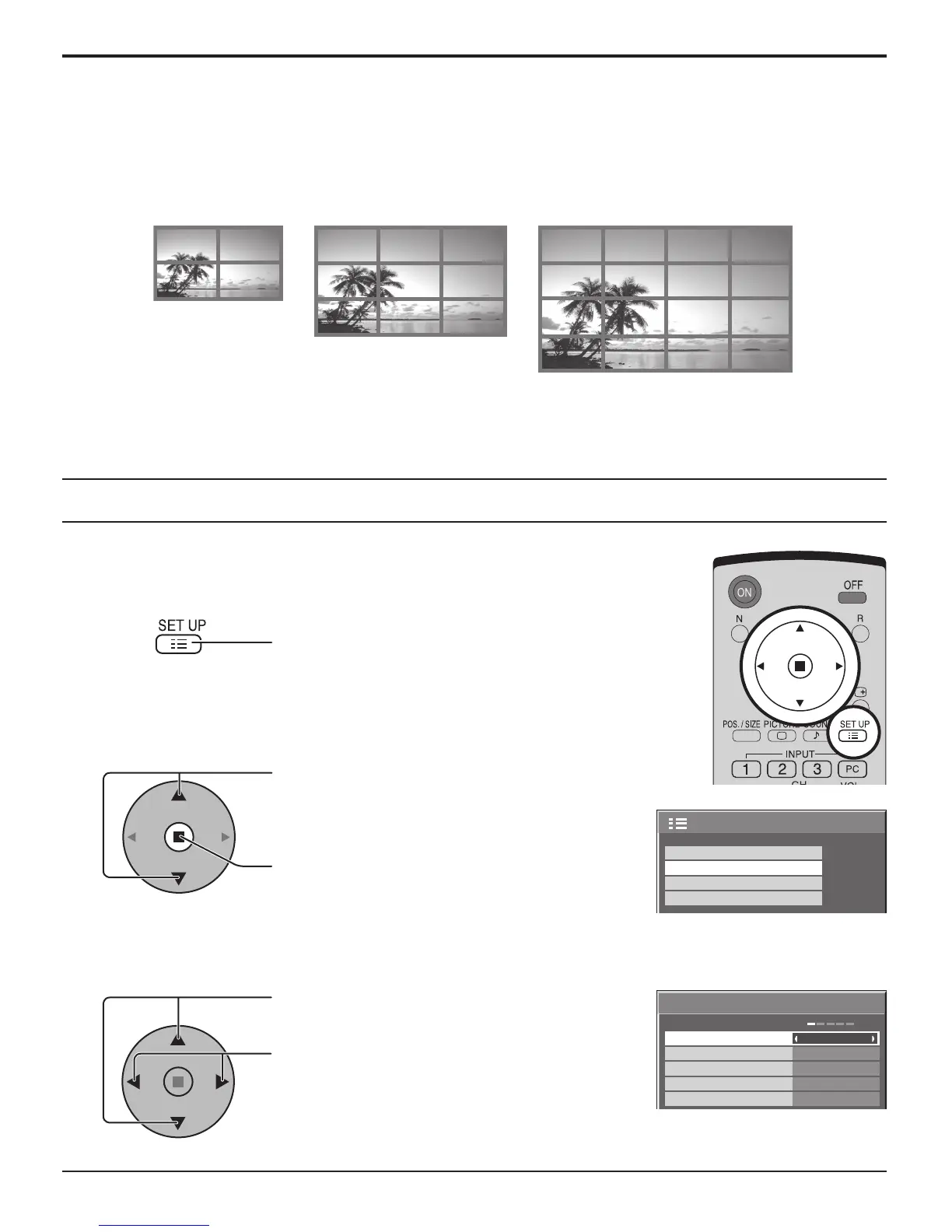
By lining up Plasma Displays in groups of 4, 9 or 16 as illustrated below, an enlarged picture may be displayed across all
screens.
For this mode of operation, each plasma display has to be set up with a Display number to determine its location.
Press to display the SET UP menu.
Press to select the MULTI DISPLAY SETUP.
Press to display the “MULTI DISPLAY SETUP”
menu.
Press to select the MULTI DISPLAY SETUP.
Press to select “ON” or “OFF”.
How to setup MULTI DISPLAY
group of 16 (4 × 4)group of 4 (2 × 2) group of 9 (3 × 3)
1
2
3
2/2SET UP
SCREENSAVER
MULTI DISPLAY SETUP
SET UP TIMER
PRESENT TIME SETUP
× 2
MULTI DISPLAY SETUP
HORIZONTAL SCALE
OFF
OFF
A1
LOCATION
VERTICAL SCALE
SEAM HIDES VIDEO
× 2
MULTI DISPLAY SETUP
SET UP for MULTI DISPLAY













 To Next Page