English
18
●
Additional computer, cables and conversion adapter
shown are not supplied wi h this set.
●
Do not set the horizontal and vertical scanning
frequencies for PC signals which are above or below
the specified frequency range.
●
Component Input is possible with the pin 1, 2, 3 of the
Mini D-sub 15P Connector.
●
Change the [Component/RGB-in select] setting in
the [Signal] menu to [Component] (when Component
signal connection) or [RGB] (when RGB signal
connection). (see page 44)
●
For audio, it is also possible to use AUDIO2 IN
terminal input. (For [Audio input select] function, see
page 63.)
Pin assignments and signal names for PC Input
Terminal (Mini D-sub 15P)
1
678
3
9
45
10
15 14 13 12 11
2
Pin No. Signal Name
R (PR/CR)
G (Y)
B (PB/CB)
NC (not connected)
GND (Ground)
GND (Ground)
GND (Ground)
GND (Ground)
+5 V DC
GND (Ground)
NC (not connected)
SDA
HD/SYNC
VD
SCL
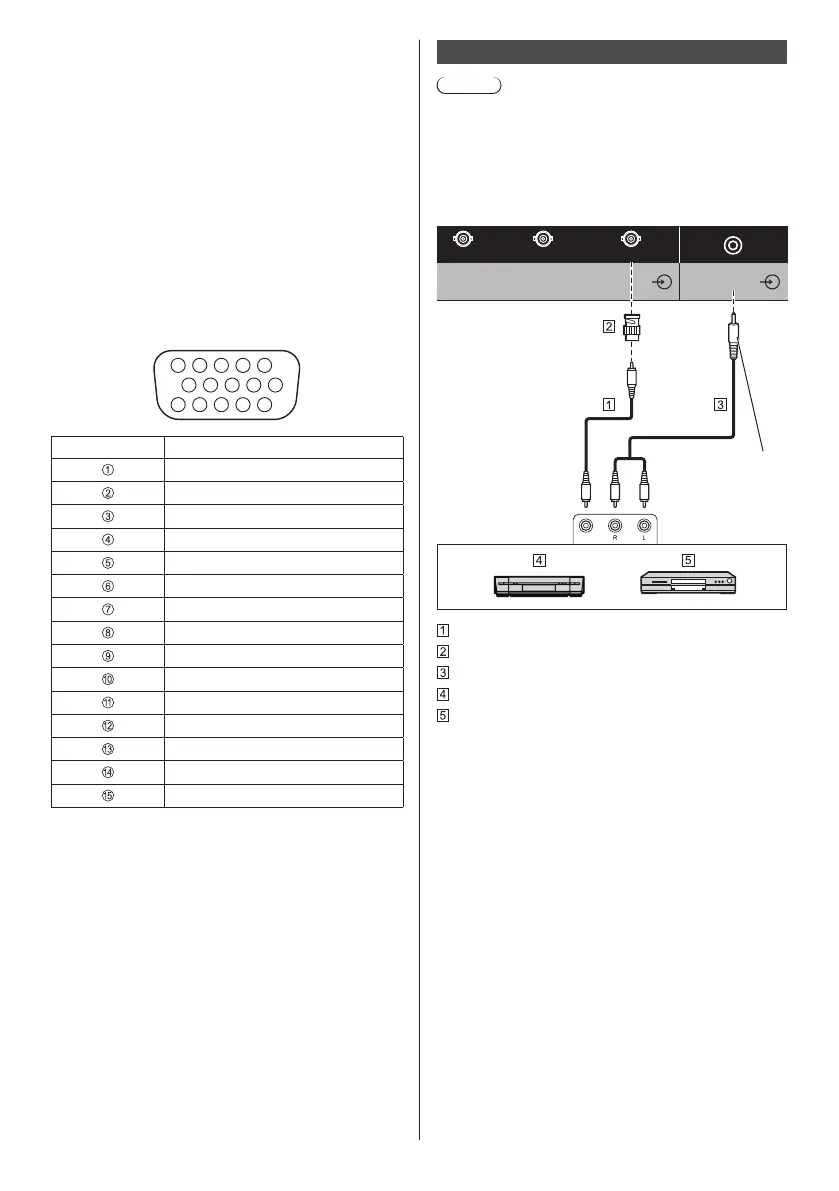
VIDEO IN terminal connection
Note
●
Video equipment, connection cables and conversion
plugs are not supplied with this unit.
●
For audio, it is also possible to use AUDIO1 IN
terminal input. (For [Audio input select] function, see
page 63.)
Shared with COMPONENT/RGB IN.
G/Y/V DEO
B/P
B/CB
R/PR/CR
AUDIO2 IN
COMPONENT/RGB/VIDEO IN
Stereo mini plug
(M3)
Video pin cable (commercially available)
Pin-BNC conversion plug (commercially available)
Stereo audio cable (commercially available)
Video Cassette Recorder
DVD Player









 To Next Page