English
58
Options Adjustments
This unit offers special functions conveniently used
according to the installation location and application.
1
Press <SETUP>.
[Setup] menu screen will be displayed.
2
Select [OSD language] with
and press <ENTER> for more than 3
seconds.
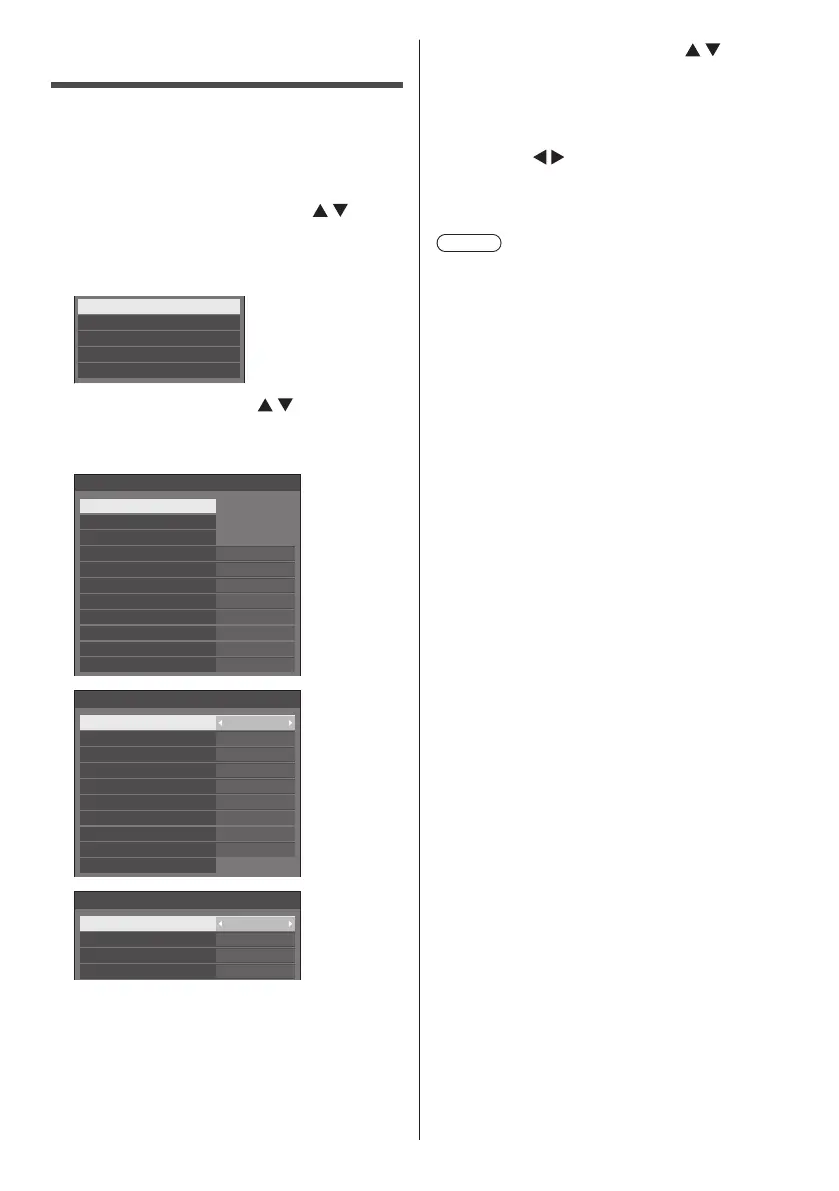
Following screen will be displayed.
Options
Display serial number
USB data cloning
Software licenses
Shipping
3
Select [Options] with and press
<ENTER>.
[Options] menu screen will be displayed.
1/3
0
0
Options
Input search
Failover/Failback
Audio input select
Onscreen display
Initial VOL level
Initial input
Maximum VOL level
Input lock
Button lock
Controller user level
PC auto setting
Off
Off
Off
On
Off
Off
Off
Off
2/3
0
---
Options
Off-timer function
Initial startup
Startup logo
Display ID
Controller ID function
Serial ID function
Information timing
LAN control protocol Protocol 1
Off
Off
Enable
Last memory
Off
Serial response(ID all) Off
Serial daisy chain position
3/3
Options
Power on screen delay
Clock display
Power on message(No ac ivity power off)
Power on message(Power management)
On
On
Off
Off
4
Select the item to set with .
For [Input search], [Failover/Failback], [Audio input
select] and [Information timing], the sub menu screen
will be displayed when you press <ENTER>.
(see page 59, 60, 63, 66)
5
Set with .
6
Press <SETUP> to exit from [Options]
menu.
Note
●
The remote control is necessary to display the
[Options] menu. The control panel buttons on the
main unit cannot be used to display the menu.
●
Press <RETURN> to return to the previous menu.
●
The serial number of this device is displayed when
[Display serial number] is selected in step 3.
●
The software License is displayed when [Software
licenses] is selected in step 3.









 To Next Page