53
English
■ [Network status]
Checks the current Network settings status.
192. 168. 0. 1
255. 255. 255. 0
192. 168. 0. 8
12:34:56:78:9A:BC
Network status
DHCP
IP address
Subnet mask
Gateway
MAC address
Off
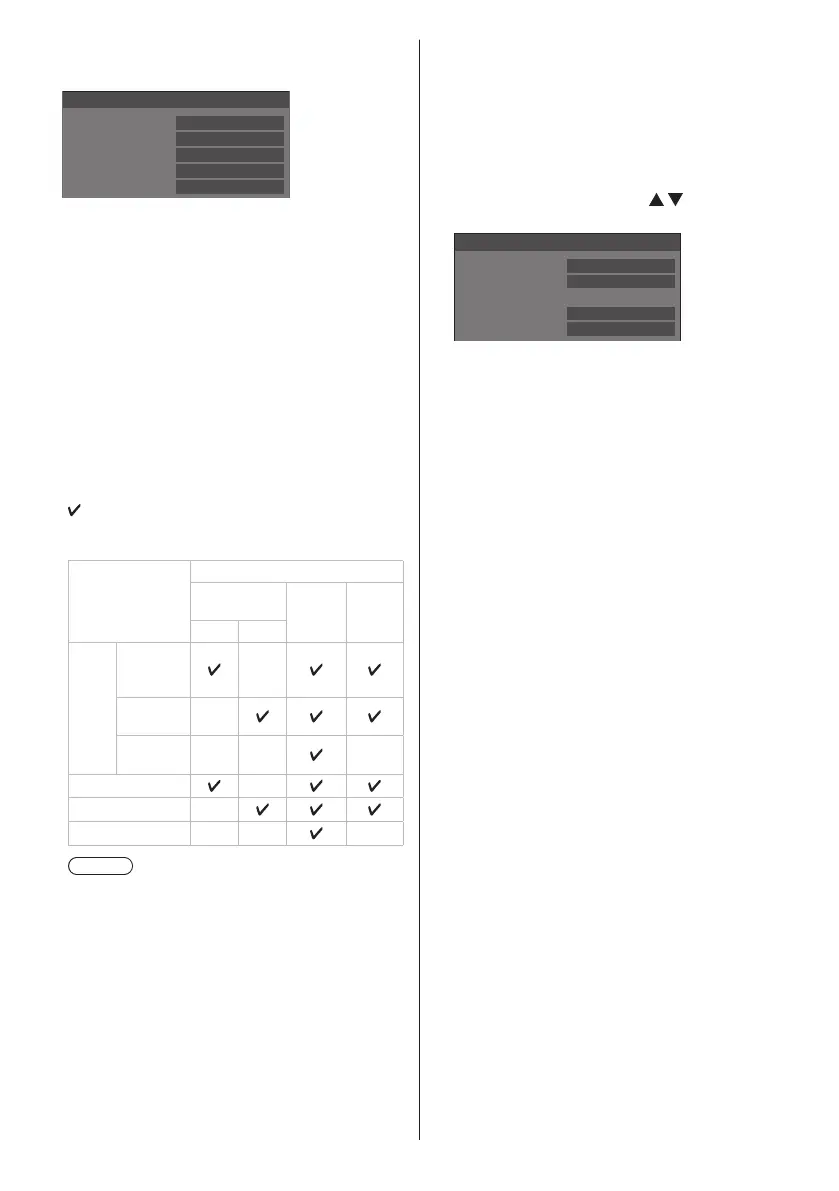
■ [DIGITAL LINK mode] (LF80 series only)
Switches communication method of DIGITAL LINK
terminal.
[Auto]:
Communication method is selected automatically.
[DIGITAL LINK]:
Communication method is fixed to DIGITAL LINK.
[Ethernet]:
Communication method is fixed to Ethernet.
[Long reach]:
Communication method is fixed to Long reach.
Modes allowing communication
:
Valid
― : Invalid
Settings
Communication validity
Picture
transmission
Ethernet
RS-
232C
100 m 150 m
Auto
For
DIGITAL
LINK
―
For Long
reach
―
For
Ethernet
― ― ―
DIGITAL LINK
―
Long reach ―
Ethernet ― ― ―
Note
●
When connected with the [Long reach]
communication method, the maximum
transmission distance is 150 m. In this case, this
unit can receive the signals of up to 1080/60p
(148 5 MHz).
●
If the communication method of the twisted
pair cable transmitter is set to [Long reach], set
[DIGITAL LINK mode] to [Auto]. Then, connection
is enabled with the [Long reach] communication
method.
When connecting with the separately sold DIGITAL
LINK Switcher (ET-YFB200G) with the [Long
reach] communication method, set [DIGITAL LINK
mode] to [Long reach].
●
Even if [DIGITAL LINK mode] is set to [Long
reach], when the twisted pair cable transmitter
does not support the communication method of
[Long reach], it will not be connected properly.
■ DIGITAL LINK status (LF80 series only)
Display the DIGITAL LINK connection environment.
Select [DIGITAL LINK status] with
and press
<ENTER>.
-YY dB
-XX dB
DIGITAL LINK status
LINK status
HDMI status
Signal quality
Min
Max
No link
No HDMI
[LINK status]:
1 of the followings will be displayed.
[No link]:
No LAN connection, etc.
[DIGITAL LINK]:
Connected to the DIGITAL LINK device by LAN.
[Long reach]:
Communication method is set to [Long reach] and is
connected to the DIGITAL LINK device by LAN.
[Ethernet]:
The PC is connected to the DIGITAL LINK / LAN
terminal of this product and is LAN connected.
[HDMI status]:
1 of the followings will be displayed.
[No HDMI]:
DIGITAL LINK not connected
[HDMI ON]:
DIGITAL LINK connected
[HDCP ON]:
HDCP supported on DIGITAL LINK









 To Next Page