Self Check
How to access
Self-check indication only:
While pressing [VOLUME ( - )] button on the main unit, press [BLUE] button on the remote control.
Self-check indication and forced to factory shipment setting:
While pressing [VOLUME ( - )] button on the main unit, press [MENU] button on the remote control for more than 5 seconds.
How to exit
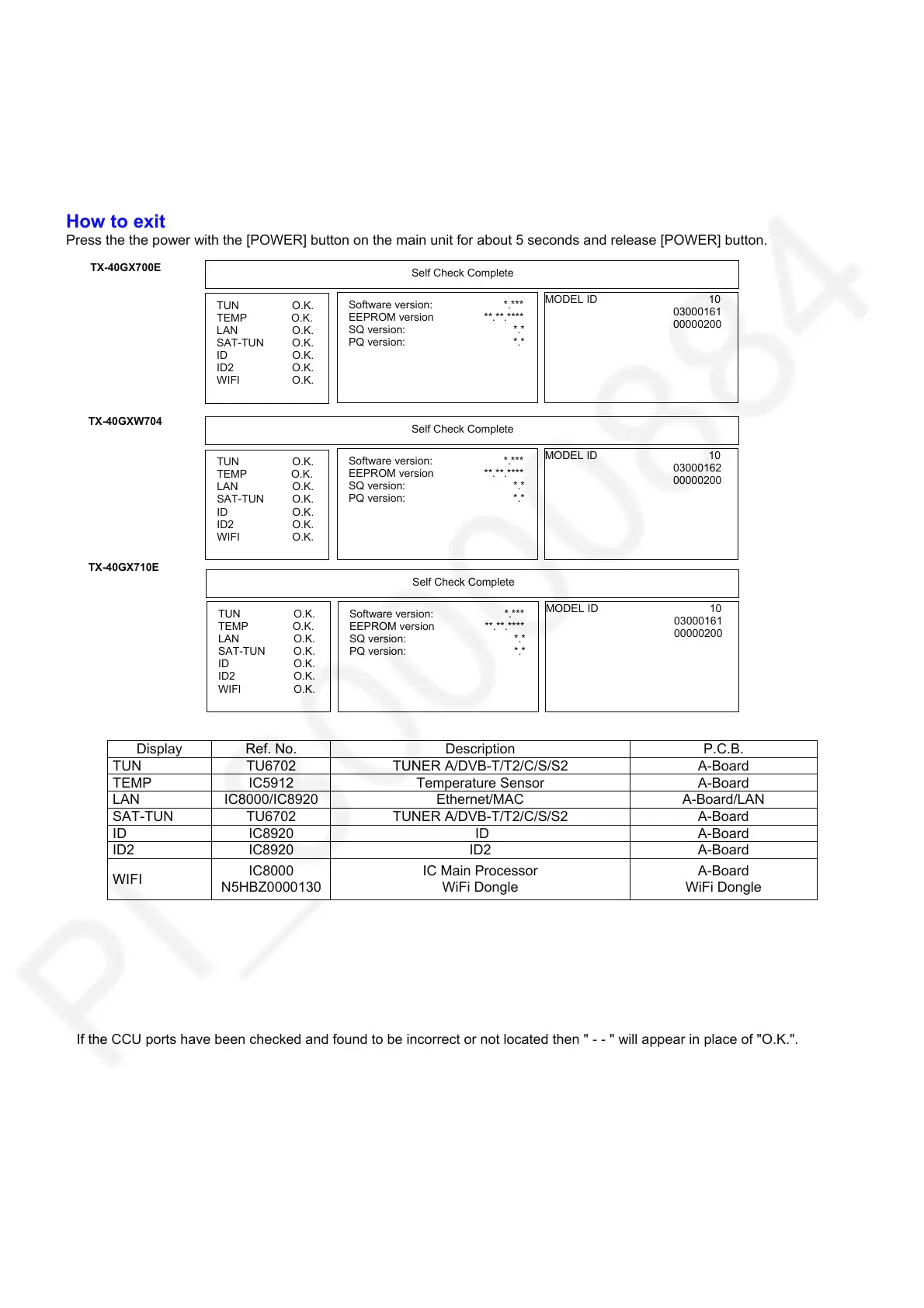
Press the the power with the [POWER] button on the main unit for about 5 seconds and release [POWER] button.
Display Ref. No. Description P.C.B.
TUN TU6702 TUNER A/DVB-T/T2/C/S/S2 A-Board
TEMP IC5912 Temperature Sensor A-Board
LAN IC8000/IC8920 Ethernet/MAC A-Board/LAN
SAT-TUN TU6702 TUNER A/DVB-T/T2/C/S/S2 A-Board
ID IC8920 ID A-Board
ID2 IC8920 ID2 A-Board
WIFI
IC8000
N5HBZ0000130
IC Main Processor
WiFi Dongle
A-Board
WiFi Dongle
If the CCU
orts have been checked and found to be incorrect or not located then " - - " will a
ear in
lace of "O.K.".
TX-40GX700E
TX-40GXW704
TX-40GX710E
TUN O.K.
TEMP O.K.
LAN O.K.
SAT-TUN O.K.
ID O.K.
ID2 O.K.
WIFI O.K.
Software version: *.***
EEPROM version **.**.****
SQ version: *.*
PQ version: *.*
MODEL ID 10
03000161
00000200
Self Check Complete
Software version: *.***
EEPROM version **.**.****
SQ version: *.*
PQ version: *.*
MODEL ID 10
03000162
00000200
Self Check Complete
Software version: *.***
EEPROM version **.**.****
SQ version: *.*
PQ version: *.*
MODEL ID 10
03000161
00000200
Self Check Complete
TUN O.K.
TEMP O.K.
LAN O.K.
SAT-TUN O.K.
ID O.K.
ID2 O.K.
WIFI O.K.
TUN O.K.
TEMP O.K.
LAN O.K.
SAT-TUN O.K.
ID O.K.
ID2 O.K.
WIFI O.K.









 To Next Page