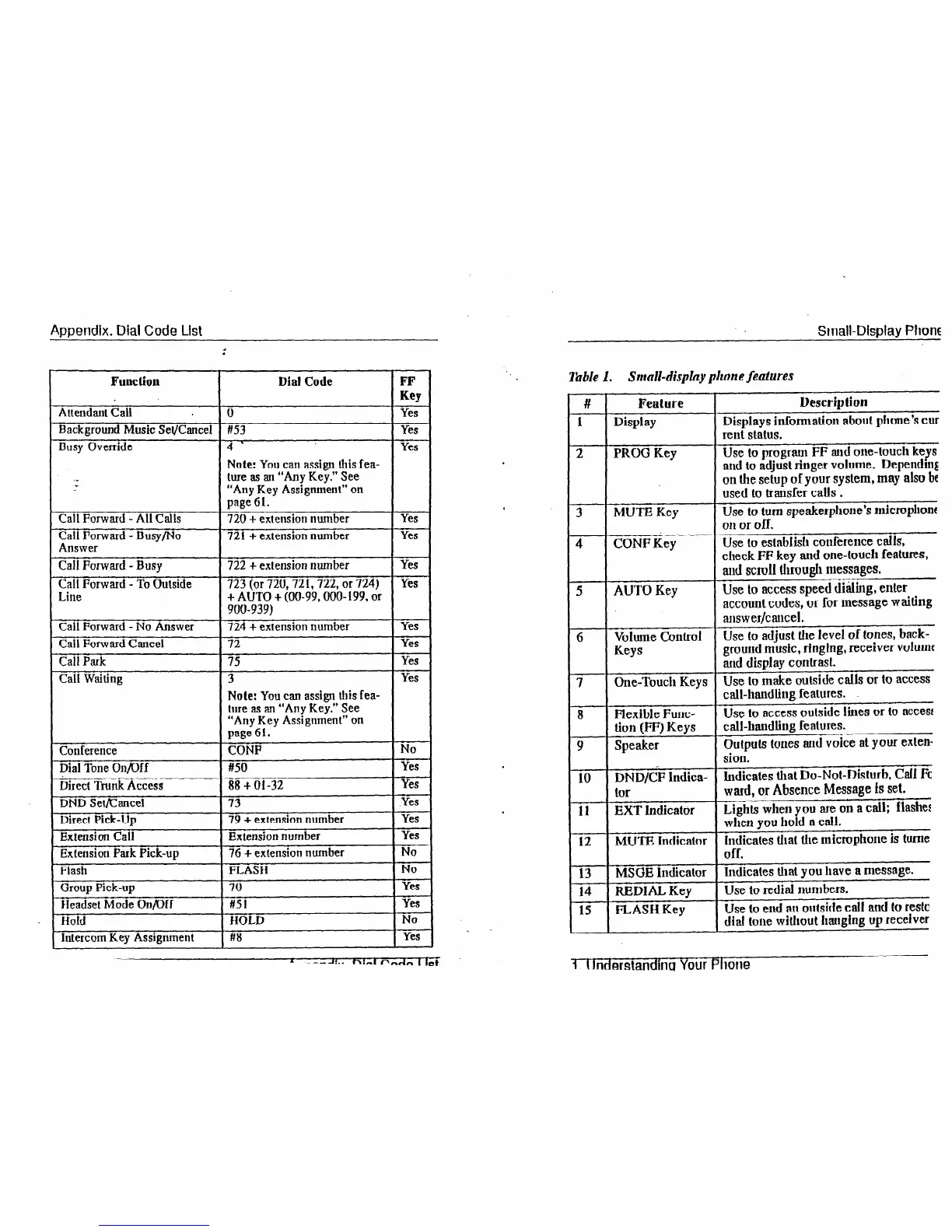
Appendix. Dial Code List
Function
Attendarlt Call
Background Music Set/Cancel
Busy Override
Call Forward -All Calls
Call Forward - Busy/No
Answer
Call Forward - Busy
Call Forward - To Outside
Line
Call Forward - No Answer
Call Forward Cancel
Call Park
Call Waiting
Conference
Dial Tone On/Off
Direct Trunk Access
DND Set/Cancel
Direct
Pick-Up
Extension Call
Extension Park Pick-up
Flash
Oroup Pick-up
Headset Mode On/IX
Hold
Intercom Key Assignment
Dial Code
#53
4 ’
Note: You
can assign this fea-
ture as an “Any Key.” See
“Any Key Assignment” on
page 61.
720 + extension number
721 -I- exlension number
722
f extension number
723
(or 720,721,722, or 724)
+ AUTO + (W-99, OOO- 199, or
900-939)
724
+ extension number
72
75
3
Note: You can
assign this fea-
ture as an “Any Key.” See
“Any Key Assignment” on
page 61.
GNP
#50
88 -I- 01-32
79 + extension number
Extension number
76 + extension number
FLASH
70
#51
HOLD
#8
FF
Key
Yes
Yes
Yes
iFG--
Yes
Yes
Yes
yes
isi-
Yes
Yes
No
yes
yes
xii-
-i&-
yes
-ET
No
xi-
-i&-
-K-
yes
Small-Display Phone
Table 1.
Small-display phone features
#
1
2
ii--
4
5
6
7
ii--
Feature
Display
PROG Key
MUTE Key
CONF Key
AUTO Key
Volume Control
Keys
One-Touch Keys
Flexible Func-
tion (FF) Keys
Speaker
DND/CF lndica-
t0r
EXT Indicator
MUTE Indicator
MSGE Indicator
REDlhL Key
FLASH Key
Description
Displays information about phone’s cur
rent status.
Use to program FF and one-touch keys
and to adjust ringer volume. Dependq
on the setup of
your system, may also bf
used to transfer calls .
Use to turn speakerphone’s micropllonf
on or off.
Use
to estabfish conference calls,
check FF key and one-touch features,
aud scroll through messages.
Use to access speed di&ng, enter
account codes, or for message waiting
answer/cancel.
Use lo adjust the level of tones, back-
ground music, ringing, receiver vohunf
and display contrast.
Use to make outside calls or to access
call-handling features.
Use to access outside lines or to access
call-handling features.
Outputs tones aud voice at your exten-
sion.
Indicates that Do-Not-Disturb, Gail Fc
ward, or Absence Message is set.
Lights when you are on a call; flashez
when you hold a call.
Indicates that the microphone is lurne
off.
Indicates that you have a message.
Use to redial numbers.
Use to end an outside call and to restc
dial tone without hanging up receiver
1 t lnderstandma Your Phone













 To Next Page