EasyManua.ls Logo

Panasonic WV-SFV310A - User Manual

Panasonic WV-SFV310A
222 pages
Print Icon
To Next Page IconTo Next Page
Loading...
Operating Instructions
Network Camera
Model No. WV-SFV311A/WV-SFV310A/
WV-SFR311A/WV-SFR310A/
WV-SFN311A/WV-SFN310A/
WV-SPN531A/WV-SPN311A/
WV-SPN310A/WV-SPW531AL/
WV-SPW311AL/WV-SPW532L/
WV-SPW312L
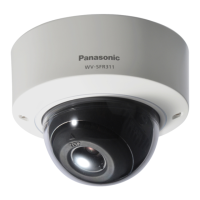
WV-SFV311A
WV-SFV311A
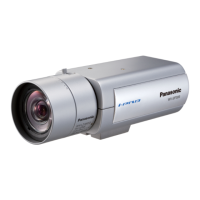
WV-SFN311A
WV-SFN311A
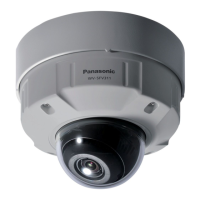
WV-SPN531A
WV-SPN531A
Before attempting to connect or operate this product, please read these instructions
carefully and save this manual for future use.
The model number is abbreviated in some descriptions in this manual.

Table of Contents

Other manuals for Panasonic WV-SFV310A

Questions and Answers

  • O
    omaddenAug 19, 2025
    How to troubleshoot power issues on my Panasonic Security Camera?
    • H
      Heather LiuSep 12, 2025
      If the Panasonic Security Camera's power is not turning on when using a PoE device, ensure the connection is properly established and refer to the operating instructions of the PoE device. Try turning down the power supply from the PoE device. If using DC power, confirm the power plug is firmly connected and check the AC adapter specifications.
  • D
    Danielle LesterAug 21, 2025
    What to do if the SD ERROR/AF indicator is red on Panasonic WV-SFV310A Security Camera?
    • J
      Jesus MorganAug 21, 2025
      If the SD ERROR/AF indicator lights up red on your Panasonic Security Camera, ensure that the write protect switch of the SD memory card is not set to 'LOCK'. Unlock the write protect switch. Also, use an SD memory card formatted on the camera, not on a PC. If the card is faulty, replace it with a normal one.
  • N
    Nicole HinesAug 23, 2025
    Why is the LINK indicator not lighting up on my Panasonic WV-SFV310A Security Camera?
    • J
      jose89Aug 23, 2025
      If the LINK indicator does not light up orange on your Panasonic Security Camera, ensure that the Ethernet cable is connected properly. Check if the hub or router you are using is operating correctly. Try replacing the Ethernet cable with a different one.
  • D
    dbyrdAug 27, 2025
    Why I cannot download the log list of Panasonic WV-SFV310A?
    • B
      Brett WilliamsAug 27, 2025
      If you cannot download the log list for your Panasonic Security Camera, change the settings in Internet Explorer to enable file downloads, as this function may be disabled.
  • D
    davischarlesAug 30, 2025
    What to do if user registration for Panasonic WV-SFV310A Security Camera fails?
    • L
      leahshortAug 30, 2025
      If user registration for the “Viewnetcam.com” service fails for your Panasonic Security Camera, visit the “Viewnetcam.com” website to register the correct E-mail address.
  • R
    Randy ThomasSep 1, 2025
    How to fix audio input noise on Panasonic WV-SFV310A Security Camera?
    • D
      David BryantSep 1, 2025
      If you are experiencing noise in the audio input of your Panasonic Security Camera, check the grounding of the camera, switching hub, and peripheral devices. Also, check the camera's location, ensuring it is not near an electrical power line or a device producing strong magnetic fields or radio waves. Consider using a powered microphone or connecting an audio output with low output impedance.
  • D
    David HodgesSep 3, 2025
    Why can't I access my Panasonic WV-SFV310A Security Camera from a web browser?
    • A
      April SantosSep 3, 2025
      There could be several reasons why you cannot access your camera from a web browser. First, check if the LAN cable is firmly connected to the network connector of the camera. Also, verify that the link indicator is lit, indicating a proper connection to the LAN. Make sure the camera's power is on and the set IP addresses are valid. Ensure you are accessing the correct IP address, using 'ping' to verify connectivity. As additional steps, you can temporarily disable firewall settings on your PC, reboot the camera and change network settings using the IP Setting Software, access the camera and set the IP address again, or reboot the camera and hold the INITIAL SET button to configure the IP.
  • B
    Brandon Thompson DDSSep 5, 2025
    What to do if I cannot access Panasonic WV-SFV310A Security Camera via the Internet?
    • B
      Beth KimSep 5, 2025
      If you're unable to access your camera via the Internet, ensure that the network settings of the camera are correct. Specifically, set the default gateway or DNS server address correctly. Also, verify that the 'Default gateway' setting is configured on the 'Network' page.
  • C
    Cynthia StoneSep 7, 2025
    What to do if I cannot obtain images on the SD memory card of my Panasonic WV-SFV310A Security Camera?
    • J
      Jenna OwensSep 7, 2025
      If you're having trouble obtaining images from the SD memory card, check that 'Allow' is selected for 'FTP access to camera' on the [Network] tab of the 'Network' page. If that setting is correct, restart the web browser and re-enter the password, ensuring it is entered correctly.
  • T
    Tiffany HarrisonSep 9, 2025
    Why is my Panasonic WV-SFV310A Security Camera image blurry?
    • P
      Philip SilvaSep 9, 2025
      If the images from your camera appear blurry, verify that the focus is adjusted correctly.

Panasonic WV-SFV310A Specifications

General IconGeneral
Maximum Resolution1920 x 1080
Frame Rate30 fps
Lens TypeFixed Lens
Focal Length2.8 mm
Ethernet10Base-T / 100Base-TX
ONVIF ComplianceYes
Ingress ProtectionIP66
Power SupplyPoE (IEEE 802.3af)
TypeNetwork Camera
Image Sensor1/2.8" MOS
Day/Night FunctionYes (ICR)
Wide Dynamic Range (WDR)Yes
Video CompressionH.264
Audio CompressionG.726, AAC
ProtocolsIPv4, IPv6, HTTP, HTTPS, FTP, RTSP

Related product manuals