EasyManua.ls Logo

Panasonic WV-SFV481 - User Manual

Panasonic WV-SFV481
232 pages
Print Icon
To Next Page IconTo Next Page
Loading...
Operating Instructions
Network Camera
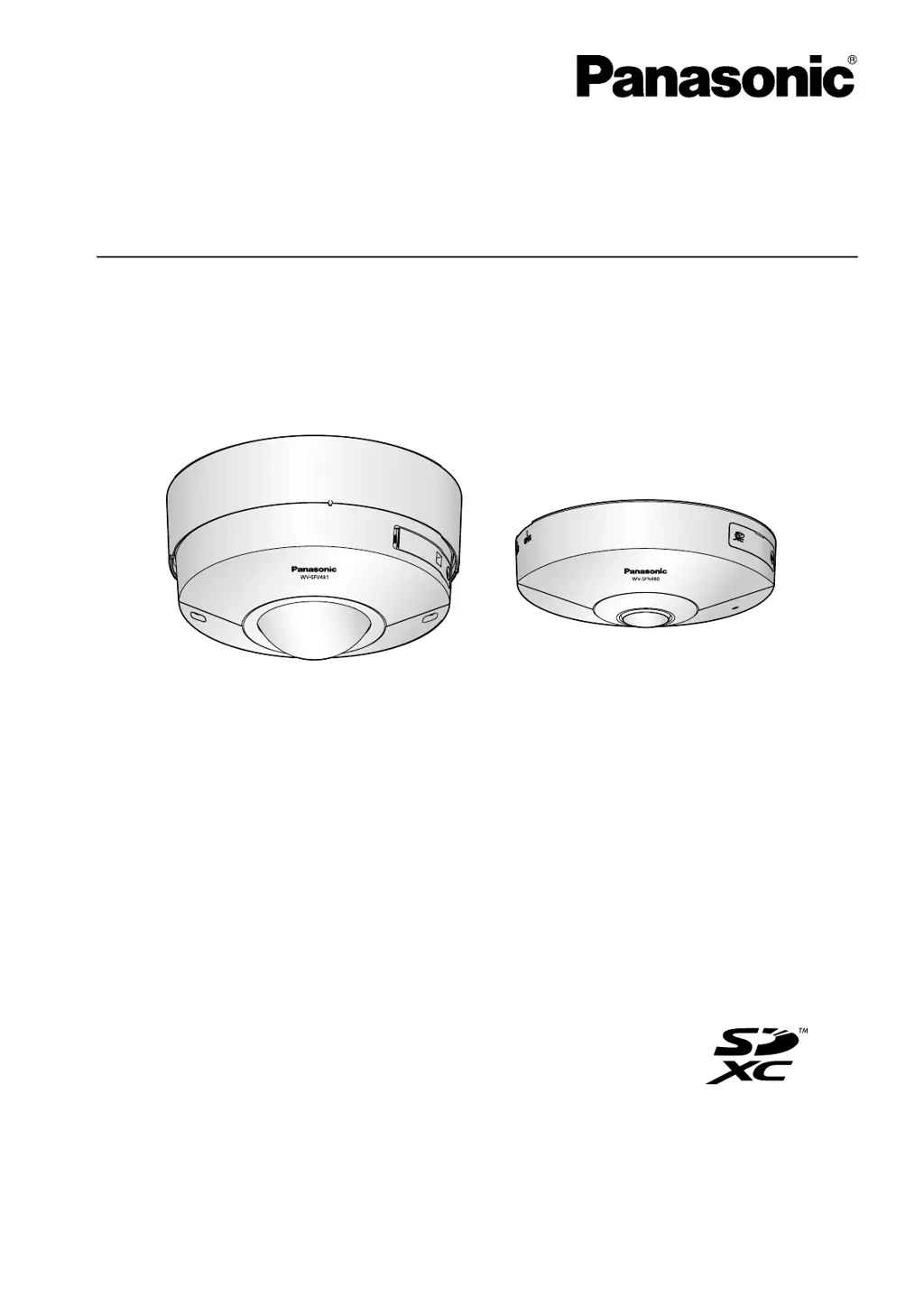
Model No. WV-SFV481
WV-SFN480
WV-SFV481
WV-SFN480
This manual covers the models: WV-SFV481 and WV-SFN480.
Before attempting to connect or operate this product, please read these instructions
carefully and save this manual for future use.

Table of Contents

Other manuals for Panasonic WV-SFV481

Questions and Answers

Summary

Monitor Images on a PC

Monitor Images on a Cellular Phone;Mobile Terminal

Record Images on the SD Memory Card Manually

Action at an Alarm Occurrence

Action at an Alarm Occurrence

Details camera actions and notifications triggered by alarm events.

Transmit Images onto an FTP Server

Playback of Images on the SD Memory Card

About the Network Security

Equipped Security Functions

Details the security features like access restrictions and HTTPS encryption.

Display the Setup Menu from a PC

How to Display the Setup Menu

Steps to access the camera's setup menu via a web browser.

Configure the Basic Settings of the Camera [Basic]

Configure the Basic Settings [Basic]

Covers fundamental camera settings like title, time, date, and SD card configuration.

Configure the Internet Settings [Internet]

Details network configuration for internet access, including UPnP, DDNS, and recommended settings.

Configure the Settings Relating to the SD Memory Card [SD Memory Card]

Explains how to manage SD memory card settings for recording and storage.

Configure the Settings Relating to Images and Audio [Image;Audio]

Configure the Settings Relating to the Image Capture Mode [JPEG;H.264]

Selects the camera's image output mode (e.g., Fisheye, Panorama) based on mounting.

Configure the Settings Relating to Image Adjust, Back Focus, Preset Position, Privacy Zone and VIQS [Image;Position]

Adjusts image parameters, camera focus, positions, privacy zones, and VIQS for optimal viewing.

Configure the Alarm Settings [Alarm]

Configure the Settings Relating to the Alarm Action [Alarm]

Defines actions to be taken when an alarm is triggered, such as output signals or notifications.

Configure the Settings Relating to the Authentication [User mng.]

Configure the Settings Relating to the User Authentication [User auth.]

Manages user accounts, passwords, and access levels for camera operation.

Configuring the Network Settings [Network]

Configure the Network Settings [Network]

Sets up IP addresses, subnet masks, gateways, and DNS for network connectivity.

Configure Advanced Network Settings [Advanced]

Manages advanced network features like SMTP, FTP, NTP, UPnP, HTTPS, DDNS, and SNMP.

Configure the HTTPS Settings

Enables secure encrypted access to the camera using the HTTPS protocol.

Access the Camera Using the HTTPS Protocol

Provides instructions on how to connect to the camera securely via HTTPS.

Configure the Settings Relating to the Schedules [Schedule]

How to Set the Schedules

Guides on setting up schedules for various camera functions like alarms and recording.

Maintenance of the Camera [Maintenance]

Using the CD-ROM

Troubleshooting

Summary

Monitor Images on a PC

Monitor Images on a Cellular Phone;Mobile Terminal

Record Images on the SD Memory Card Manually

Action at an Alarm Occurrence

Action at an Alarm Occurrence

Details camera actions and notifications triggered by alarm events.

Transmit Images onto an FTP Server

Playback of Images on the SD Memory Card

About the Network Security

Equipped Security Functions

Details the security features like access restrictions and HTTPS encryption.

Display the Setup Menu from a PC

How to Display the Setup Menu

Steps to access the camera's setup menu via a web browser.

Configure the Basic Settings of the Camera [Basic]

Configure the Basic Settings [Basic]

Covers fundamental camera settings like title, time, date, and SD card configuration.

Configure the Internet Settings [Internet]

Details network configuration for internet access, including UPnP, DDNS, and recommended settings.

Configure the Settings Relating to the SD Memory Card [SD Memory Card]

Explains how to manage SD memory card settings for recording and storage.

Configure the Settings Relating to Images and Audio [Image;Audio]

Configure the Settings Relating to the Image Capture Mode [JPEG;H.264]

Selects the camera's image output mode (e.g., Fisheye, Panorama) based on mounting.

Configure the Settings Relating to Image Adjust, Back Focus, Preset Position, Privacy Zone and VIQS [Image;Position]

Adjusts image parameters, camera focus, positions, privacy zones, and VIQS for optimal viewing.

Configure the Alarm Settings [Alarm]

Configure the Settings Relating to the Alarm Action [Alarm]

Defines actions to be taken when an alarm is triggered, such as output signals or notifications.

Configure the Settings Relating to the Authentication [User mng.]

Configure the Settings Relating to the User Authentication [User auth.]

Manages user accounts, passwords, and access levels for camera operation.

Configuring the Network Settings [Network]

Configure the Network Settings [Network]

Sets up IP addresses, subnet masks, gateways, and DNS for network connectivity.

Configure Advanced Network Settings [Advanced]

Manages advanced network features like SMTP, FTP, NTP, UPnP, HTTPS, DDNS, and SNMP.

Configure the HTTPS Settings

Enables secure encrypted access to the camera using the HTTPS protocol.

Access the Camera Using the HTTPS Protocol

Provides instructions on how to connect to the camera securely via HTTPS.

Configure the Settings Relating to the Schedules [Schedule]

How to Set the Schedules

Guides on setting up schedules for various camera functions like alarms and recording.

Maintenance of the Camera [Maintenance]

Using the CD-ROM

Troubleshooting

Panasonic WV-SFV481 Specifications

General IconGeneral
BrandPanasonic
ModelWV-SFV481
CategorySecurity Camera
LanguageEnglish

Related product manuals