EasyManua.ls Logo

Panasonic WV-SFV631L - User Manual

Panasonic WV-SFV631L
216 pages
Print Icon
To Next Page IconTo Next Page
Loading...
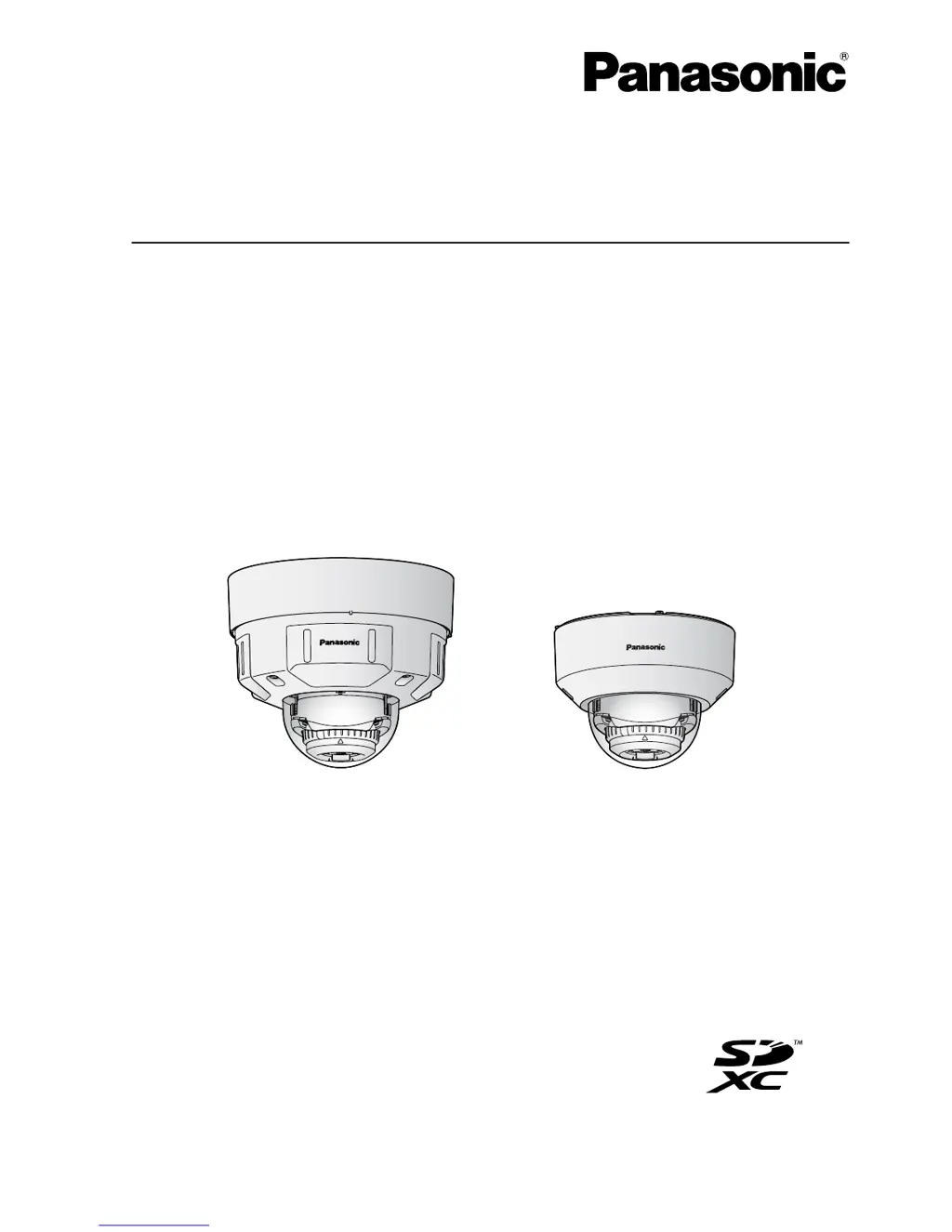
Operating Instructions
Network Camera
Model No. WV-SFV631L/WV-SFV611L
WV-SFR631L/WV-SFR611L
WV-SFN631L/WV-SFN611L
WV-SFV631L
WV-SFN631L
WV-
SFV631L
WV-SFV6
31L
WV-SFN631L
WV-SFN631L
Before attempting to connect or operate this product, please read these instructions
carefully and save this manual for future use.
The model number is abbreviated in some descriptions in this manual.

Table of Contents

Other manuals for Panasonic WV-SFV631L

Questions and Answers

  • C
    Catherine MyersAug 20, 2025
    Why is my Panasonic Security Camera not turning on?
    • K
      Katelyn HolmesAug 20, 2025
      If you're using a PoE (Power over Ethernet) device, ensure the connection is properly established. If using a DC power supply, check that the power plug is firmly connected.
  • T
    Tracy MendezAug 22, 2025
    What to do if the LINK indicator doesn't light on my Panasonic Security Camera?
    • T
      taylorpatriciaAug 22, 2025
      First, ensure the LAN cable is correctly connected. Next, check if the hub or router connected to the camera is operating correctly. Finally, if the issue persists, try replacing the LAN cable with a new one.
  • J
    Jennifer HamiltonAug 25, 2025
    Why does my Panasonic WV-SFV631L Security Camera audio input contain noise?
    • S
      Sarah GreenAug 25, 2025
      Check the grounding of the camera, switching hub, and peripheral devices. If that's not the issue, try repositioning the camera away from electrical power lines or devices that produce strong magnetic fields or radio waves. As an alternative, consider using a powered microphone or connecting an audio output with low output impedance.
  • T
    Timothy RiveraAug 26, 2025
    What to do if my Panasonic WV-SFV631L Security Camera shows SD ERROR?
    • A
      Abigail MillerAug 27, 2025
      First, check if the write protect switch on the SD memory card is set to 'LOCK' and unlock it. If that doesn't work, ensure the SD memory card was formatted on the camera itself. If problems persist, replace the SD memory card.
  • C
    castrojefferyAug 28, 2025
    Why is my Panasonic WV-SFV631L screen blurred when the IR LED lights?
    • Y
      ybrennanAug 28, 2025
      The issue occurs when there is a reflecting surface or object near the camera. Adjust the camera angle to prevent light from the IR LED from reflecting.
  • J
    johnsonchristopherAug 30, 2025
    Why does my Panasonic WV-SFV631L switch between color and black-and-white mode when the IR LED is on?
    • M
      margaretmartinezAug 30, 2025
      The subject may be too close to the camera. Adjust the distance between the camera and the subject.
  • M
    Melinda LewisSep 5, 2025
    What to do if cannot obtain images on the SD memory card Panasonic WV-SFV631L Security Camera?
    • A
      Alexis RamosSep 5, 2025
      If you cannot obtain images on the SD memory card of your Panasonic Security Camera, check the following: * Ensure that “Allow” is selected for “FTP access to camera” on the [Network] tab of the “Network” page. * Verify that the entered password is correct. Restart the web browser and enter the password again.
  • M
    Michael TorresSep 7, 2025
    How to fix cannot transmit audio to the Panasonic Security Camera?
    • M
      Michael JohnsonSep 7, 2025
      If you cannot transmit audio to the Panasonic Security Camera, check the following: * Make sure the microphone and speaker are connected correctly and firmly. * Confirm that the viewer software “Network Camera View 4S” is installed on the PC.
  • T
    timothytaylorSep 9, 2025
    What to do if cannot access Panasonic WV-SFV631L Security Camera via the URL of the “Viewnetcam.com” service?
    • T
      timothymurraySep 9, 2025
      If you cannot access the Panasonic Security Camera via the URL of the “Viewnetcam.com” service, check the following: * Verify if the global address of the camera (or router) is notified to the “Viewnetcam.com” service server. Log into the “My Account” page of “Viewnetcam.com” website (http://www.viewnetcam.com/) to check the information of the registered camera. If the global address is not displayed for the IP address, access the camera, and register the user information for the “Viewnetcam.com” service on the [Advanced] tab on the “Network” page of the setup menu. In addition, check the “Status” of “Viewnetcam.com” (on the [Status] tab) and the system log (on the [System log] tab) of the “Maintenance” page of the setup menu.
  • T
    Tamara JonesSep 12, 2025
    What to do if user registration for the “Viewnetcam.com” service fails Panasonic WV-SFV631L?
    • B
      Brian WagnerSep 12, 2025
      If the user registration for the “Viewnetcam.com” service fails for your Panasonic Security Camera, check the following: * Verify that the registered email address is correct. If you haven't received an email with the “Viewnetcam.com” website link, the registered email address may be incorrect. Visit the “Viewnetcam.com” website (http://www.viewnetcam.com/) to register the correct email address.

Panasonic WV-SFV631L Specifications

General IconGeneral
BrandPanasonic
ModelWV-SFV631L
CategorySecurity Camera
LanguageEnglish

Related product manuals