EasyManua.ls Logo

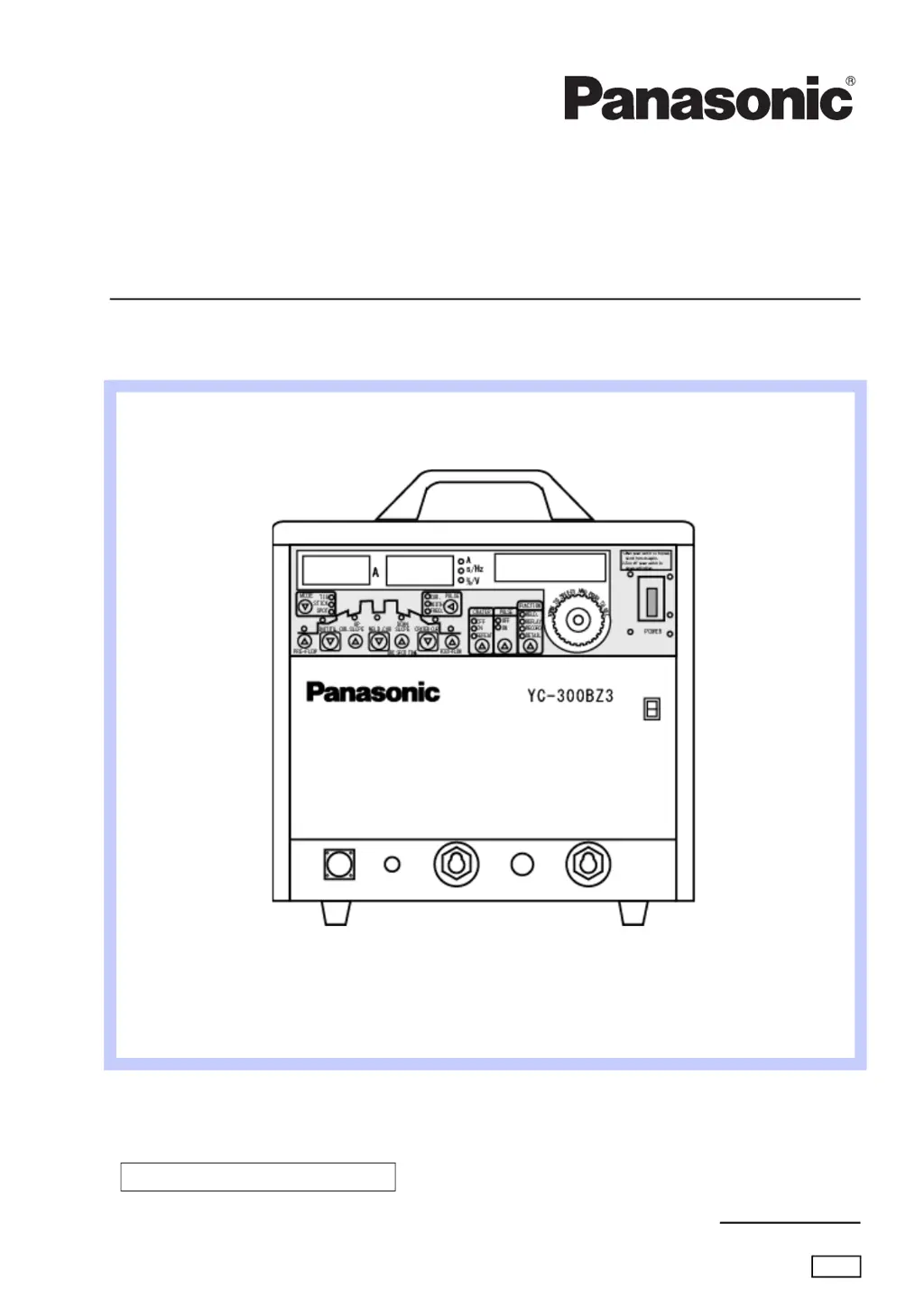
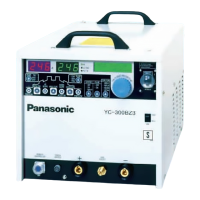
Panasonic YC-300BZ3YHD - User Manual

Panasonic YC-300BZ3YHD
60 pages
Print Icon
To Next Page IconTo Next Page
Loading...
Before operating this product, please read the instructions carefully and save this manual for future use.
Please also read the operating instructions of peripheral equipment.
First, please read the “Safety Precautions”.
English version is the original instructions.
2011
Operating Instructions
Model No. YC-300BZ3YHD
Fully digital and inverter controlled TIG welding
OMCTT5621E18
DC TIG Welding Power Source

Table of Contents

Questions and Answers

Summary

1. Safety Precautions

Welding Power Source Safety

General safety guidelines for the welding power source operation.

Electric Shock Prevention

Instructions to prevent hazards related to electric shock during operation.

Electromagnetic Disturbance Precautions

Guidance on minimizing electromagnetic interference during welding.

Ventilation and Protective Equipment

Safety measures for hazardous gases, fumes, and ventilation.

Fire, Explosion, and Blowout Prevention

Cautions to prevent fire, explosion, or blowout hazards during welding.

Arc Flash and Spatter Protection

Measures to protect eyes, skin, and hearing from arc flash and spatter.

Noise Hazard Mitigation

Guidelines for managing noise exposure during welding operations.

Gas Cylinder and Regulator Safety

Safe handling procedures for gas cylinders and flow regulators.

Rotating Parts Hazard

Warnings regarding injury from rotating parts like cooling fans.

Insulation Deterioration Prevention

Measures to prevent fire caused by insulation deterioration.

2. Rated Specifications

Standard Accessories

List of standard accessories included with the welding power source.

Duty Cycle and Dimensions

3. Installation

Installation Site Requirements

Guidelines for selecting a suitable and safe installation location.

Power Supply Equipment Requirements

Specifications and precautions for connecting the power supply.

4. Configuration

TIG Welding Configuration

Setup details for TIG welding operation.

Stick Welding Configuration

Setup details for Stick welding operation.

TIG Welding Torch Options

Details on various TIG welding torches and their specifications.

Tungsten Electrodes and Nozzles

Information on tungsten electrode types and special nozzles for TIG welding.

Ground Ring Assembly

Details on the ground ring assembly for arc start improvement.

Extension Cable Usage

Information and selection guide for extension cables.

Argon Gas Regulator and Cooling Water System

Setup for argon gas regulator and cooling water unit.

Remote Control and External Connection Units

Details on potentiometer remote control and external connection units.

5. Names and Functions

Front Panel Overview

Identification and description of front panel controls and displays.

Welding Condition Setting Buttons

Explanation of buttons used for setting welding conditions.

Switches and Rear Panel Connections

Description of switches and rear panel ports for connections.

6. Connection

Connecting TIG;SPOT Output Cables

Procedure for connecting output cables for TIG or SPOT welding.

Connecting STICK Output Cables and Input Cables

Procedures for connecting STICK output and input power cables.

Gas Regulator Connection

Instructions for connecting the gas regulator and managing gas flow.

Connecting with Jigs

Procedures for connecting external jigs, including wiring and terminal functions.

Connecting Robots and External Devices

Procedures for connecting robots and external device connecting units.

7. Preparation and Termination Processing

Pre-Operation Preparation

Steps for preparing the unit and using protective equipment before operation.

Termination Processing Steps

Procedures for shutting off gas, power, and winter precautions for water-cooling torches.

8. Settings

Detailed Settings and Factory Defaults

Overview of detailed settings and their default values.

Checking and Changing Settings

Procedures for checking and modifying various unit settings.

Restoring Original Factory Settings

Steps to reset the unit to its original factory default settings.

Memory Deletion Procedure

Instructions for deleting stored welding conditions from memory.

Memory Lock Functionality

How to lock stored memory to prevent unauthorized changes.

Welding Conditions: Settings and Checking

How to adjust and verify welding parameters for optimal quality.

Welding Condition Tables and Descriptions

Tables and explanations of welding parameters like pulse and width.

Storing and Reproducing Welding Conditions

Procedures for saving and recalling custom welding settings.

9. Operation

TIG Welding Operation Modes

Detailed explanation of TIG welding operations, including crater modes.

Spot and Stick Welding Operations

Instructions for performing SPOT and STICK welding operations.

10. Maintenance and Inspection

Daily Checks

Routine checks for the welding machine and its components.

Cable, Hose Checks, and Periodic Inspection

Procedures for checking cables, hoses, and performing periodic maintenance.

Maintenance Check Guidelines and Condition Retention

Guidelines for regular maintenance checks and information on retaining set conditions.

Withstand Voltage and Insulation Resistance Test Precautions

Safety precautions for performing voltage and insulation resistance tests.

11. Troubleshooting

Error Codes and Messages

Explanation of error codes and messages displayed by the unit.

Troubleshooting Error Details

Further details on error codes, messages, and their remedies.

Welding Error Troubleshooting Table

A table to diagnose and resolve common welding errors without error code indications.

12. Parts List

13. Circuit Diagram

14. Appendix

TIG Welding Conditions Table

Reference table for recommended TIG welding parameters based on base metal thickness.

Tungsten Rods, Shield Gas, and Filler Wire

Information on tungsten electrodes, shield gas, and filler wire selection.

Welding Conditions Memorandum

Template for recording user-created welding conditions for convenience.

Program List for Stored Conditions

A list of program numbers for storing custom welding configurations.

15. Information on Disposal

Summary

1. Safety Precautions

Welding Power Source Safety

General safety guidelines for the welding power source operation.

Electric Shock Prevention

Instructions to prevent hazards related to electric shock during operation.

Electromagnetic Disturbance Precautions

Guidance on minimizing electromagnetic interference during welding.

Ventilation and Protective Equipment

Safety measures for hazardous gases, fumes, and ventilation.

Fire, Explosion, and Blowout Prevention

Cautions to prevent fire, explosion, or blowout hazards during welding.

Arc Flash and Spatter Protection

Measures to protect eyes, skin, and hearing from arc flash and spatter.

Noise Hazard Mitigation

Guidelines for managing noise exposure during welding operations.

Gas Cylinder and Regulator Safety

Safe handling procedures for gas cylinders and flow regulators.

Rotating Parts Hazard

Warnings regarding injury from rotating parts like cooling fans.

Insulation Deterioration Prevention

Measures to prevent fire caused by insulation deterioration.

2. Rated Specifications

Standard Accessories

List of standard accessories included with the welding power source.

Duty Cycle and Dimensions

3. Installation

Installation Site Requirements

Guidelines for selecting a suitable and safe installation location.

Power Supply Equipment Requirements

Specifications and precautions for connecting the power supply.

4. Configuration

TIG Welding Configuration

Setup details for TIG welding operation.

Stick Welding Configuration

Setup details for Stick welding operation.

TIG Welding Torch Options

Details on various TIG welding torches and their specifications.

Tungsten Electrodes and Nozzles

Information on tungsten electrode types and special nozzles for TIG welding.

Ground Ring Assembly

Details on the ground ring assembly for arc start improvement.

Extension Cable Usage

Information and selection guide for extension cables.

Argon Gas Regulator and Cooling Water System

Setup for argon gas regulator and cooling water unit.

Remote Control and External Connection Units

Details on potentiometer remote control and external connection units.

5. Names and Functions

Front Panel Overview

Identification and description of front panel controls and displays.

Welding Condition Setting Buttons

Explanation of buttons used for setting welding conditions.

Switches and Rear Panel Connections

Description of switches and rear panel ports for connections.

6. Connection

Connecting TIG;SPOT Output Cables

Procedure for connecting output cables for TIG or SPOT welding.

Connecting STICK Output Cables and Input Cables

Procedures for connecting STICK output and input power cables.

Gas Regulator Connection

Instructions for connecting the gas regulator and managing gas flow.

Connecting with Jigs

Procedures for connecting external jigs, including wiring and terminal functions.

Connecting Robots and External Devices

Procedures for connecting robots and external device connecting units.

7. Preparation and Termination Processing

Pre-Operation Preparation

Steps for preparing the unit and using protective equipment before operation.

Termination Processing Steps

Procedures for shutting off gas, power, and winter precautions for water-cooling torches.

8. Settings

Detailed Settings and Factory Defaults

Overview of detailed settings and their default values.

Checking and Changing Settings

Procedures for checking and modifying various unit settings.

Restoring Original Factory Settings

Steps to reset the unit to its original factory default settings.

Memory Deletion Procedure

Instructions for deleting stored welding conditions from memory.

Memory Lock Functionality

How to lock stored memory to prevent unauthorized changes.

Welding Conditions: Settings and Checking

How to adjust and verify welding parameters for optimal quality.

Welding Condition Tables and Descriptions

Tables and explanations of welding parameters like pulse and width.

Storing and Reproducing Welding Conditions

Procedures for saving and recalling custom welding settings.

9. Operation

TIG Welding Operation Modes

Detailed explanation of TIG welding operations, including crater modes.

Spot and Stick Welding Operations

Instructions for performing SPOT and STICK welding operations.

10. Maintenance and Inspection

Daily Checks

Routine checks for the welding machine and its components.

Cable, Hose Checks, and Periodic Inspection

Procedures for checking cables, hoses, and performing periodic maintenance.

Maintenance Check Guidelines and Condition Retention

Guidelines for regular maintenance checks and information on retaining set conditions.

Withstand Voltage and Insulation Resistance Test Precautions

Safety precautions for performing voltage and insulation resistance tests.

11. Troubleshooting

Error Codes and Messages

Explanation of error codes and messages displayed by the unit.

Troubleshooting Error Details

Further details on error codes, messages, and their remedies.

Welding Error Troubleshooting Table

A table to diagnose and resolve common welding errors without error code indications.

12. Parts List

13. Circuit Diagram

14. Appendix

TIG Welding Conditions Table

Reference table for recommended TIG welding parameters based on base metal thickness.

Tungsten Rods, Shield Gas, and Filler Wire

Information on tungsten electrodes, shield gas, and filler wire selection.

Welding Conditions Memorandum

Template for recording user-created welding conditions for convenience.

Program List for Stored Conditions

A list of program numbers for storing custom welding configurations.

15. Information on Disposal

Panasonic YC-300BZ3YHD Specifications

General IconGeneral
BrandPanasonic
ModelYC-300BZ3YHD
CategoryWelding System
LanguageEnglish

Related product manuals