EasyManua.ls Logo

Panasonic YF-0201Z5HGF - User Manual

Panasonic YF-0201Z5HGF
38 pages
Print Icon
To Next Page IconTo Next Page
Loading...
Before operating this product, please read the instructions carefully and save this manual for future use.
First of all, please read “Safety precautions” or “Safety manual”.
Operating Instructions
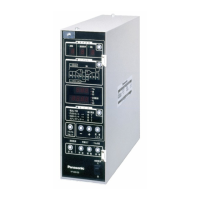
Controller for resistance welder
Model No. YF-0201Z5
TSM80344
Question and Answer IconNeed help?

Do you have a question about the Panasonic YF-0201Z5HGF and is the answer not in the manual?

Summary

Introduction to Panasonic Welding Controller

Product Features Overview

Details the product's capabilities, including welding sequences, current incrementing, and counters.

Warning Symbols for Safe Usage

Explains symbols used to prevent hazards and property damage, categorizing them by danger level.

Safety Precautions

Welding Power Source Safety

Instructions for safe operation and handling of the welding power source to prevent injury.

Electric Shock Prevention

Guidance on preventing electric shock, including grounding and handling precautions for charged parts.

Fire and Explosion Prevention

Precautions to prevent fires or explosions, including managing combustible materials and gases.

Specifications

Rated Specifications

Lists electrical and physical characteristics such as model number, power, frequency, dimensions, and mass.

Appearance Description

Provides visual details of the product and its included accessory.

Dimensions and Performance

Details physical dimensions and performance characteristics like current control range and speed.

Installation Guide

Installation Site Requirements

Specifies environmental conditions and locations suitable for installing the welding controller.

Electrical Connections

Provides instructions for connecting the controller to the welding machine and power supply.

Basic Operation

Operator Interface and Controls

Details the operation panel, indicators, keys, and rear panel terminals for system interaction.

Welding Condition Settings

Explains procedures for setting parameters like current, time, and sequence modes via the operation panel.

Operational Execution

Covers steps for adjustment, test runs, and initiating the welding process.

Maintenance and Inspection

Welding Current Adjustment

Guides on calibrating and adjusting the welding current measurement for accuracy.

Checking Set Data

Describes procedures for verifying stored welding condition values and handling memory errors.

Troubleshooting Guide

Error Code Reference

Lists error codes, their contents, judgment times, and recommended treatments.

Setup Error Types

Details specific setup errors related to slope times, current limits, and tip sticking.

Advanced Functions

DIP Switch Configuration

Explains how to configure controller functions using DIP switches (DPSW1, DPSW2).

Step-up and Signal-up Functions

Describes functions for increasing welding current incrementally over steps or signals.

Sequence Chart and Timing

Illustrates sequence timing and output signals for welding operations.

Circuit Diagram

Parts List

Data Sheet Information

Data Sheet 1 Details

Provides detailed parameter settings for sequence, monitor, and job selection.

Data Sheet 2 Details

Details monitor parameters and counter settings for step-up and signal-up functions.

Summary

Introduction to Panasonic Welding Controller

Product Features Overview

Details the product's capabilities, including welding sequences, current incrementing, and counters.

Warning Symbols for Safe Usage

Explains symbols used to prevent hazards and property damage, categorizing them by danger level.

Safety Precautions

Welding Power Source Safety

Instructions for safe operation and handling of the welding power source to prevent injury.

Electric Shock Prevention

Guidance on preventing electric shock, including grounding and handling precautions for charged parts.

Fire and Explosion Prevention

Precautions to prevent fires or explosions, including managing combustible materials and gases.

Specifications

Rated Specifications

Lists electrical and physical characteristics such as model number, power, frequency, dimensions, and mass.

Appearance Description

Provides visual details of the product and its included accessory.

Dimensions and Performance

Details physical dimensions and performance characteristics like current control range and speed.

Installation Guide

Installation Site Requirements

Specifies environmental conditions and locations suitable for installing the welding controller.

Electrical Connections

Provides instructions for connecting the controller to the welding machine and power supply.

Basic Operation

Operator Interface and Controls

Details the operation panel, indicators, keys, and rear panel terminals for system interaction.

Welding Condition Settings

Explains procedures for setting parameters like current, time, and sequence modes via the operation panel.

Operational Execution

Covers steps for adjustment, test runs, and initiating the welding process.

Maintenance and Inspection

Welding Current Adjustment

Guides on calibrating and adjusting the welding current measurement for accuracy.

Checking Set Data

Describes procedures for verifying stored welding condition values and handling memory errors.

Troubleshooting Guide

Error Code Reference

Lists error codes, their contents, judgment times, and recommended treatments.

Setup Error Types

Details specific setup errors related to slope times, current limits, and tip sticking.

Advanced Functions

DIP Switch Configuration

Explains how to configure controller functions using DIP switches (DPSW1, DPSW2).

Step-up and Signal-up Functions

Describes functions for increasing welding current incrementally over steps or signals.

Sequence Chart and Timing

Illustrates sequence timing and output signals for welding operations.

Circuit Diagram

Parts List

Data Sheet Information

Data Sheet 1 Details

Provides detailed parameter settings for sequence, monitor, and job selection.

Data Sheet 2 Details

Details monitor parameters and counter settings for step-up and signal-up functions.

Panasonic YF-0201Z5HGF Specifications

General IconGeneral
BrandPanasonic
ModelYF-0201Z5HGF
CategoryWelding System
LanguageEnglish

Related product manuals