MACHINE BASICS
4
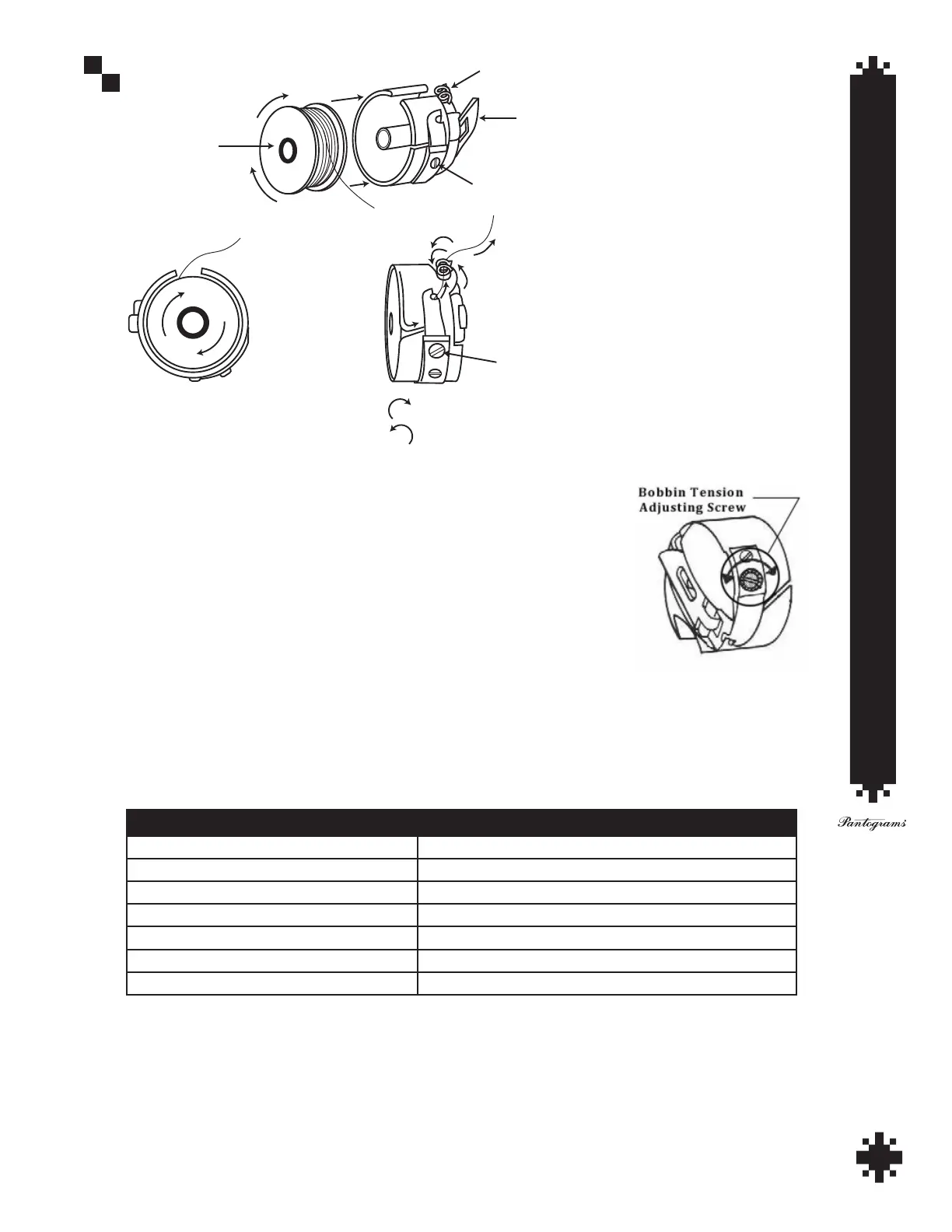
Bobbin goes
into bobbin case
clockwise
Pigtail
View looking inside
bobbin case, thread
rotates clockwise
Side view of bobbin
in bobbin case,
follow arrows
for thread path
Turn this screw
to adjust
bobbin tension,
1/4 turn makes a
significant change
Wrap thread
around pigtail
two times
Bobbin tension screw
Latch
To tighten tension turn clockwise
To loosen tension turn counter clockwise
Bobbin Placement in Case
Adjusting Bobbin Tension:
• Adjust the tension knob until the top of the plastic knob is ush with the top of
the chrome post.
• Follow the chart below to set the tension knob for the type of thread you are
using. Poly threads require nearly twice the amount of tension as rayon.
• After setting the upper tension knobs, stitch a (1 inch) capital letter “I”. View the
underside of the garment to determine if the bobbin tension needs adjusting.
Thread Tension Adjustments
THREAD TYPE SOLUTION
Metallic and Polyester Threads Turn tension knob 0-1 turn counter clockwise
Light Color Rayon Turn tension knob 1-2 turns counter clockwise
White Rayon Turn tension knob 1 turn counter clockwise
Medium Color Rayon Turn tension knob 1½ - 2½ turns counter clockwise
Dark Color Rayon Turn tension knob 2 - 3 turns counter clockwise
Black Rayon Turn tension knob 3 turns counter clockwise
TIP: Only one third of the bobbin thread should be showing down the middle of the column. If too much
bobbin is showing, loosen the upper tension slightly by turning the tension knob to the left; if too little bobbin
thread is showing, tighten the upper tension slightly by turning the knob to the right.


 To Next Page