Section 2
3
SPEED ADJUSTMENTS
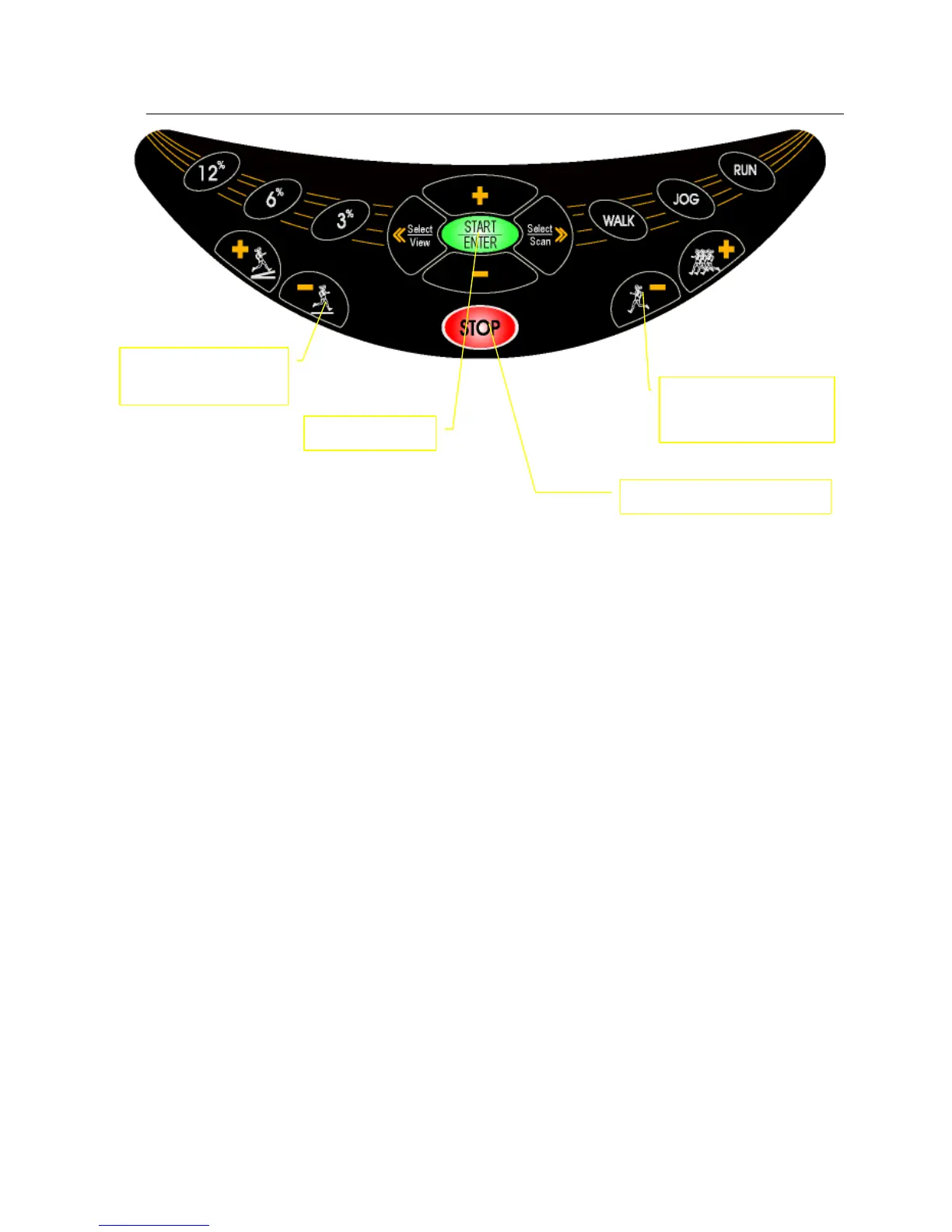
There are two ways to adjust speed during workout. FAST and SLOW will adjust speed by increments of 0.1Km/H. Or
you may hold these buttons to ramp up or down. If the speed adjustment increment is large, it is easier to use the direct
speed buttons, which function as direct speed control buttons during the workout. There are three direct speed buttons,
WALK(4 km/H),JOG(8Km/H), RUN(12Km/H)
ELEVATION ADJUSTMENTS
For safety reasons, elevation is designed to be manually adjusted only. At no time will treadmill automatically adjust
elevation except during one of the following three programs: elevation program, METS program, HRC control proram.
Elevation may be adjusted even while the running belt is not moving. However, during the program setup mode,
elevation will not be adjustable. There are two ways to adjust elevation during workout: UP and DOWN on the console,
direct elevation buttons on the console.
PULSE FUNCTION (ONLY FOR T561)
This treadmill features wireless heart rate monitoring, the most advanced technology to date for accurate read out of
your heartbeat.
To use the wireless pulse monitoring system, you must wear the heart rate transmitter chest strap so that the contact
surface is next to your skin directly under your heart to pick up the pulse signals.
Please note that some fibers used in clothes (e.g. polyester, polyamide) create static electricity which may prevent
reliable heart rate measurement. Also note that mobile phone, television and other electrical appliances form an
electro-magnetic field around them, which may also cause problems in heart rate measurement. Specially, increasing the
volume of your MP3/CDP that is plugged in treadmill console, it can make huge interference. Using HRC program, we
recommend to use volume to medium level. Using chest strap to measure the heartbeat, we also recommend to use
volume to medium level.
STOP – press twice to stop
UP – elevation up
DOWN – elevation
FAST – increase speed
SLOW – decrease



 To Next Page