Section 3
8
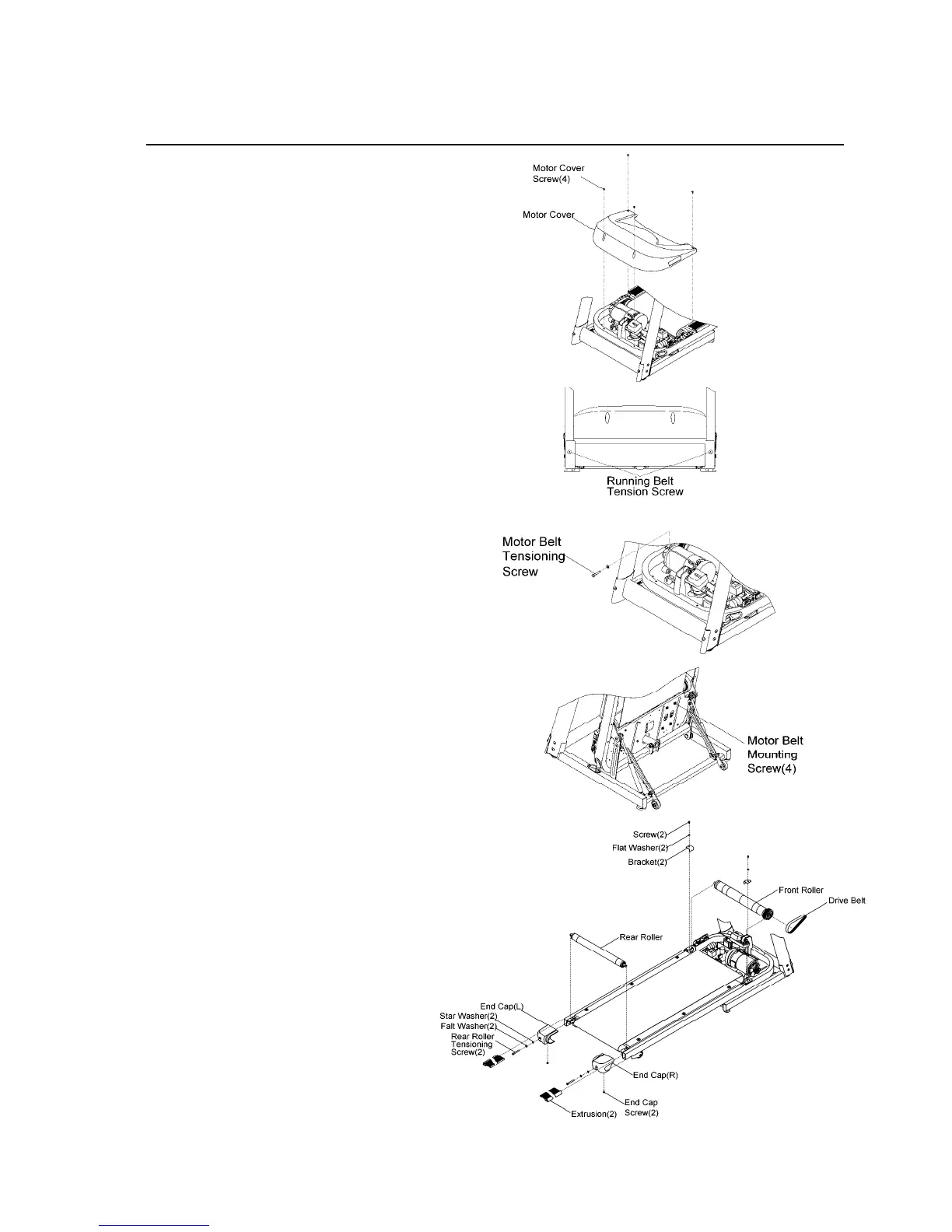
REMOVAL AND INSTALLATION
1. At the power switch, turn off the unit
then unplug the power cord at the wall
outlet.
2. Remove the motor cover front
screws(4) of the motor cover, lift off the
motor cover.
3. Loosen the rear roller tensioning bolts
to slacken the running belt.
4. Loosen the motor belt tensioning
screws(1). Fold the treadmill, loosen
the four motor mounting screws.
NOTE: To remove front roller easily,
release motor belt via loosen motor
belt tensioning screws (1) and the
four mounting screws.
5. Remove the end caps by removing end
cap screws(2).
6. Unfold the treadmill. Slide each
extrusion back.
7. Move the motor mounting plate
towards the rear roller to relieve belt
tension. Remove the flat washers(2),
bracket(2) and screw(2) from the front
roller mounting brackets and main
frame.
8. Lift out the front roller from the running
belt and remove the motor drive belt.
9. Install new front roller in reverse order
and make sure to properly adjust the
motor drive belt (85~95 lbs.) (See
section 3 page 3) and running belt.
(See How To… Replace The Running
Belt and Deck.)



 To Next Page