English
5 / 8
ICEP007-024 (60Hz)
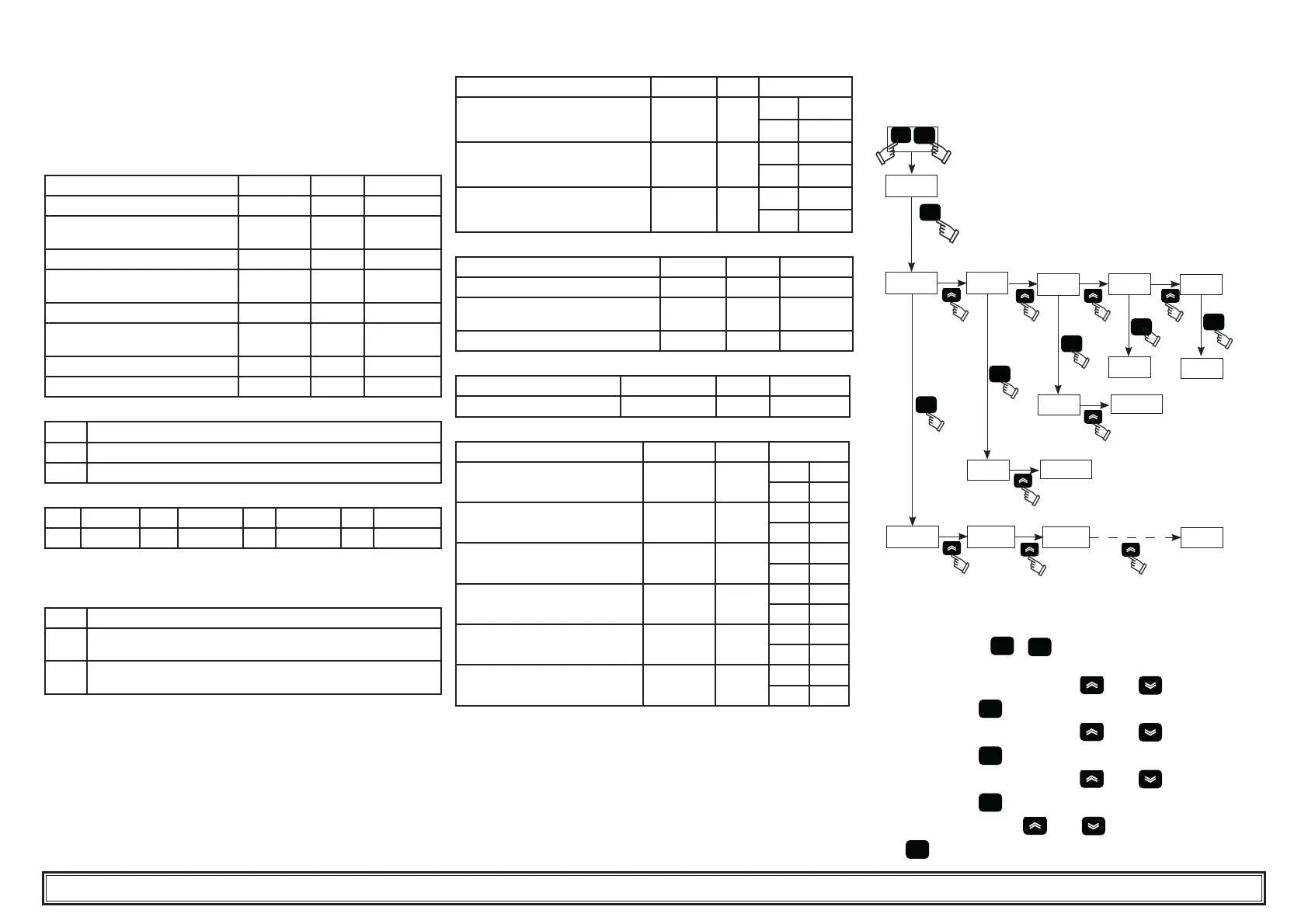
4.4 Parameter settings
General
There are two levels of protection for parameters:
a) Direct (D): with immediate access, User-changeable;
b) Password protected (U): password required for access; Factory-set
parameters.(do not change).
4.4.1 Chiller parameters
PARAMETER CODE TYPE DEFAULT
Unit of measurement.
C-F
D
0FF
Remote on / off enabling
(see para. 4.4.1.1)..
rE
D
0
Unit address
CF30
D
1
Baud rate
(see para. 4.4.1.2)
CF31
D
3
Protocol modbus
CF32
D
1
Alarm relay management
(see para. 4.4.1.3)
rAL
D
0
Supervisor on / off enabling
SUP
D
OFF
Restore default parameters
dEF
D
OFF
4.4.1.1 Remote On / Off mode
0
Remote On/Off disabled
1
Remote On/Off enabled together with local On/Off
2
Remote On/Off only, local On/Off disabled
4.4.1.2 Baud rate
1
2400
3
9600
5
38400
7
115200
2
4800
4
19200
6
57600
Note: if you change the baud rate, the chiller must be switched off
and on again.
4.4.1.3 Alarm relay management
0
Relay normally deactivated, excited by an alarm.
1
Relay normally excited (also with control OFF), deactivated by an
alarm.
2
Relay normally excited (only with control ON), deactivated by an alarm
or with control OFF.
4.4.2 Temperature control
PARAMETER CODE TYPE DEFAULT
Temperature control set point
SEt
D
C°
--
F°
--
Temperature control set point
“ CPt= On”
SEt
D
C°
20.0
F°
68.0
Temperature control differential
(NOT visible with code “ CPt= On”)
dIFI
D
C°
4
F°
7.2
4.4.3 Compressor parameters
PARAMETER CODE TYPE DEFAULT
Minimum `On’ time.
dAS
F
2
Minimum time between two compres-
sor switch-ons.
dES
F
5
Compressor hour counter 1
AbCI
D
0
4.4.4 General parameters
PARAMETER CODE TYPE DEFAULT
precision control enable
CPt
U
OFF
4.4.5 B1, B2, B3 sensor parameters
PARAMETER CODE TYPE DEFAULT
High temperature alarm (water)
HA1
D
C°
60
F°
140
Low temperature alarm (water)
LA1
U
C°
-20
F°
-4
High temperature alarm (evapora-
tor)
HA2
U
C°
60
F°
140
Low temperature alarm (evaporator)
LA2
U
C°
3
F°
5.4
High temperature alarm (ambient)
HA3
U
C°
60
F°
140
Low temperature alarm (ambient)
LA3
U
C°
-20
F°
-4
4.5 Change parameters
4.5.1 Parameter (SEt / dIFI/ dEF )
Fig.2
set
set
set
set
set
PAr
esc
set
set
P_nA tEr
CnP
r9E
PbI
Ar9
HA1
C1H
C1H2
SEt
diFI
CF30 CF31
CF32
dEF
4.5.2 Water temperature setting (see fi g.1/2)
1. Turn the main swicth (QS) to “ON” and wait for the “OFF” visualiza-
tion.
2. Press the buttons “
esc
” “
set
” together to enter on the parameter
type “D” .
3. Select the parameter “PAr”using “
”and “ ” buttons and
press the button “
set
” to enter.
4. Select the parameter “tEr”using “
”and “ ” buttons and
press the button “
set
” to enter.
5. Select the parameter “SEt”using “
”and “ ” buttons and
press the button “
set
” to enter.
6. Change the value using “
”and “ ” buttons and press the but-
ton “
set
” to con rm and exit.


 To Next Page