EasyManua.ls Logo

Parker PLLC - User Manual

Parker PLLC
2 pages
Print Icon
To Next Page IconTo Next Page
Loading...
Refrigerating Specialties Division
1
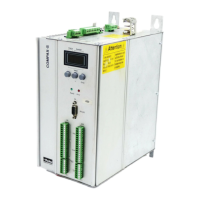
Programmable
Liquid Level Controller
Type PLLC
For use with ITP Depth Tracker transducer
liquid level probe
Purpose:
The Programmable Liquid Level Control provides remote
liquid level management for industrial refrigeration. The
PLLC is designed for use specifically with Parker's ITP
Depth Tracker transducer liquid level probe. The PLLC
provides the power source for the current loop of the
ITP. The ITP probe is used to provide a current signal
proportional to the vertical liquid level in a standpipe or
vessel. The PLLC serving as a switching mechanism also
converts the return signal and performs up to 5 program-
mable relay functions.
Bulletin 61-50B
Type PLLC
October 2006
Installation Information
309317
Keypad Programmable Level Setting Procedure
Supply power to the PLLC. All 4 digits will light for a
second then count down 1-4 from left to right. If there is
no level in the vessel or the probe is disconnected, the
display should read 00
Push the "Channel" button once. The LED will display
the Channel, Mode (Relay Disposition) and the Actual
Level Set-point.
Use the "Up" and "Down" arrow keys to select the set-
point for this level.
Press the "Enter" key, you will hear a BEEP that will
confirm your setting.
Channels 1, 4, and 5 are programmed using the same
procedure.
• Channel 2 is capable of operation as an additional
differential level control or it can be set to operate an
alarm function.
• Differential Level Control: Follow the same procedure
used in setting channel 3.
• Alarm: In order for Channel 2 to be used as an alarm,
a differential must be set using the High and Low level
settings of this channel.
• Push the Channel button on the keypad until Channel
2 and Mode L is displayed. Using the arrow keys, set
the low level to represent 2% of Full Scale (Full Scale =
100%) lower than the actual level setting required and
press the enter key.
• Example: If 80% is required for Channel 2 setpoint, set
the channel 2 Low setting for 78%.
• Push the channel button again to display Channel 2
and Mode H. Now set the High Level setting required
for this channel and press Enter.
Note: 2% is the smallest value that can be en-
tered. Larger differentials can be used to allow high
liquid levels in the vessel to return to a safe operating
Wiring:
The separable terminal blocks on the PLLC will accom-
modate up to 14 gage wire. The Line Voltage Input can
be either 120/240V 60Hz or 110/220V 50Hz. The PLLC
provides the power source for the current loop of the
transducer probe. The programmable relays are indi-
vidually 5 amp fused. Relays are equipped with normally
open and closed terminals and can be wired as either.
The maximum recommended distance between PLLC and
probe is 5000 ft.
Fig.1
CHANNEL 1 HIGH RED
CHANNEL 2 LEVEL CONTROL
CHANNEL 3 LEVEL CONTROL
CHANNEL 4 LOW GREEN
CHANNEL 5 LOW RED
I S O 9 0 0 0 - 2 0 0 0 C E R T I F I E D
STRAIN RELIEF
1" CONDUIT KNOCKOUT
PLLC
Question and Answer IconNeed help?

Do you have a question about the Parker PLLC and is the answer not in the manual?

Summary

Programmable Liquid Level Controller

Type PLLC

Specifies the product model for use with ITP Depth Tracker transducer liquid level probe.

Purpose

Explains the function of the Programmable Liquid Level Control in industrial refrigeration.

Wiring

Details the wiring specifications for the PLLC, including wire gauge and voltage input.

Installation Information

Keypad Programmable Level Setting Procedure

Guides users through configuring level setpoints using the PLLC keypad interface.

Programmable Relay Disposition

Level Test Mode

First Mode

Describes the initial level test mode where display responds, relays maintain position.

Second Mode

Details the second level test mode for confirming relay function with energized/de-energized states.

ITP Probe Installed In Standpipe

Overview

The Programmable Liquid Level Controller (PLLC), detailed in Bulletin 61-50B, is designed for remote liquid level management in industrial refrigeration systems. It is specifically intended for use with Parker's ITP Depth Tracker transducer liquid level probe.

Function Description:

The PLLC serves as a power source for the current loop of the ITP probe, which provides a current signal proportional to the vertical liquid level within a standpipe or vessel. Acting as a switching mechanism, the PLLC converts the return signal and performs up to five programmable relay functions. This allows for precise control and monitoring of liquid levels, preventing rapid repeat alarms due to equipment failure and ensuring safe operating conditions.

Important Technical Specifications:

  • Compatibility: Exclusively designed for use with Parker's ITP Depth Tracker transducer liquid level probe.
  • Power Input: The Line Voltage Input can be either 120/240V 60Hz or 110/220V 50Hz.
  • Relays: Features five programmable relays, each individually 5 amp fused. Relays are equipped with normally open and closed terminals, allowing for flexible wiring configurations.
  • Wiring: Separable terminal blocks accommodate up to 14 gauge wire.
  • Maximum Distance: The maximum recommended distance between the PLLC and the probe is 5000 ft.
  • Level Measurement: The display shows liquid level as a percentage (0-99%).
  • Output: Provides a 4-20mA output signal.

Usage Features:

Keypad Programmable Level Setting Procedure:

  1. Power On: Upon supplying power, all four digits will light for a second and then count down 1-4 from left to right. If no liquid is in the vessel or the probe is disconnected, the display will read "00".
  2. Channel Selection: Push the "Channel" button once. The LED will display the Channel, Mode (Relay Disposition), and the Actual Level Set-point.
  3. Set-point Adjustment: Use the "Up" and "Down" arrow keys to select the desired set-point for the current level.
  4. Confirmation: Press the "Enter" key. A BEEP will confirm the setting.
  5. Channels 1, 4, and 5: These channels are programmed using the same procedure for single set-points.

Channel 2 and 3 (Level Controls):

These channels require both a "Low" and a "High" level setting for differential control or alarm functions.

  1. Low Level Setting: Push the "Channel" button until the desired Channel (2 or 3) and mode "L" (Low Level) are displayed. Use the arrow keys to set the Low Level and press "Enter" (a BEEP confirms).
  2. High Level Setting: Push the "Channel" button again. The "Mode" LED will change from "L" to "H" (High Level). Use the arrow keys to set the High Level and press "Enter" (a BEEP confirms).

Channel 2 as an Alarm Function:

To use Channel 2 as an alarm, a differential must be set using its High and Low level settings.

  1. Low Level Alarm Setting: Push the "Channel" button until Channel 2 and Mode L is displayed. Use the arrow keys to set the low level to represent 2% of Full Scale (Full Scale = 100%) lower than the actual level setting required, then press "Enter". For example, if an 80% set-point is required for Channel 2, set the low level to 78%.
  2. High Level Alarm Setting: Push the "Channel" button again to display Channel 2 and Mode H. Set the High Level setting required for this channel and press "Enter".
  • Note: 2% is the smallest value that can be entered. Larger differentials can be used to allow high liquid levels in the vessel to return to a safe operating condition, preventing rapid repeat alarms due to equipment failure.

Programmable Relay Disposition (Channels 1, 4, and 5):

These channels have programmable relay dispositions. Channel 1 defaults to "H" (High Level), and Channels 4 and 5 default to "L" (Low Level).

  1. Select Channel: Press the "Channel" button on the keypad, paying attention to the letter displayed on the "Mode" LED.
  2. Change Mode: Press the "Mode" key. The displayed letter will toggle between "H" and "L". Select the desired mode.
  3. Set Level: Use the "Up" and "Down" keys to select the level for the channel.
  4. Confirm: Press the "Enter" key. A BEEP will verify the entry, and the LED for the channel will light up or turn off depending on the selected disposition.

Maintenance Features:

Level Test Mode: 2 Modes Available (With Relays De-energized & Energized):

This feature allows for testing the display response and relay functions without affecting equipment operation.

First Mode (Display Responds, Relays Maintain Disposition):

  1. Enter Test Mode: Scroll through channels by pressing the "Channel" button until a single "t" is displayed in the "Channel" segment of the LED.
  2. Activate First Mode: Press the "Mode" key; a second "t" will appear in the "Mode" segment of the LED.
  3. Simulate Level Change: Push the "Up" or "Down" arrow keys to simulate a level change. The LEDs on the right will light up or go off (depending on the relay disposition selected) as the channel set-point is passed. The 4-20 mA output will also change during simulation.

Second Mode (Both Relays and Display Respond to Confirm Control Circuits):

  1. Enter Test Mode: Follow the procedure for the De-energized Test Mode until "tt00" is displayed on the LED.
  2. Scroll Through Settings: Using the "Up" arrow key, scroll through the channel settings one at a time.
  3. Test Relay Function: After each set-point is passed, press and hold the "Enter" key for about 5 seconds. The "tt" segments will flash, and you will hear the relay energize or de-energize depending on the relay disposition.
  • Note: Caution should be used during this procedure to prevent Alarms and Equipment Shut Downs.

The PLLC is a robust and versatile controller designed to provide reliable and accurate liquid level management, enhancing safety and efficiency in industrial refrigeration applications.

Parker PLLC Specifications

General IconGeneral
BrandParker
ModelPLLC
CategoryController
LanguageEnglish

Related product manuals