Messages, errors and error handling
55
10 Messages, errors and error handling
The device control is equipped with an internal system for error detection. The visualisation of the
messages and the error forecast is made according to the display possibilities of the connected control
panel.
10.1 Error signalling by means of the LED control panel
If an error occurs within the system, it is indicated by the LEDs. The breakdown of the supply or exhaust air
fan, a sensor error and a dropping below the anti-freeze protection threshold is displayed as described in
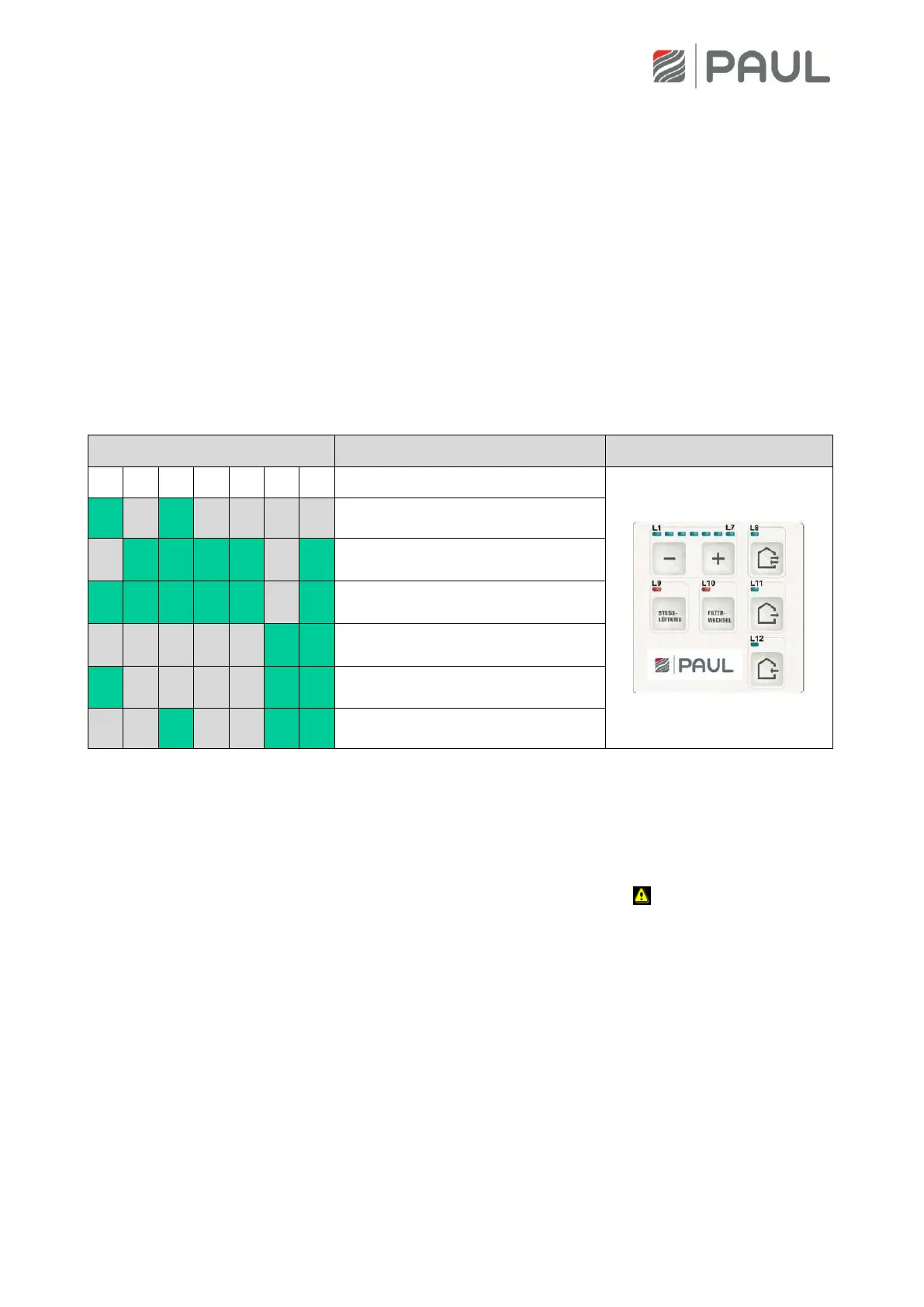
table 3. In case another general error occurs, the LEDS <L8+L11+L12> are blinking and the LEDs L1…L7
display the error number in binary format. The following LED combinations marked with an “x” apply for
the illustration of the binary error coding:
Error – supply air too low
Communication error of the fan
slave
Communication error of the
defroster
Communication error of the heater
battery
Communication error of the flap of
the ground pipe diverter
Table 3: Binary error coding with the LED control pane
10.2 Visualisation of errors with the TFT touch panel
A plain text visualisation of errors is only possible with the TFT-Touch panel. If there is a message or an
error it will be signalised at the right upper edge by a flashing warning triangle . Occurring messages are
displayed in Menu/ Information/ Messages.



 To Next Page